
Dashboard customization should begin with a contract, not a theme editor. The implementation has to preserve the host product's identity across the required journey while keeping authentication, tenant authorization, and data access independently enforceable.
Our white-label explains the term, and the white-label analytics overview defines the surfaces. This guide turns those surfaces into an implementation sequence for an embedded analytics platform.
1. Inventory every customer-visible surface
Create a matrix before choosing technology. Include the main dashboard and the states teams commonly miss:
- Product shell, route, page title, favicon, and custom domain
- Header, navigation, filters, menus, dialogs, and tooltips
- Typography, spacing, colour, borders, radius, shadows, icons, and chart palettes
- Loading, empty, stale, partial, denied, timeout, and error states
- Keyboard focus, screen-reader labels, reduced motion, zoom, and mobile layout
- Login, consent, logout, expired session, help, and support links
- PDF, image, spreadsheet, CSV, and shared-link output where supported
- Scheduled email, alert, sender, reply-to, subject, template, and unsubscribe behavior
For each row, identify the audience: the host company's brand, a tenant's brand, or both. Record whether control is required, preferred, or intentionally left to the analytics provider. “Fully customizable” is not a testable value.
The first row on that list is the one that is not a setting
Every other surface above is configuration you control. The custom domain is not: it is a DNS record in someone else's zone and a certificate that has to validate before the page renders at all.
Cloudflare's SaaS platform documentation describes the shape plainly, and it is worth reading even if your provider is a different one. "To finish the custom hostname setup, your customer needs to set up a CNAME record at their authoritative DNS that points to your CNAME target", with an example of mystore.example.com CNAME customers.saasprovider.com. On the certificate side, "for each custom hostname, Cloudflare issues two certificates bundled in chains that maximize browser compatibility", and the hostname is only usable once "Cloudflare has issued and deployed the certificate for the hostname" (Cloudflare for SaaS).
Three consequences follow for the matrix, and all three are invisible on a settings screen.
The row has an owner outside your company. A tenant's brand on the address bar depends on that tenant's DNS administrator doing something, which means the rollout schedule for this surface is not yours and a stalled tenant is stuck at your domain rather than theirs.
It fails differently from a theme. A wrong colour is visible and harmless; a certificate that has not validated is a browser warning on the customer's own brand, which is worse than not having attempted the custom domain in the first place.
And it changes what "one tenant, one brand" means for sessions, because cookies and redirect URLs are scoped to the hostname the customer actually loaded. This is the testable version of the phrase the list above rejects: for this row, "fully customizable" means a named DNS owner, a validated certificate, and a session that survives the domain it was issued on.
We did not check which analytics vendors offer custom hostnames or on what tier, so treat that as a question for each shortlisted platform rather than something this section settles.
2. Let the rendering boundary decide who owns the interface
The integration boundary determines which team owns the interface:
Themed vendor interface: the analytics product owns layout and interaction; configuration changes approved brand surfaces. This minimizes host UI work when the vendor's behavior already fits.
Composed components: an SDK renders charts, filters, dashboards, or authoring pieces inside host-owned layout. The product team owns page composition and integration state; the vendor still owns component APIs and some behavior.
Host-owned frontend: the product builds interface components over query or semantic APIs. This maximizes interface control and transfers accessibility, responsive behavior, state management, visualization, and upgrade work to the host team.
An iframe is not evidence of shallow customization, and an SDK is not evidence of native behavior. Evaluate the controls and observed output for the chosen route. The complete white-label guide covers the trade-offs across vendors.
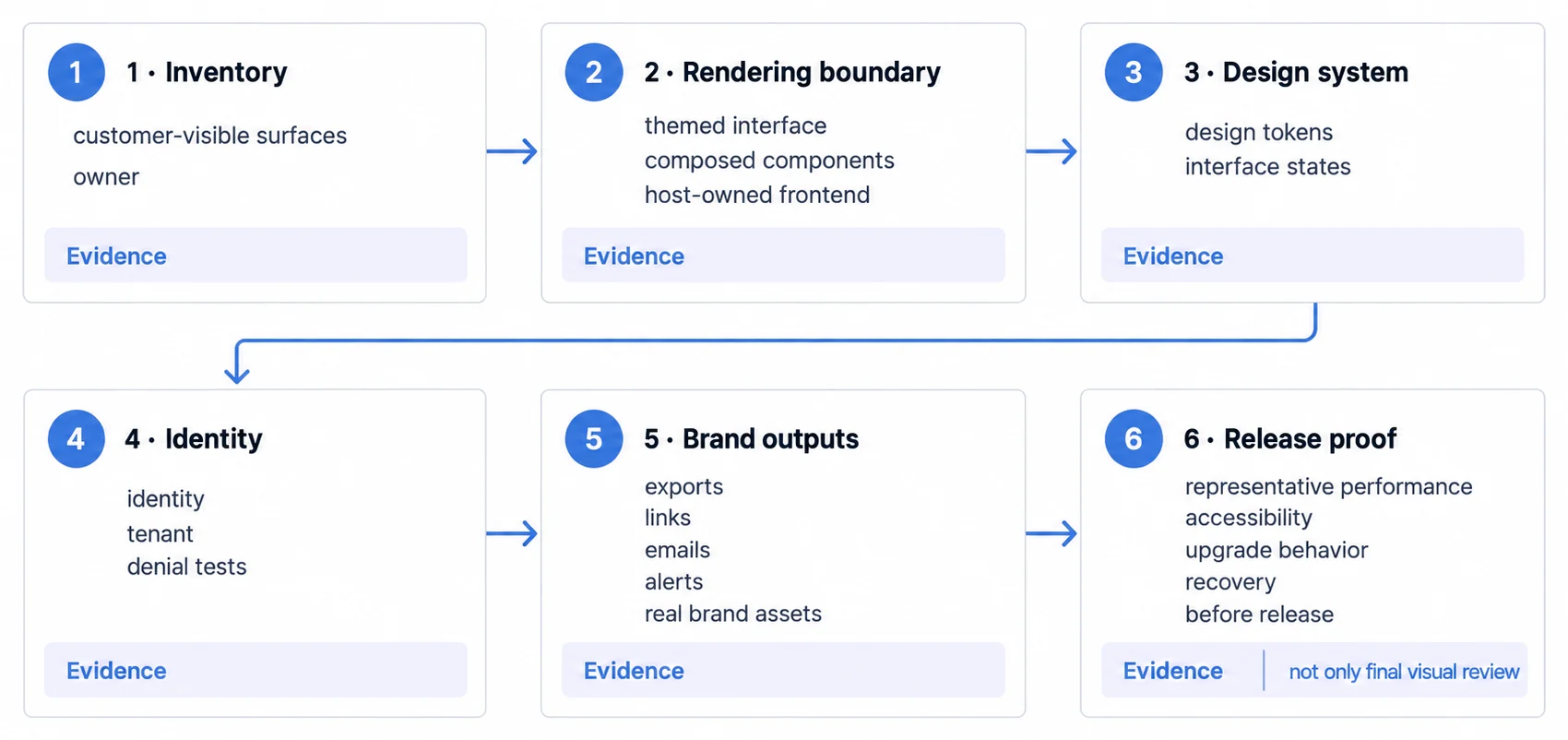
3. Translate the host design system into a versioned theme
Translate the host design system into a versioned analytics theme. Use semantic tokens: surface, text, border, accent, positive, warning, critical, instead of copying isolated hex values. Define chart series and status colours separately so data meaning does not depend on the application accent.
Cover interactive states as well as rest states:
- Default, hover, active, selected, disabled, and focus-visible
- Loading skeletons and progress indicators
- Empty data, filtered-empty, stale data, and partial failures
- Permission denied, expired session, source unavailable, and retry behavior
- Long labels, localization expansion, dense data, narrow screens, and high zoom
Brand accuracy cannot override legibility or accessibility. Test text and non-text contrast, keyboard order, visible focus, labels, zoom, motion preferences, and screen-reader output on the rendered integration.
4. Never use a theme identifier as the authorization boundary
White-label appearance often varies by tenant, but a theme identifier must not become the authorization decision. A trusted service should authenticate the user, derive the permitted tenant and roles, and issue or exchange a scoped credential that the analytics service validates.
For a multi-tenant architecture, test at least:
- A valid user requesting another tenant's dashboard or direct URL
- Modified tenant, filter, resource, or export identifiers
- Cached results before and after switching tenants
- Scheduled reports and shared links addressed to the wrong recipient
- Expired, replayed, missing, and incorrectly scoped credentials
- Logout and account deactivation across host and analytics sessions
Row-level, model-level, workspace, or source-database controls should enforce the approved scope. The UI can communicate identity; it cannot be the only place that restricts data. See the embedded analytics security guide for the wider trust path.
5. Approve export and email branding from the real artifact
Do not approve export or message branding from a settings screen. Generate the real output with representative content:
- Multi-page PDF with long titles, page breaks, legends, and footer rules
- Image export at supported sizes and backgrounds
- Spreadsheet or CSV with approved sheet names, columns, encodings, and data scope
- Shared link in signed-in, signed-out, expired, revoked, and forwarded states
- Scheduled email in common desktop and mobile clients
- Alert with the actual sender, reply-to, subject, template, destination URL, and tenant context
Outbound artifacts often reach people who never see the host product. Legal attribution, accessibility, support, and vendor-disclosure requirements may also require provenance; “invisible vendor” should not be assumed to be the correct contractual outcome.
6. Measure the whole customer journey
Measure the full journey on representative data and devices: host navigation, authentication, analytics initialization, query time, first meaningful result, interaction latency, and export generation. Set a product-specific budget for the workflows that matter instead of using a universal dashboard-load number.
A release gate should contain evidence, not adjectives:
- Approved screenshots for every required state and breakpoint
- Successful keyboard, zoom, screen-reader, and mobile tasks
- Negative tenant tests for views, direct links, caches, and exports
- Generated outbound artifacts approved with real brand assets
- Measured performance under representative data and concurrency
- Documented owners for alerts, incidents, upgrades, and rollback
Repeat the relevant checks after changing theme tokens, the embed library, identity configuration, export renderer, email service, or analytics-platform version. White-label quality is a maintained interface contract, not a one-time setup task.
7. Treat locale as part of the brand
Date format, decimal and thousands separators, currency placement, first day of the week, and text length all move with locale, and a theme signed off in one language can fail in another. A German label at twice the English length overflows the tab it fit in. A right-to-left layout mirrors elements a fixed stylesheet assumed would stay put. A currency symbol placed after the number in one market sits before it in the next.
If the product ships more than one locale, the brand review runs in each of them, on the states that hold the longest strings: filter chips, tab labels, empty-state copy, and export headers.
8. Give sign-off an owner
Every step above is a check someone has to perform again when the vendor ships a new interface state, when a tenant is added, or when the host design system changes. Without a named owner and a trigger, the checklist becomes a launch artefact and the next unthemed state reaches a customer first.
Name the person who accepts the branded result, attach the check to the events that invalidate it, and keep the evidence from the real artefacts rather than from a settings screen.
Decide white-label depth on one real tenant path
Before committing to a build or vendor, implement one realistic path: sign in as a tenant user, open the most demanding dashboard, interact by keyboard and mobile, trigger an error, export a report, and deliver a scheduled message. Record the engineering work, unsupported controls, performance, plan gates, and operating ownership.
That vertical slice provides a defensible estimate and exposes the boundaries a feature checklist misses. It also keeps the goal of embedded analytics clear: a reliable customer workflow with deliberate product identity, not merely a dashboard with a different logo.
Related guides
- Embedded analytics guide: the three routes to shipping it, what each one costs in calendar time, and the four things that set your launch date.
- Embedded analytics roi: model embedded analytics ROI with explicit cost, adoption, revenue, retention.
- Embedded Analytics articles: every article in this cluster.
Ready to launch customer-facing analytics?
Stop losing customers to competitors with better analytics. Sumboard's customer-facing analytics platform lets you launch self-service dashboards in days, not months.