
Embedded analytics succeeds when a customer can complete a valuable task through a trusted, understandable, reliable product surface, and the team can operate that surface after launch. The implementation method matters, but it is only one part of that contract.
A first chart can render quickly in a compatible example. Cashpad reports a 10-minute first integration, which is useful evidence about that implementation. It is not a universal production timeline. Production acceptance also includes metric correctness, authorization, accessibility, workload, failure, support, and operating evidence.
Start With a Task Contract
Replace “we need analytics” with a specific question, context, permitted action, and owner. Record:
- The user and product context
- The business question and metric definitions
- The decision or action the surface may support
- Uses the analytics is not approved to support
- Required data scope, freshness, and uncertainty
- Success measures and source-of-truth behavior during failure
Do not force an arbitrary count such as three workflows or two dashboards. The first slice should be small enough to learn from and large enough to exercise the hardest boundary that could invalidate the architecture.
Analytics delivered as part of a product experience for its users. The product contract includes workflow, identity, permitted data, metric meaning, interaction, accessibility, runtime behavior, support, and commercial operation, not only visual placement.
Build One Production-Shaped Slice
A happy-path demo can hide the exact problems that make embedded analytics difficult. Select a representative slice with the hardest realistic combination of tenant size, permission model, metric, query, dashboard, device, locale, and integration boundary, then run it as an embedded analytics proof of concept designed to fail rather than to impress.
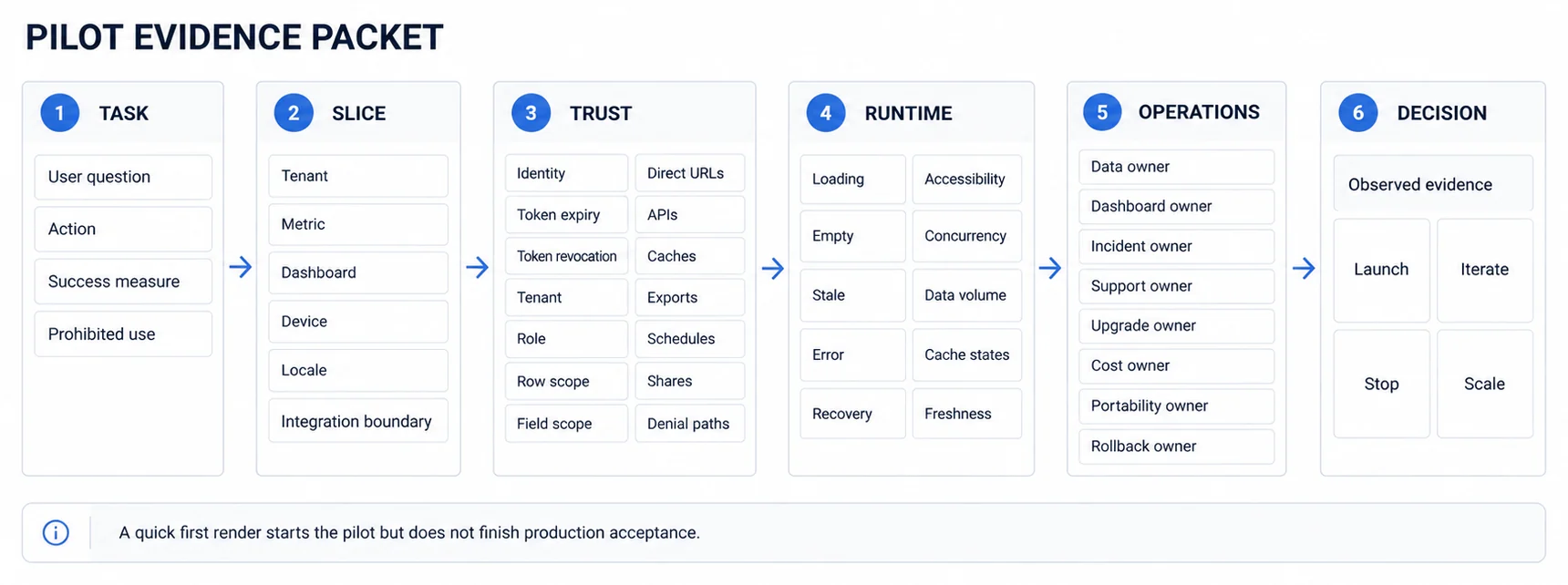
Define evidence before implementation so the team does not move the acceptance bar after seeing the result. The slice should produce a decision packet, not merely a demo URL.
Treat Trust as a System Boundary
Tenant isolation is not equivalent to adding tenant_id to a query. Map the authenticated identity to permitted organizations, roles, attributes, rows, fields, metrics, actions, and artifacts at trusted boundaries. Fail closed when required context is absent or invalid.
Test the complete embedded analytics security architecture:
- Token issuance, audience, scope, expiry, rotation, and revocation
- Direct URLs, APIs, query parameters, and altered client state
- Row, field, metric, aggregate, and cross-tenant constraints
- Cache keys, invalidation, exports, schedules, shares, and email delivery
- Support access, logs, backups, observability, and incident workflows
- Positive and negative cases using synthetic identities and tenants
Database RLS, API authorization, and platform policies are possible layers. The correct combination depends on the architecture and threat model. Apply the same policy to derived paths; a secure query followed by an over-broad export is still a broken boundary.
Review multi-tenant analytics architecture early, but do not claim a retrofit is impossible. Retrofitting can be expensive and risky because assumptions propagate into models, caches, APIs, and artifacts; estimate and test the actual migration instead of using a generic multiplier.
Choose the Integration Boundary by Evidence
Iframe, SDK, web component, API-driven composition, and custom frontend are delivery mechanisms with different ownership boundaries. None inherently guarantees speed, native feel, accessibility, security, or compliance.
Compare each viable option on the same acceptance contract:
- Host identity, tenant, product state, filters, locale, and theme
- Navigation, focus, keyboard, responsive behavior, and accessibility
- Loading, empty, stale, denial, error, resize, expiry, and recovery states
- Performance under representative data, concurrency, network, and cache cases
- Observability, incident ownership, upgrades, compatibility, and support
- Export, schedule, share, portability, termination, and commercial terms
An iframe may offer a smaller initial frontend surface while imposing constraints elsewhere. A headless API may offer greater presentation control while leaving more state, rendering, accessibility, and operations to the host. A production-shaped prototype should expose that trade-off.
Define Native Feel as an Acceptance Matrix
Native feel is not “users cannot tell a vendor is present,” nor is it achieved by logo, colors, and font alone. Test the host product and analytics surface across:
- Visual tokens: type, spacing, color roles, charts, controls, and states
- Interaction: filters, selection, drill, navigation, and application state
- Accessibility: names, structure, keyboard, focus, alternatives, zoom, and announcements
- Boundaries: login, expiry, errors, exports, scheduled messages, and share links
- Runtime: loading, resizing, slow data, partial data, stale state, and recovery
Use the embedded analytics product as one candidate boundary, then verify every required surface with your own brand, content, states, and generated artifacts. A configuration tier or API label does not establish coverage.
Test Performance From Event to Useful Result
Avoid a universal three-second rule, fixed cache TTL, or generic scale test. Define workload cases using observed or forecast tenants, concurrent actions, queries, data volume, refresh, exports, devices, networks, and cache states.
For each important event, record a percentile budget and measurement boundary:
- Host navigation to useful analytics content
- Filter or drill action to a stable visible result
- Accepted source event to visible freshness
- Export request to a correctly authorized artifact
- Failure detection to understandable state and recovery
Test cold and warm caches, invalidation, late data, slow sources, timeouts, partial failures, and retry behavior. Caching can reduce repeated work, but its TTL and invalidation must follow the metric's freshness and correction contract. Pre-aggregation can help known workloads, but it changes storage, definitions, and update behavior that also need validation.
Assign the Operating Contract Before Rollout
Embedded analytics remains a product surface after launch. Name owners for:
- Metric definitions, data quality, and source changes
- Dashboards, templates, content review, and accessibility
- Authorization policies and security response
- Performance, availability, incidents, and capacity
- Customer support, documentation, and change communication
- Vendor management, cost, upgrades, portability, and exit
Instrument task completion, errors, repeat use, support displacement, authorization failures, latency, freshness, and cost in ways that respect privacy and purpose. Usage counts alone do not show whether the analytics answered the intended question.
Roll Out Against Predefined Criteria
Choose pilot participants and duration based on the risks and learning goals, not a universal number of customers or weeks. Before starting, define:
- Launch criteria and evidence owners
- Iterate criteria and the next experiment
- Stop criteria for trust, safety, reliability, cost, or task failure
- Rollback and customer communication paths
- Scale triggers, capacity checks, and review date
After the pilot, compare observed evidence with those criteria. Scale, revise, change the boundary, or stop. The best practice is not “ship fast” or “perfect before launch”; it is to learn through a bounded slice without exposing customers to unowned risk.
Where to go next
- Embedded analytics guide: the three routes to shipping it, what each one costs in calendar time, and the four things that set your launch date.
- Branded Analytics Solutions: branded analytics means the dashboard carries your identity, not the vendor's.
- Embedded Analytics articles: every article in this cluster.
Ready to launch customer-facing analytics?
Stop losing customers to competitors with better analytics. Sumboard's customer-facing analytics platform lets you launch self-service dashboards in days, not months.