Teams often search for a Looker alternative after a pricing conversation, a difficult embed milestone, or a change in product requirements. Those are valid triggers for evaluation, but they do not prove that replacement is the right outcome.
The first question is not “Which tool has more features?” It is: Which parts of the current Looker contract does this workload depend on, and can another route reproduce the required outcomes with acceptable ownership and exit risk?
If you are still mapping the market, the embedded BI tools comparison helps identify candidate categories. This guide focuses on the evidence needed before choosing one.
Looker Beyond Internal Reporting
Looker is not only an internal reporting product. Google's current product and documentation describe a dedicated Embed platform edition for external analytics and custom applications. The official embedding guide documents private embedding, signed embedding, and signed embedding with the Embed SDK; each uses an iframe, supports theming, and can embed Looker content. Google recommends the Embed SDK route for managing and interacting with the iframe.
For Looker (Google Cloud core), Google's signed embedding documentation says signed embedding requires the Embed edition. A signed route creates or updates an embed user from a one-time URL, with the host application authenticating the user outside Looker. Models, permission sets, user attributes, session settings, and other parameters become part of that integration contract.
That does not mean Looker is the right fit for every workload a customer-facing analytics product is built for. It means an evaluation should test the actual edition and embed route instead of rejecting or selecting the platform from an outdated category label. For a deeper product inventory, see what Looker is.
Write Down the Looker Contract You Depend On
Evidence that a candidate can reproduce the required semantic, security, product, artifact, workload, operating, and commercial outcomes of a bounded production slice, or that an intentionally retired capability has an approved replacement path.
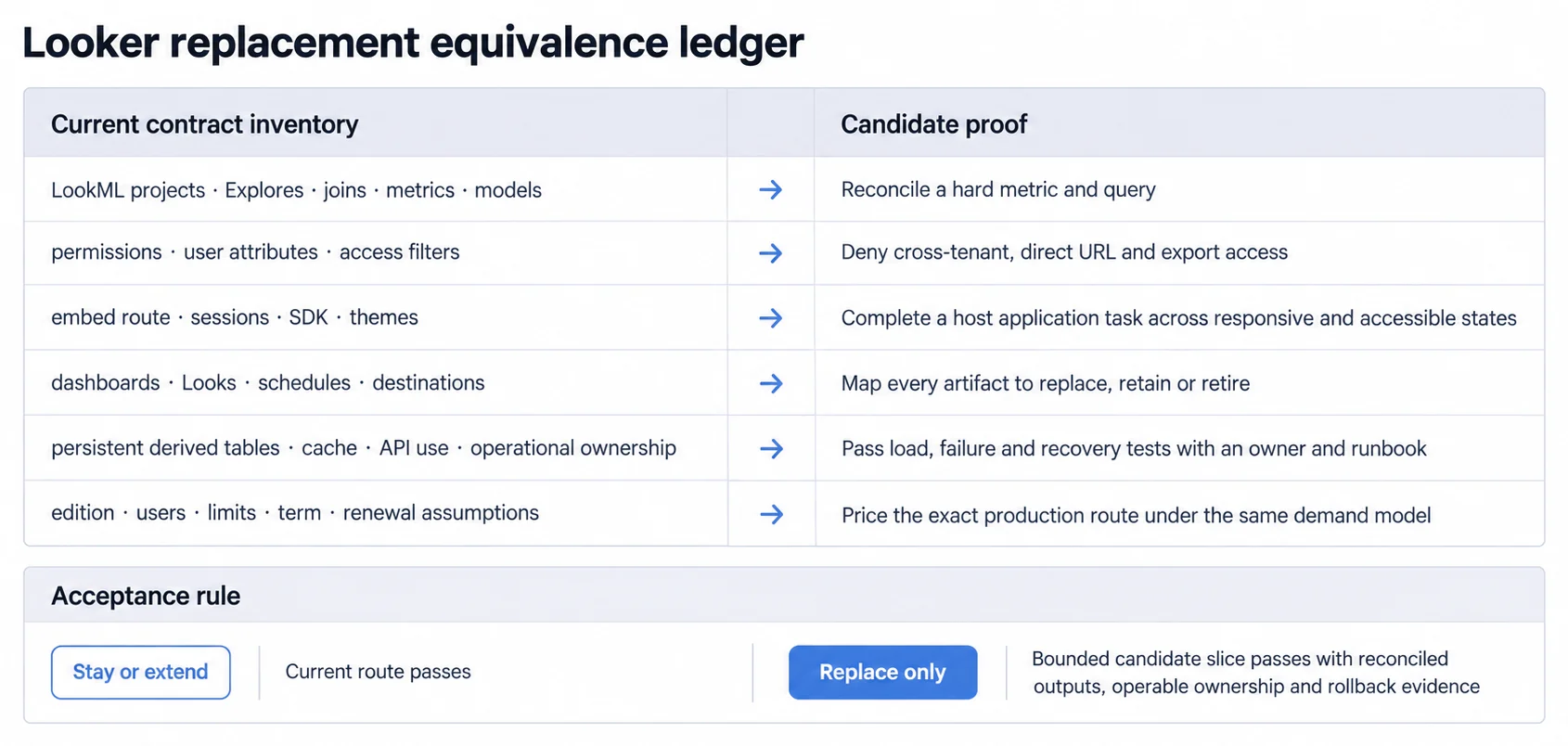
The inventory is the baseline for both evaluation and migration. Record at least:
- LookML projects, Git repositories, models, views, Explores, joins, metrics, access grants, and validation state;
- persistent derived tables (PDTs), aggregate tables, datagroups, triggers, cache behavior, and database dependencies;
- dashboards, LookML dashboards, Looks, folders, boards, alerts, schedules, destinations, downloads, and shared links;
- embed route, content identifiers, SDK or API integration, themes, custom domain and cookieless configuration where used;
- embed-user identity mapping, models, permission sets, groups, user attributes, access filters, session behavior, and logout flow;
- API clients, service accounts, automation, rate or edition allowances, monitoring, support procedures, and operating owners;
- platform edition, included and additional users, environments, term, usage assumptions, overages, support, and renewal terms.
LookML is not merely proprietary syntax to count as migration effort. Google's LookML documentation describes projects as collections of model and view files, typically version-controlled in Git, on which Looker queries depend. Those files can encode metric definitions, join paths, access behavior, persistence, and query logic. Replacing the UI without reproducing those semantics is not equivalence.
Hosting Your Own Instance: Two Looker Products
Deployment route is one of the contract lines above, and it is the one most likely to decide the evaluation on its own, because Looker's two products do not offer the same answer.
For Looker (original), Google documents hosting as a choice. "When Looker hosts your deployment, Looker manages all necessary IT functions that are related to the Looker application on your behalf", and "When you host your own deployment, you are responsible for managing many of these processes and functions". The documentation frames it as "a trade-off between convenience and control" rather than recommending one, and it is explicit about what the second option costs: "You will be responsible for maintaining uptime and service resilience", and "You are responsible for creating and maintaining processes that ensure that users are getting the latest features and security patches from Looker" (Choosing a hosting option).
For Looker (Google Cloud core), there is no choice to make. "Looker (Google Cloud core) instances are hosted by Google in the Google Cloud", and the overview states directly that "Looker (Google Cloud core) is not available for customer-hosted or multicloud environments" (Looker (Google Cloud core) overview).
Why that single sentence can end the evaluation early
If self-hosting is a real requirement, whether it comes from data residency, an air-gapped environment, a customer's security review, or a multicloud commitment, then it is not a preference to weigh against features. It removes one of the two Looker products from the shortlist before any feature comparison starts.
That changes what the rest of this evaluation is for. The question stops being "which alternative matches Looker" and becomes "which platforms run where we are required to run", with the Looker contract as the functional bar those platforms have to clear.
We did not verify whether new customer-hosted Looker (original) deployments are currently being sold or only maintained for existing customers, so confirm the commercial availability in writing rather than reading it from the documentation.
Four Possible Outcomes of a Looker Evaluation
An alternative evaluation can end in more than “stay” or “replace.”
Stay when the current Looker edition and route still pass the workload contract
Stay when the current Looker edition and route pass the workload contract, the team can operate the LookML and content estate, and the written commercial model is acceptable. Existing semantic governance, content, schedules, integrations, and staff expertise are assets; count them rather than treating sunk work as zero.
Extend when the semantics hold and only the host-product experience needs work
Extend when the underlying semantics and platform remain suitable but the host-product experience needs work. A bounded extension might change the signed embed flow, adopt the Embed SDK, revise themes and navigation, improve identity mapping, or place a purpose-built host workflow around embedded content.
Google's embedding options guide distinguishes direct iframe management from the Embed SDK path. Test the chosen route's session, cookie, domain, interaction, responsive, accessibility, failure, and logout behavior rather than blending features from different routes into one promise.
Add a second route when one workload needs a different operating boundary
Use a second analytics route when one workload needs a different product or operating boundary while the existing Looker estate remains useful elsewhere. This avoids forcing a high-value internal or governed workload through a replacement designed for a narrower customer-facing task. It also creates a new semantic reconciliation and ownership obligation, which must be explicit.
Replace when a material requirement fails and an alternative passes the same test
Replace when a material workload requirement fails on the current route, an alternative passes the same end-to-end test, and the organization has an operable migration and rollback plan. The failing requirement might be product interaction, access isolation, workload behavior, commercial fit, deployment boundary, or exit constraint. Document the evidence rather than substituting a general claim about Looker.
Test Permissions in Looker Signed Embedding
In signed embedding, the host supplies the embed user's allowed models, permissions, and optionally user attributes. Looker's access filters can apply user-specific data restrictions to an Explore, but Google's access_filter documentation explicitly warns that each Explore requiring the restriction must include it.
That makes tenant security an executable test, not a configuration screenshot. For the current route and every candidate, verify:
- allowed and denied tenants, roles, fields, models, and entities;
- a direct content URL outside the host navigation;
- altered filters, parameters, identifiers, and embed-user attributes;
- drill-through, downloads, schedules, alerts, cached results, shared links, and API retrieval;
- session expiry, logout, user switching, replay attempts, and browser privacy modes relevant to the chosen route;
- errors and empty states that must not disclose hidden names, values, or query structure.
Use the broader embedded analytics security contract for threat modeling, then retain request, policy, and result identifiers so a denial failure can be reproduced.
Build One Hard Slice Instead of a Checklist
Feature checklists hide integration risk. Build one slice that contains the hardest representative customer task:
- Authenticate a real test role through the intended host flow.
- Render the intended embedded or native experience with the correct tenant and semantic scope.
- Reconcile a hard metric against an accepted source, including filters, timezone, grain, corrections, and known exclusions.
- Complete the user's task, including drill-through, save, share, download, or action if the product promises it.
- Deny a second tenant and a forbidden field through UI, direct URL, export, cache, and API paths.
- Exercise realistic concurrency, data volume, slow queries, stale caches, source failure, timeout, reconnect, and recovery.
- Verify responsive behavior, keyboard and screen-reader access, visible scope, loading, partial, empty, stale, and error states.
- Preserve the artifact mapping, expected results, owners, runbooks, costs, rollback trigger, and support evidence.
Only after this slice passes should the team generalize effort and cost across the remaining estate.
Schedules and Exports in a Looker Estate
A Looker estate can include more than dashboards. The official scheduler documentation covers recurring deliveries for dashboards and Looks, with destinations and formats that vary by content type. PDTs may be rebuilt by datagroup, SQL, interval, or other persistence rules. Content references can break when LookML names change; Looker's Content Validator exists to find such errors.
For every artifact, choose one disposition:
- replace with a tested target artifact;
- retain in Looker with an explicit dual-route owner;
- retire with stakeholder approval and a documented alternative;
- rebuild outside BI because the behavior belongs in the host product or another system.
Do not count a dashboard screenshot as migration evidence. Reconcile the metric, filters, permissions, freshness, delivery behavior, and downstream consumer.
Looker Pricing: Model the Route You Will Ship
Google's current Looker pricing page separates platform and user pricing. It lists Standard, Enterprise, and Embed editions, with different included users and API allowances; the annual commitment price for each edition is “Call sales.” That means the comparison needs a written quote tied to a usage model.
Request and model:
- the required edition and production/non-production instances;
- developer, standard, viewer, embed, or other relevant user treatment under the quote;
- API, AI, query, or usage allowances and overage treatment;
- support, onboarding, implementation, and partner services;
- contract term, minimums, price protections, renewal, termination, and data or artifact export;
- infrastructure and database workload that remains outside the platform quote.
Apply the same demand model to each embedded analytics platform candidate: tenants, users, sessions, queries, concurrency, data volume, schedules, exports, environments, and growth scenarios. “Predictable” is not a pricing model until the variables and contract terms are written down.
Shortlist Looker Alternatives by Operating Boundary
The embedded analytics alternatives guide covers categories, but the shortlist should reflect who owns each layer.
- A traditional BI or enterprise platform may retain a broad semantic, governance, content, and administration surface.
- A purpose-built embedded product may narrow the boundary around host identity, customer-facing interaction, and developer integration.
- An open-source route may change license terms while moving upgrades, backups, security response, monitoring, scaling, and support to your team or a managed provider.
- A custom route may maximize product control while assigning semantics, visualization, query runtime, artifacts, accessibility, observability, and operations to your engineering organization.
Use Looker vs Metabase or Sisense vs Looker only after fixing the workload and deployment route. A product name alone does not specify hosting, embedding, authentication, permissions, support, or commercial terms.
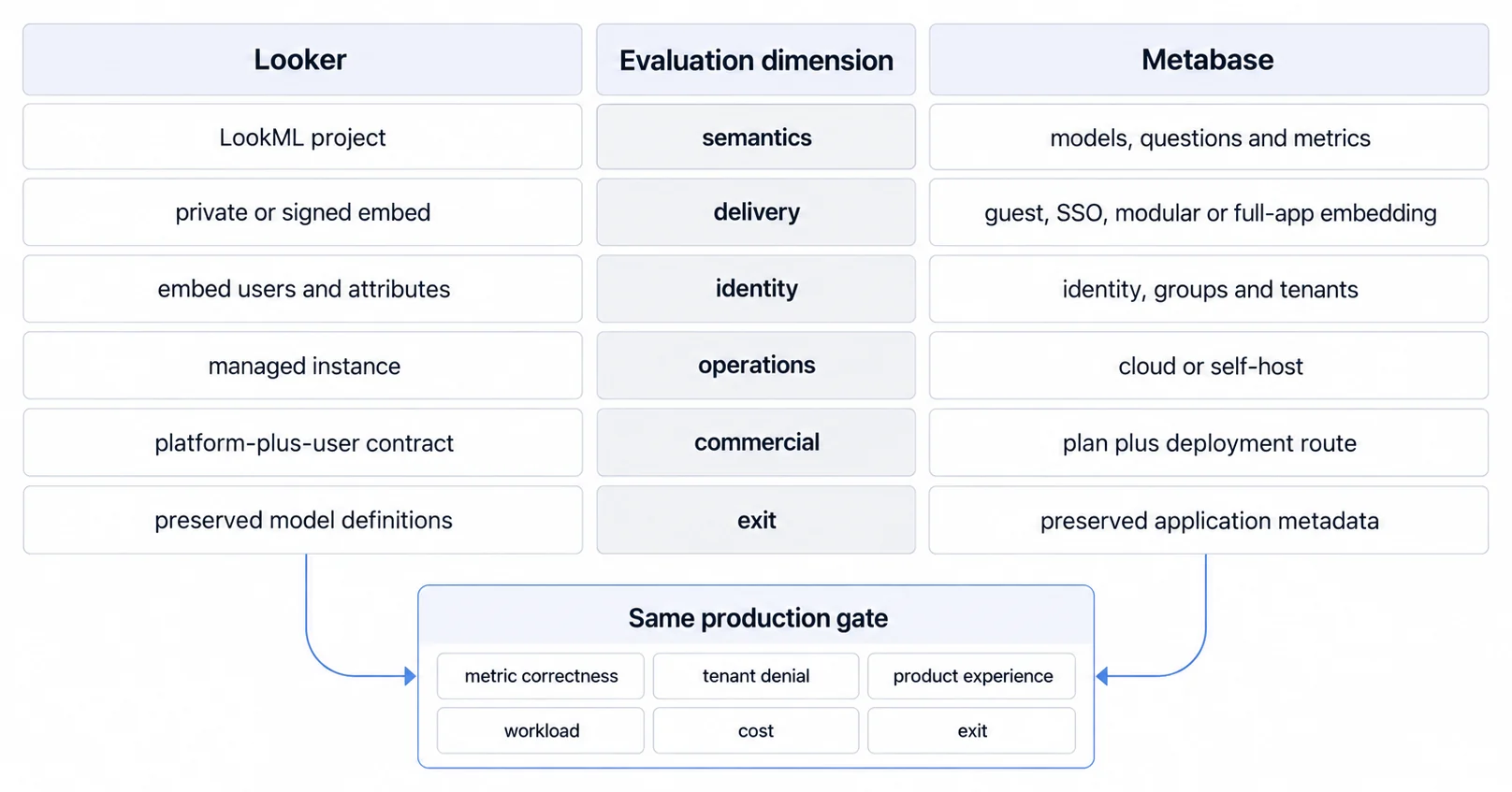
Close the Evaluation With a Record Someone Else Could Review
Finish the evaluation with a short, reviewable record:
- the workload and users in scope;
- the current Looker edition and route tested;
- requirements, pass rules, results, and unresolved gaps;
- semantic and artifact inventory coverage;
- security, workload, accessibility, failure, and recovery evidence;
- three-year or contract-term assumptions under the same demand model;
- owner and runbook for each retained or new layer;
- migration stages, rollback triggers, and preserved evidence;
- the decision to stay, extend, add a route, or replace, and what would reopen it.
The right Looker alternative is not the product with the shortest feature list or the loudest migration claim. It is the route that passes the required production workload with reconciled semantics, enforceable access, operable ownership, written economics, and a credible exit.
For the integration boundary itself, continue with the embedded analytics platform comparison and the embedded analytics.
Where to go next
- BI tools comparison guide: which platforms survive being embedded, judged on the embedding rather than the connector list.
- Domo Alternative: looking beyond Domo for customer-facing analytics? Here's what SaaS product teams are choosing.
- BI Tools & Comparisons articles: every article in this cluster.
Ready to launch customer-facing analytics?
Stop losing customers to competitors with better analytics. Sumboard's customer-facing analytics platform lets you launch self-service dashboards in days, not months.