Looker versus Metabase is often framed as enterprise BI against open-source simplicity. That framing hides the decision that matters: which candidate can carry your semantic, identity, delivery, operating, commercial, and exit contract with evidence.
Both products document customer-facing embedding. Google describes Looker's Embed edition as a platform for external analytics and custom applications at scale. Metabase documents public, guest, SSO, modular, and full-app embedding. Those capabilities make both legitimate candidates for an embedded analytics shortlist, alongside purpose-built embedded analytics products like ours; they do not prove that either one fits your production boundary.
First, Check Which Looker You Mean, Because Google Sells Two and Only One of Them Is on This Page
Searches for this comparison return two different products under one brand, and the answer is completely different depending on which one you had in mind. Google's own comparison documentation separates them plainly.
Looker is "a business intelligence platform. It provides a self-serve analysis, data exploration, and dashboarding interface for users, an IDE for data modelers, and rich embedding and API features for developers." It "may be managed for you in Google Cloud, hosted by you in another cloud service, or hosted on your own servers." That is the product this page compares against Metabase.
Looker Studio, which the same documentation still refers to by its former name Data Studio, is "a no-cost tool that turns your data into fully customizable reports. It provides an easy-to-use drag-and-drop editor," and it "is a Google Cloud service that is available at datastudio.google.com to anyone with a Google account." The documentation lists its fit as "One-off visualizations or reports" and a "Single data source or pre-aggregated datasets," with "Access to more than 1,000 data sources."
The two are aimed at different work, and the documentation says so directly: Looker's summary leads with "Governance for key metric definitions" and "Robust data access permissions," while Studio's leads with "Self-service analytics and visualizations."
If you meant Looker Studio, this is not your comparison
The honest redirect is worth two sentences rather than a footnote. A no-cost drag-and-drop report builder aimed at one-off reports and a self-hostable platform with a modelling IDE and embedding APIs are not competing for the same budget or the same decision, and a page that weighs LookML governance against Metabase models is answering the second question.
What both versions of the question do share is the part that comes next: whichever Google product you were looking at, if the plan is to put the result in front of your own customers, the licence and tenant questions arrive the same way. Those are set out in the embedded analytics alternatives guide, and the Looker overview separates the two products again in the context of what each one costs.
Looker's LookML Semantic Layer Is the Contract You Cannot Migrate
LookML defines dimensions, aggregates, calculations, and relationships in Looker. A LookML project contains model and view files and is typically version-controlled in Git. Looker's query generator uses that model to produce SQL, so the useful evaluation question is not whether a proprietary language is automatically good or bad. It is whether your team can govern, test, review, reuse, and migrate the definitions it needs.
Metabase organizes analytical work through questions, models, metrics, dashboards, and collections. Its documentation presents both visual and SQL querying, with models acting as curated starting points for further analysis. Evaluate the same difficult business definition in both candidates: joins, filters, time zones, null handling, currency, late data, and authorization-dependent logic.
Review the artifacts as carefully as the result. Can another person find the definition, understand its owner, see its change history, test it before release, and reproduce it outside the product? Our Looker overview and Metabase overview can orient the shortlist, but your own metric contract should decide whether the modeling approach is acceptable.
Looker and Metabase Embed Differently, So Fix the Route Before the Vendor
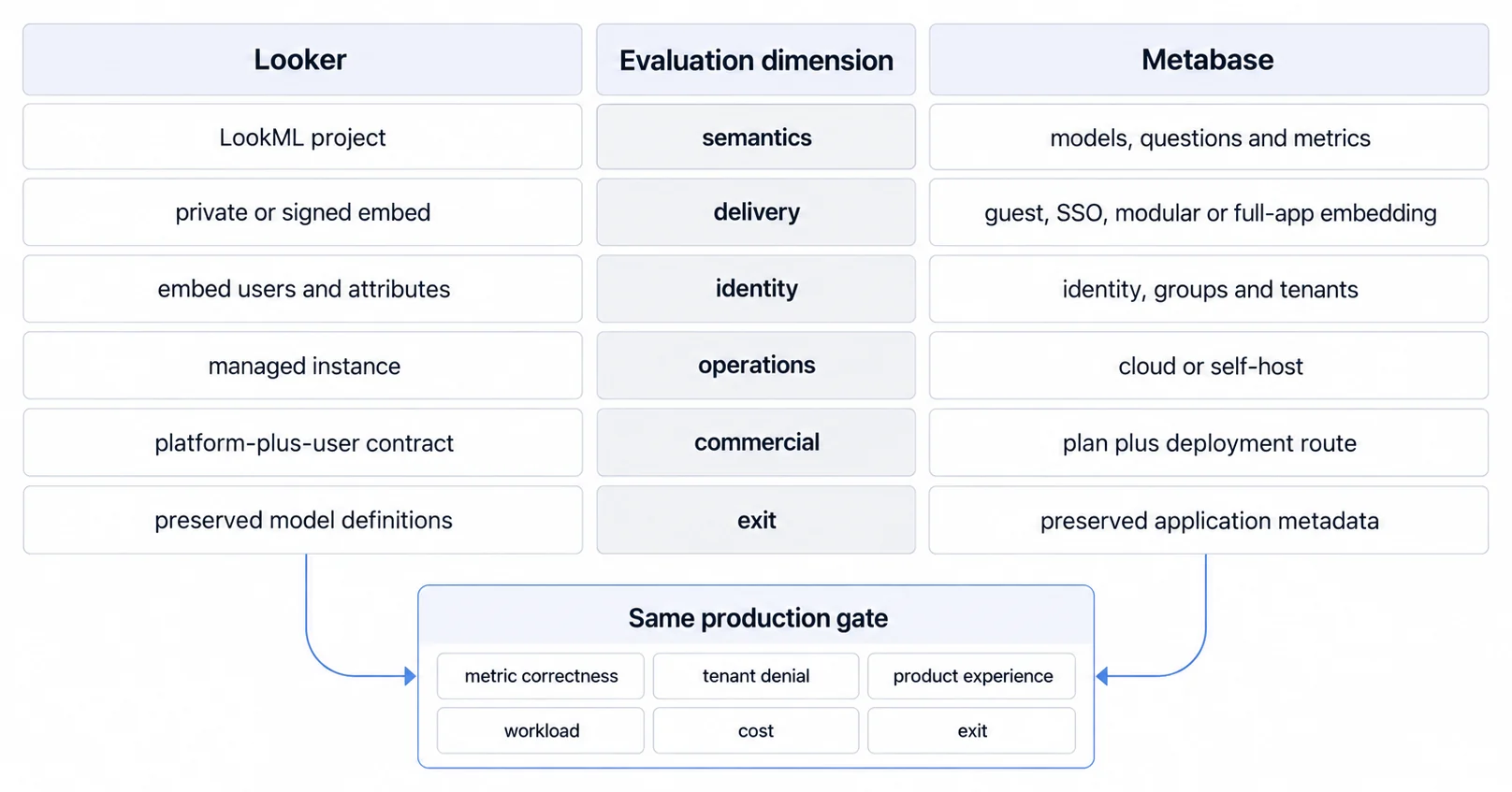
Looker documents private and signed embedding. Signed embedding authenticates an external user through the host application, then supplies a one-time signed URL for Looker content. The documented parameters can carry an external user ID, permissions, models, groups, user attributes, and access filters. Google also documents an Embed SDK and an API endpoint for creating signed embed URLs.
That is a real customer-facing route, not an internal-only afterthought. It is also a security contract. Test secret handling, URL generation, domain allowlists, cookie behavior, session changes, revoked access, and every external-user attribute that influences data access. Edition belongs in the technical decision, and the pricing page gives a harder reason than feature names. Read on 5 August 2026, all three Looker (Google Cloud core) editions include one production instance, 10 Standard Users and 2 Developer Users, and they differ on API volume: Standard allows up to 1,000 query-based API calls per month, Enterprise up to 100,000, and Embed up to 500,000. A customer-facing surface spends query calls per viewer action rather than per analyst, so that is a 500-fold difference on the axis an embedded product actually consumes.
Metabase documents several embedding paths. A guest embed can present scoped charts or dashboards with locked parameters and works on all plans. SSO embedding can apply permissions and supports richer multi-tenant and self-service workflows. Modular embedding exposes individual components; full-app embedding exposes a broader Metabase experience. Availability, interaction, customization, identity, data segregation, and billing differ by path.
Do not combine the best promise from every route into one imaginary product. Select the exact path you intend to ship, then prototype it inside the real host application. Our comparison of embedded analytics platforms explains why the surrounding product boundary matters as much as the chart.
Neither Looker's Signed Token nor Metabase's Row-Level Security Proves Your Tenant Boundary
Neither a vendor's “row-level security” label nor a signed token proves your multi-tenant analytics architecture. Translate each product's primitives into an explicit access matrix: host user, account, role, data scope, saved content, export rights, and administrative support access.
Then test negative paths, not only the successful dashboard:
- change the tenant, group, user, or resource identifier in a URL and request;
- open saved, shared, cached, exported, scheduled, and emailed artifacts as the wrong user;
- switch accounts in one browser session and verify that filters and cached results do not cross the boundary;
- exercise drill-through, query builders, downloads, APIs, background jobs, and error states;
- confirm that logs and support tools reveal enough context without leaking customer data.
Metabase's current documentation describes Tenants for eligible plans, alongside groups, permissions, SSO, and guest embeds with locked parameters. Looker's signed-embed documentation describes external-user attributes, groups, permissions, models, and access filters. The existence of those controls admits each candidate to the test; only denied requests across every route prove your boundary.
White-Label Fit Is Settled by the Empty, Denied and Export States, Not by the Logo
White-label fit is more than removing a logo. Define the states your customers will experience: loading, empty, filtered, no-data, denied, expired, partial failure, export, print, narrow viewport, keyboard navigation, and screen-reader use. Test them within your own navigation, typography, focus order, localization, telemetry, and support workflow.
The delivery mechanism alone does not decide quality. An iframe can be appropriate when its session, sizing, interaction, and accessibility contract passes. An SDK can still fail if the host owns unclear state, broken focus, inconsistent permissions, or an unstable upgrade surface. Use our white-label customization guide and embedded analytics alternatives guide to turn appearance claims into acceptance criteria.
Metabase Cloud Makes Self-Hosting a Separate Decision From Embedding
Metabase does not require self-hosting. Metabase Cloud is its hosted service, while self-hosting assigns your team more runtime responsibility and control. The official Cloud versus self-hosting comparison calls out upgrades, backups, monitoring, availability, support, custom builds, and custom drivers among the differences.
Looker's current Google Cloud offering is a managed instance with Standard, Enterprise, and Embed editions. That changes the ownership ledger, but it does not remove implementation, semantic governance, regression testing, access administration, performance testing, customer support, or exit work.
For each candidate and route, name who owns upgrades, incidents, backups, security response, capacity, model changes, embed regressions, accessibility, and customer support. “Managed” and “open source” are inputs to that ledger, not complete operating models.
Looker Quotes Per Deal and Metabase Publishes Plans, So Compare After You Pick the Route
Google's Looker pricing page separates platform pricing from user licensing and lists Standard, Enterprise, and Embed editions. Every commitment row on it reads "Call sales", so the platform cost is quote-based and cannot be modelled from the page. That affects procurement and forecasting, but quote-based pricing alone does not prove poor product fit.
Metabase's commercial boundary varies with plan, hosting choice, authentication, embedding path, and eligible features. Recalculate from current vendor terms for the route you actually tested. Include implementation, model work, identity integration, infrastructure, support, upgrades, regression testing, capacity, and exit, not only the license line.
Avoid invented company-size thresholds and universal timelines. A small team with a mature semantic workflow may prefer Looker; a larger team may prefer Metabase; either may reject both after the production test. Current terms and your measured workload are stronger evidence than category stereotypes.
Preserve an Exit Packet Before You Commit
An evaluation is incomplete until another team can reproduce the important result. Preserve model and query definitions, source mappings, dashboard inventory, identity and permission mappings, test fixtures, expected results, exports, operational runbooks, and the current commercial assumptions.
For Looker, inspect how LookML files and related project history will be retained and how embedded identity will be remapped. For Metabase, inspect how questions, models, dashboards, settings, users, and application metadata can be exported or migrated for the chosen route. Then reproduce the hardest metric and tenant-denial tests outside the trial environment.
Compare Looker and Metabase on One Production-Shaped Slice, Not on Feature Lists
Run the same production-shaped slice through both candidates: one difficult metric, one tenant-scoped workflow, realistic identities and data volume, representative concurrent traffic, every important runtime state, and a documented recovery and exit path.
The result can reasonably be Looker, Metabase, another candidate, or a combination with explicit boundaries. Choose Looker when its governed semantic and embed contract passes and the edition, workflow, and commitment are acceptable. Choose Metabase when its selected query, embed, tenant, and hosting route passes and your team accepts the remaining ownership. Evaluate another customer-facing analytics platform, ours included, when the evidence exposes a boundary neither candidate carries well.
Our Looker alternatives, Metabase alternatives, and BI tools comparison hub can expand that shortlist. Sumboard should pass the same metric, identity, tenant-denial, UX, workload, commercial, and exit tests before it earns the decision. That comparison hub is a starting point, not a substitute for that evidence.
Where to go next
- BI tools comparison guide: which platforms survive being embedded, judged on the embedding rather than the connector list.
- Domo Alternative: looking beyond Domo for customer-facing analytics? Here's what SaaS product teams are choosing.
- BI Tools & Comparisons articles: every article in this cluster.
Ready to launch customer-facing analytics?
Stop losing customers to competitors with better analytics. Sumboard's customer-facing analytics platform lets you launch self-service dashboards in days, not months.