

Embedded analytics places analytical views, exploration, or data-driven actions inside another application's workflow, with explicit integration, identity, data-access, and operating boundaries.
What Embedded Analytics Means Inside a Product Workflow
Embedded analytics is analytics delivered in the context where a person is already working. Examples include customer-facing analytics inside a SaaS product, which is the customer-facing analytics product we build, a risk view inside an underwriting workflow, a chart inside an operations portal, or an analytical component in an internal application.
The definition does not require real-time data, white-label branding, self-service authoring, multi-tenancy, or a particular framework. Those are requirements an implementation may add. It also does not mean “no external system”: a host application can embed a view that is rendered and queried by an analytics service.
The useful distinction from standalone BI is the user journey. In standalone BI, analytics is the destination. In embedded analytics, analytics supports a task in another product. Our embedded BI versus traditional BI comparison explores that delivery difference without assuming one tool category can serve only one audience.
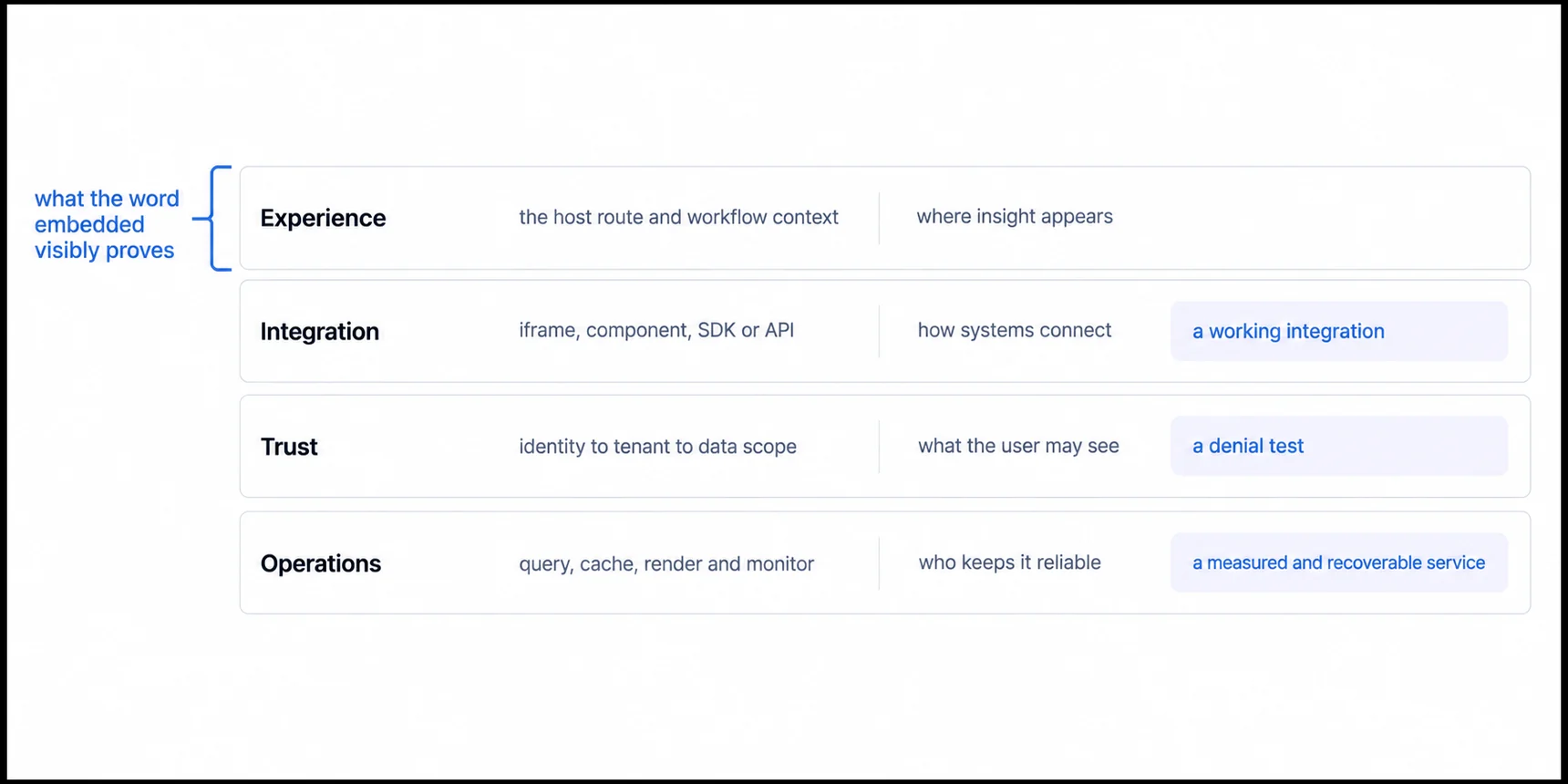
Four Contracts That Make Embedded Analytics Production-Ready
The Experience Contract Fixes Where Analytics Appears and Which Decision It Serves
Define where analytics appears, which user decision it supports, how the host navigation behaves, and which loading, empty, denied, and error states the user sees. A dashboard can be technically embedded while still creating a disconnected task flow.
The Integration Contract Is the Route, and the Route Changes What You Own
The host and analytics system can connect through an iframe, web component, SDK, direct API, or a combination. The choice changes interface control, state synchronization, version compatibility, browser boundaries, and the work owned by the host team. An embedded analytics platform is one way to supply these capabilities; a team can also compose them from BI tools, open-source software, or custom services.
The Trust Contract Maps an Authenticated Person to a Tenant and a Permission
The host authenticates a person, and trusted services map that identity to tenant, role, and permitted data. The analytics service must validate the resulting credential and enforce scope in the query or data layer. Visual filters and tenant-themed UI are not authorization boundaries. See embedded analytics security for direct-link, export, cache, and failure tests.
The Operating Contract Assigns Who Owns Freshness, Performance and Recovery
Assign ownership for data freshness, query performance, caching, rendering, monitoring, upgrades, backups, incidents, and recovery. A managed vendor can operate more of the analytics service, but the product team still owns its data contract, integration, user journey, and acceptance tests. “Zero maintenance” is not a reliable architecture description.
The Four Integration Routes Differ by What the Host Team Ends Up Owning
The integration contract gets decided fastest and revisited most, because the word chosen at the start rarely describes what arrives. Four routes appear in practice, and the useful axis is not how modern each sounds. It is which side owns rendering, upgrades, and the states a user sees when something fails.
Iframe. The vendor owns rendering and the release lifecycle, and the host gets a bounded theme and messaging surface. Parent CSS does not cascade into the child document, which isolates styling and also means your design system stops at that boundary. Little host code is needed to display a dashboard, but production readiness still needs authentication, tenant scope, responsive sizing, accessibility, and error states.
Web component. The vendor still ships the rendering, and it lands inside your document rather than a nested one. Theming depth, the event surface, and accessibility behaviour depend entirely on what the component exposes, so that contract is worth reading before the demo.
SDK. One word covering three different products. Some SDKs render components in your tree, some expose query primitives, and some manage a vendor-rendered frame on your behalf. Source-level interface control applies only to the first two, and only inside the supported contract. Where the SDK renders, the host takes on package upgrades, dependency compatibility, bundle size, and browser-side performance. Our iframe against SDK integration comparison works through what each label actually delivers.
Direct API or headless. The analytics service supplies queries, metrics, or rendered assets, and your product owns the interface completely. That buys the most control and moves accessibility, responsive behaviour, interaction design, and testing onto your team. The headless BI implementation guide covers where that trade pays for itself.
These are not categories we invented for this page. Metabase's embedding documentation separates "modular embedding", implemented either through web components or a React SDK, from "full app embedding", which it describes as embedding the entire application in an iframe, and lists public links as a third option (checked 5 August 2026). The vocabulary differs by vendor and the boundary it describes does not.
None of the four is safer than the others by construction. Each moves a different piece of work across the boundary, and the question worth asking a vendor is which pieces land on your side of it.
Embedded Analytics Capabilities Are Real, and None of Them Guarantee the Contract
Embedded implementations often include:
- Contextual dashboards and components: analytical content inside a host route or workflow
- Interaction: filters, drill paths, exports, alerts, or action triggers
- Identity integration: SSO, signed tokens, session exchange, or service credentials
- Tenant-aware access: workspace, model, row, column, or database-level enforcement
- White-label presentation: host or tenant branding across required surfaces; see the dashboard types guide
- Self-service: saved views, query building, dashboard editing, or governed exploration where required
- Developer interfaces: embedding APIs, SDKs, web components, events, and automation endpoints
- Operations: freshness monitoring, usage telemetry, performance budgets, auditability, and recovery
Capability depth and commercial availability vary by platform and plan. Verify each requirement through documentation, a representative implementation, negative security tests, generated artifacts, and the final contract.
Evaluate Embedded Analytics on One User Path That Contains the Hard Parts
Choose one workflow that includes the hard parts: authenticate a real role, map it to the correct tenant, open a representative dashboard, exercise filters and exports, trigger an error, test mobile and keyboard use, and observe performance under realistic data and concurrency.
That path produces evidence for integration effort and cost. It also separates embedded delivery from adjacent concepts:
- Customization past the logo covers product identity and how far it has to go.
- Multi-tenant analytics at scale covers isolation and shared-system architecture.
- Two jobs behind one self-service name covers what users can explore or author independently.
- Embedded analytics security covers row restriction alongside the other ways in.
Embedded Analytics Is the Wrong Answer When the Unserved Decision Is Internal
Embedded analytics answers a question about delivery, not about worth. If the decision that lacks a trusted number is one your own team makes, and the evidence is people reconciling conflicting reports by hand, then the problem is an internal analytics problem and putting the view inside a customer's screen does not touch it.
The signals point in different directions. Users repeatedly exporting the same data, support answering a question the product could safely answer itself, and observed research showing that a missing view blocks a defined workflow all indicate a customer-facing need. A recurring operating decision with no owner or trusted metric indicates an internal one. Our customer-facing against internal analytics comparison sets both evidence lists side by side, and they can both be true at once with different clocks.
Related Embedded Analytics Concepts and Evaluation Guides
- Embedded analytics guide: the three routes to shipping it, what each one costs in calendar time, and the four things that set your launch date.
- White-label analytics guide: for branding and customer-visible surfaces
- What is embedded analytics: for an expanded product-team overview
- Embedded analytics alternatives compared: for thirteen platforms side by side
- Benefits of embedded analytics: for evaluating outcomes and evidence
Ready to evaluate embedded analytics?
Test the integration, identity, data scope, and operating model against a representative product workflow.