

An Iframe Creates a Nested Browsing Context With Its Own Document and Styling
iFrame embedding is a web development technique that uses the HTML <iframe> element to display another document within a web page. An iframe creates a nested browsing context with its own document and styling; DOM access and capabilities depend on origin, sandbox, and permissions policy.
How iFrame Embedding Works Across Origin and Sandbox Boundaries
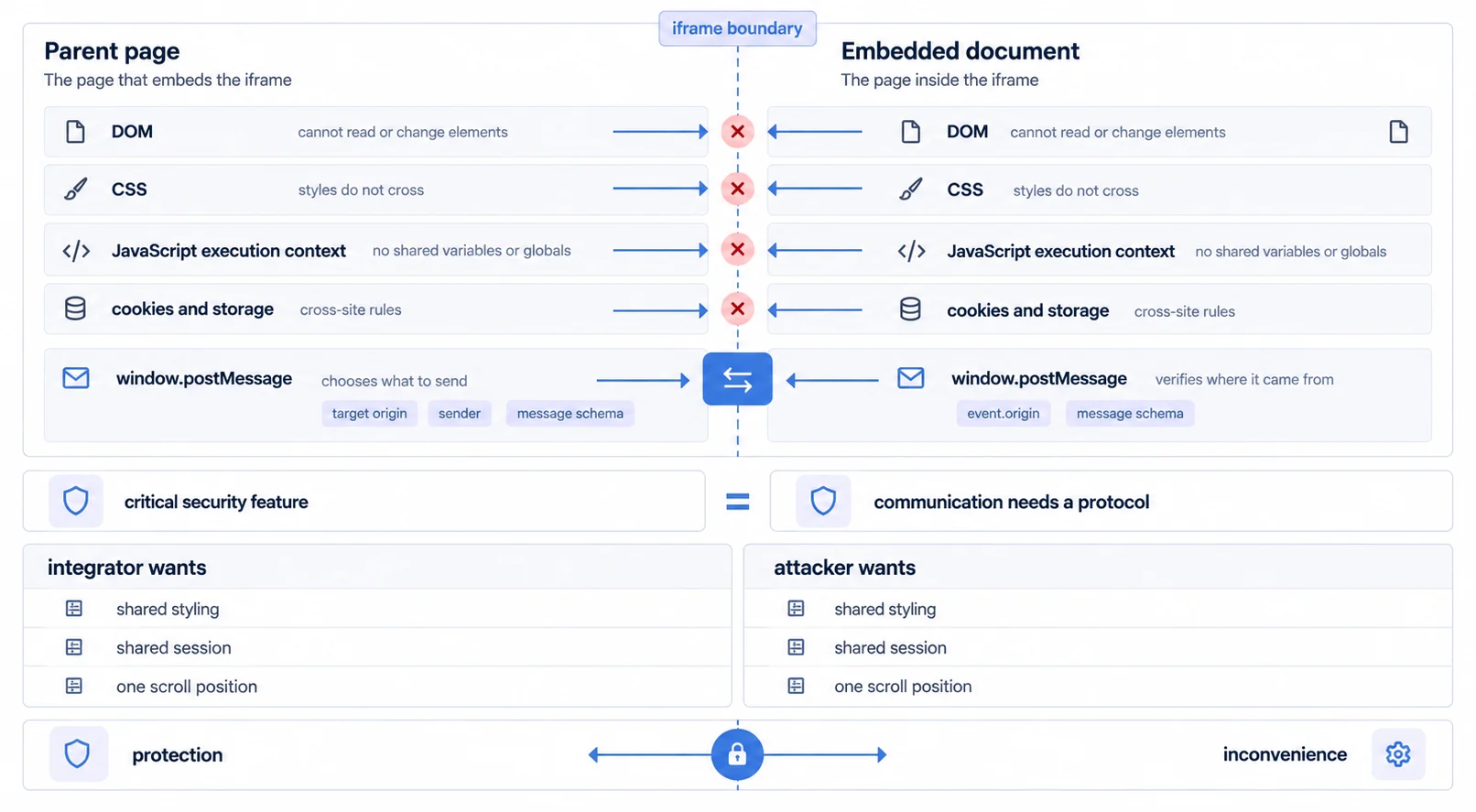
An iframe functions by creating a separate HTML document window within the current page. The browser renders this embedded content independently, with its own JavaScript execution context and CSS styling scope.
The basic HTML syntax is straightforward:
<iframe src="https://analytics.sumboard.io/dashboard/123"
        width="100%"
        height="600"
        sandbox="allow-scripts allow-same-origin allow-forms">
</iframe>
Key Technical Attributes
src: The URL of the external content to load.sandbox: Enforces security restrictions (e.g., blocking popups or limiting script execution).allow: Specifies permissions for browser features (e.g., fullscreen, geolocation).loading: Controls lazy-loading behavior to optimize initial page performance.
Cross-origin documents are restricted by the same-origin policy. Same-origin documents may access each other unless sandboxing changes that capability. Communication commonly uses window.postMessage; both sides must set a specific target origin where possible and validate event.origin, the sender, and the message schema.
In an Analytics Product, an Iframe Places a Vendor-Rendered Dashboard Inside Your Application
In embedded analytics, an iframe is one common way to place vendor-rendered dashboards inside a SaaS application, and the complete embedded analytics guide sets out where each embedding approach fits. For a practical walkthrough, see embedded analytics implementation.
Common analytics use cases
- Customer-facing dashboards: Embedding secure, multi-tenant reports in B2B portals.
- Third-party widgets: Displaying charts from external data providers.
- Rapid prototyping: Deploying analytics features without complex build pipelines.
Sumboard Uses a Managed Iframe, and Its Performance Should Be Tested on Your Own Data
Sumboard uses a managed iframe architecture. Its performance and integration quality should be tested on the customer's representative data, devices, regions, and host layout.
Implementation choices can reduce payload, redundant requests, redraws, and integration work while retaining a document boundary. They do not remove network, parsing, rendering, memory, or communication cost.
Why use a separate document? A frame can isolate styles and execution and support a separately deployed UI. Direct components are not inherently insecure; in either architecture, authorization and tenant isolation must be enforced by trusted server-side controls. The trade-off is document isolation versus host-level rendering and design control.
iFrame Embedding Advantages and Limitations
Advantages
- Configurable isolation: Origin policy,
sandbox, CSP, Permissions Policy, and validated messaging can narrow capabilities. See embedded analytics security for the surrounding controls. - Implementation Speed: Integration often requires just a few lines of code, bypassing complex build processes.
- Cross-origin document loading: The frame can display another origin; API requests and frame communication still follow their own browser security rules.
- Broad browser support: The core element is widely supported, while individual attributes and policies should be checked against the supported browser matrix.
Limitations
- Additional document cost: Each frame has its own document lifecycle and can add network, memory, CPU, and coordination work depending on its contents.
- Styling Constraints: CSS from the parent page does not cascade into the iframe. Matching the look and feel requires theming engines or message-passing.
- Responsive coordination: Width can be fluid through CSS, while content-driven height often requires a constrained layout or validated resize messages.
Iframe, Component, and Headless Approaches Serve Different Integration Requirements
A Component SDK Wraps the Iframe and Hides the postMessage Work
A component API rather than iframe lifecycle management often involves a JavaScript wrapper that manages the iframe creation and communication for you. This abstracts the complexity of postMessage APIs and resizing logic, offering a smoother developer experience while retaining the underlying benefits of the iframe.
Headless Bypasses the Visual Layer and Charges for It in Development Effort
One metrics layer behind any front end bypasses the visual layer entirely. You fetch data via API and render charts using your own charting libraries (e.g., Recharts, D3.js). This offers maximum control but requires significantly more development effort.
For a detailed side-by-side analysis, see iFrame vs SDK implementation.
Architecture comparison summary
- Basic iFrame: Quickest to implement, limited control.
- Managed iframe: Vendor-rendered UI with a document boundary; integration control depends on the SDK and theming surface.
- Headless BI: Host-rendered UI with deeper control and greater implementation and operating ownership.
What Works Outside a Frame and Breaks Inside One
The boundary that provides the isolation also intercepts a set of behaviours that work without thinking about them on a normal page. Each is testable and each has surprised a team late.
Storage and session. A frame from a different origin is subject to whatever partitioning the visitor's browser applies to third-party storage, and those rules have tightened and continue to differ between browsers. An authentication approach that assumes a cookie will be available inside the frame has to be verified per browser rather than inherited from how it behaves standalone.
Navigation and history. The host owns the address bar. Anything happening inside the frame is invisible to the back button and to a bookmark unless the two sides exchange state deliberately, which means deep-linking to a filtered view is a feature to build rather than one you get.
Focus, keyboard and scroll. Tab order crosses the boundary in ways that need testing, a scroll inside the frame competes with the page's own, and on mobile the viewport belongs to the host while the frame sizes itself.
Popups, downloads and dialogs. Exports, print, new windows and permission prompts are all affected by sandbox and permissions policy, and an export that opens correctly in a standalone tab can be silently blocked once framed.
None of this argues against the approach. It argues for testing the frame in the host application, on the browsers your customers use, rather than testing the analytics product on its own and assuming the result transfers.
Related iFrame, SDK, and Headless BI Guides
- Headless BI guide: the metrics layer underneath all of this, and what each exposure route leaves you owning.
Complete guides
- White-Label Analytics, Customization strategies for embedded solutions
Related concepts
- The real trade-offs between an iframe and an SDK, decided on what you want to own
- What flexibility actually buys in a headless architecture, and what it costs to run
- Embedded analytics security, which is where an embedding boundary is judged
Experience the Optimized iFrame
Evaluate Sumboard's managed iframe on your own data, devices, security policy, and performance budget.