

SDK Integration Incorporates a Toolkit That Wraps Someone Else's API
SDK integration is the process of incorporating a Software Development Kit (SDK) into an application to enable communication with external platforms, APIs, or services. An SDK provides developers with pre-built libraries, code samples, documentation, and tools that simplify the integration process, reducing development time from months to minutes.
What SDK Integration Changes Compared With Raw API Work
SDK integration involves downloading an SDK package, configuring it within your development environment, and implementing the provided code to connect your application with a target platform. Rather than building API connections from scratch, developers use SDK wrappers that handle authentication, data formatting, and error handling automatically.
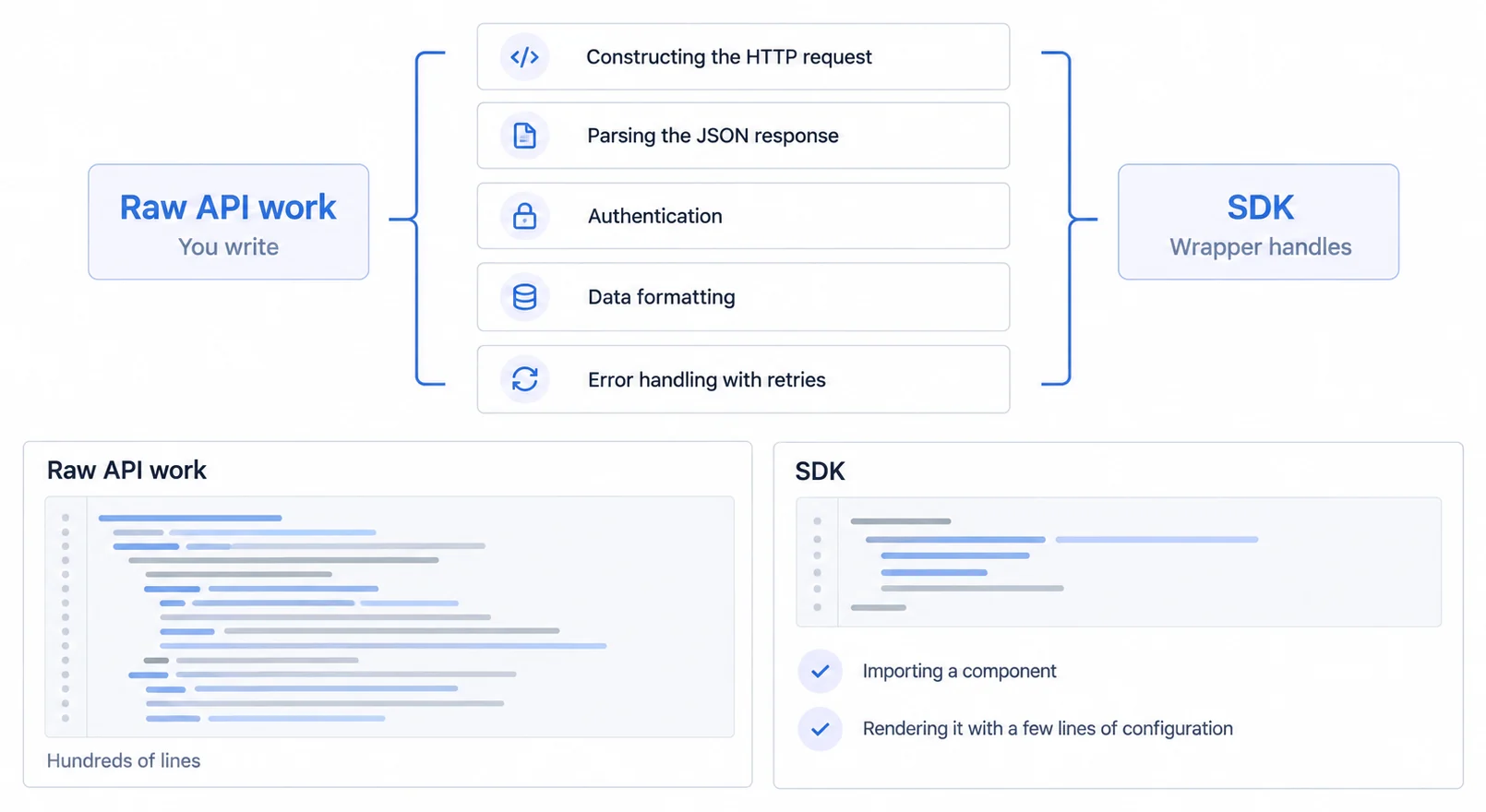
For example, integrating an embedded analytics platform through an SDK allows developers to add interactive dashboards to their application with minimal code. Instead of writing hundreds of lines to render a chart, a developer can import a component and render it with a few lines of configuration.
The integration typically follows a standard workflow:
- Selection: Choose the appropriate SDK for your tech stack (e.g., React, JavaScript, Node.js).
- Installation: Install the package via a package manager (like npm or yarn).
- Configuration: Initialize the SDK with your API keys or authentication tokens.
- Implementation: Use the SDK's pre-built methods or components to display data or trigger actions.
- Testing: Verify the integration in a staging environment before deploying to production.
An SDK Handles Four Things by Default
SDK integration differs from direct API integration in several important ways, primarily focusing on developer experience and maintenance:
SDKs Turn the HTTP Request and the JSON Parsing Into a Method Call
SDKs abstract complex API calls into simple methods. Where raw API integration might require manually constructing HTTP requests and parsing JSON responses, an SDK encapsulates this logic. This can reduce integration time from weeks of custom coding to just a few hours of implementation.
A Framework-Native SDK Ships Hooks and Components, Not Just Endpoints
Modern SDKs often provide native support for popular frameworks. For React applications, an SDK might offer pre-built Hooks and Components (e.g., <Dashboard />) that integrate smoothly with the application's lifecycle, state management, and styling systems.
Security, Rate Limiting, Error Handling and Retries Arrive Switched On
Good SDKs incorporate security measures, rate limiting, error handling, and retry logic by default. This eliminates common implementation pitfalls that developers face when connecting to APIs manually, ensuring a more reliable application.
The Provider Absorbs API Changes and You Bump a Version
SDK providers handle version updates, security patches, and API changes. When an API endpoint changes, the SDK provider updates the library, and the developer simply updates their package version. This is particularly valuable for headless BI architectures where stability is critical.
Check Framework, Security, Customization and Architecture Before Committing
SDK integration plays a crucial role in modern application development, particularly in embedded analytics, where fast time-to-market is essential. The complete embedded analytics guide covers the other integration paths alongside it. The SDK-first analytics guide and API-first analytics implementation both cover how to structure this approach. Companies building customer-facing dashboards benefit from SDK-first approaches that prioritize developer experience over traditional iFrame embedding, a choice examined in the iframe and SDK trade-offs.
When evaluating SDK integration for your product, consider:
- Framework compatibility: Ensure native support for your tech stack (React, Vue, Angular), JavaScript charting libraries and React chart libraries vary significantly in how they integrate
- Security requirements: Verify built-in authentication and the row-level controls described in the embedded analytics security guide. The multi-tenant analytics architecture guide covers how SDK design interacts with tenant isolation
- Customization needs: Assess white-label analytics requirements for smooth branding
- Architecture patterns: Understand what multi-tenant analytics at scale implies for SDK design
For developers building analytics into SaaS products, using a platform with reliable React SDK support can significantly accelerate the roadmap, allowing teams to focus on core product features rather than rebuilding visualization engines.
One Word, Three Different Products
"SDK" describes at least three architectures, and the differences decide what your team owns rather than being implementation detail.
Some SDKs render components in your own component tree, which gives source-level control over layout and interaction inside whatever the contract supports, and hands you package upgrades, dependency compatibility, bundle size and browser-side performance.
Some expose query or semantic primitives and render nothing, so the interface is entirely yours along with accessibility, responsive behaviour, interaction design and testing.
Some manage a vendor-rendered frame: the package handles the embed lifecycle, tokens, sizing and cleanup, while the vendor still owns what is drawn and when it changes.
Establish which one you are being offered before comparing anything else, because the word alone predicts none of it. Our SDK-first analytics guide works through what each variety actually delivers.
The Upgrade Path Is Part of the Integration
A package that ships in your bundle becomes a standing obligation rather than a one-time integration, and the contract around that is worth reading before the first install.
Four questions cover most of it. Can breaking changes arrive in a minor release, and how long does a version keep receiving fixes. Do the published types agree with what the package returns at runtime, including error shapes. What does the component render when a token expires mid-session, and can your own error boundary catch it. And what does the changelog for the last twelve months look like, since that is a better predictor of your maintenance cost than any roadmap.
Related SDK, API, and Embedding Concepts
- Headless BI guide: the metrics layer underneath all of this, and what each exposure route leaves you owning.
- The real trade-offs between an iframe and an SDK, decided on what you want to own
- A component API against iframe lifecycle management, compared on the work each one leaves you
- One metrics layer behind any front end, which is the shape an SDK talks to
Experience SDK-First Analytics
Sumboard's React SDK gets you live in minutes, pre-built components, zero configuration overhead, and smooth integration with your existing stack.