React chart libraries provide maintained scales, marks, axes, interactions, and composition patterns that teams would otherwise build and operate. Recharts has a large public repository and a composable React API; Victory publishes web and React Native packages; Nivo spans many chart families; Chart.js and ECharts offer Canvas rendering routes; Visx exposes lower-level primitives. Choose from a production-shaped fixture, not popularity or a universal point-count threshold.
React developers building data-rich applications must choose a rendering and component contract that fits their product. The consequential differences are concrete: supported chart families, web or native targets, customization surface, accessibility output, rendering backend, package boundary, licensing, and the work the team must continue to own.
This guide compares leading React chart libraries in 2026, provides a reproducible benchmark contract, and addresses multi-tenant architecture and embedded analytics requirements. The comparison separates documented capabilities from measurements that must be run in the target application.
What are React Chart Libraries?
Pre-built component collections enabling developers to create data visualizations without writing low-level SVG or Canvas code. Developers describe charts declaratively in JSX, pass data as props, and let the library handle visualization logic.
React chart libraries are pre-built component collections enabling developers to create data visualizations without writing low-level SVG or Canvas code. Instead of manually calculating scales and axes, you describe charts declaratively in JSX, pass data as props, and let the library handle visualization logic.
The value proposition is avoiding ownership of every scale, mark, axis, interaction, and browser edge case. The actual time saved depends on the chart families and product behavior you would otherwise build. The ecosystem spans high-level libraries with ready-to-use components and lower-level primitives that trade implementation work for control.
Chart libraries integrate with React's component model and rendering cycle, working particularly well for dashboard types requiring frequent data updates or user interactions.
How React Chart Libraries Work
React chart libraries use React's component architecture and declarative rendering. You provide data and configuration through props, the library computes scales and layout internally, then renders using SVG, Canvas, or HTML elements.
Scalable Vector Graphics rendering creates charts as XML-based vector images, enabling crisp display at any resolution, CSS styling support, and built-in accessibility features through ARIA labels and semantic markup.
Many libraries use SVG for standard charts, enabling vector rendering and element-level styling. Canvas can reduce DOM-node pressure for dense scenes, while moving semantics, focus, and hit testing into application or library code. Some libraries support more than one renderer. Benchmark the visible and interactive workload rather than switching at a borrowed point count.
The technical foundation varies. Recharts and Victory wrap D3.js calculations in React components. Visx exposes D3 primitives as composable elements. Chart.js uses Canvas with a React wrapper. Each approach trades ease-of-use against flexibility.
Three Approaches to React Visualization, Separated by How Much You Render Yourself
Three broad approaches exist for React data visualization. D3 modules provide scales, shapes, layouts, and selections at a lower level; teams must choose how those operations compose with React ownership. This route fits unique visualizations when the additional implementation surface is intentional.
React chart libraries package visualization behavior behind components or configuration APIs. They can reduce implementation work for supported chart and interaction patterns, while constraining the parts their API does not expose.
Canvas-based rendering draws pixels through JavaScript's Canvas API instead of representing each mark as a DOM element. It can reduce DOM-node pressure, but the application or library must still provide hit testing, focus behavior, semantics, redraw scheduling, and an accessible alternative where required.
Raw Canvas APIs provide an immediate-mode drawing surface without one DOM element per mark. The host then owns scales, hit testing, focus, semantics, redraw scheduling, and interaction unless another layer supplies them. This route fits specialized scenes when measured requirements justify that ownership.
Start at the highest-level API that satisfies the product fixture. Move toward primitives or a lower-level renderer only when a measured requirement: visual form, interaction, runtime, accessibility, or design-system control, cannot be met at the current layer.
Compare options at JavaScript charting libraries.
Common Use Cases for React Chart Libraries
Business dashboards track KPIs and operational data for internal teams using standard chart types. Analytics platforms provide data exploration for end users with interactive filtering and drill-downs. Financial applications demand specialized charts like candlesticks with real-time streaming.
Real-time monitoring systems track IoT sensors or infrastructure health with sub-second updates. Data exploration tools enable insight discovery through flexible configurations. Customer-facing analytics embedded in B2B SaaS products require multi-tenant isolation, white-label branding, and dashboard builders, chart libraries handle visualization while platforms like embedded analytics solutions provide complete infrastructure.
Top React Chart Libraries Comparison (2026)
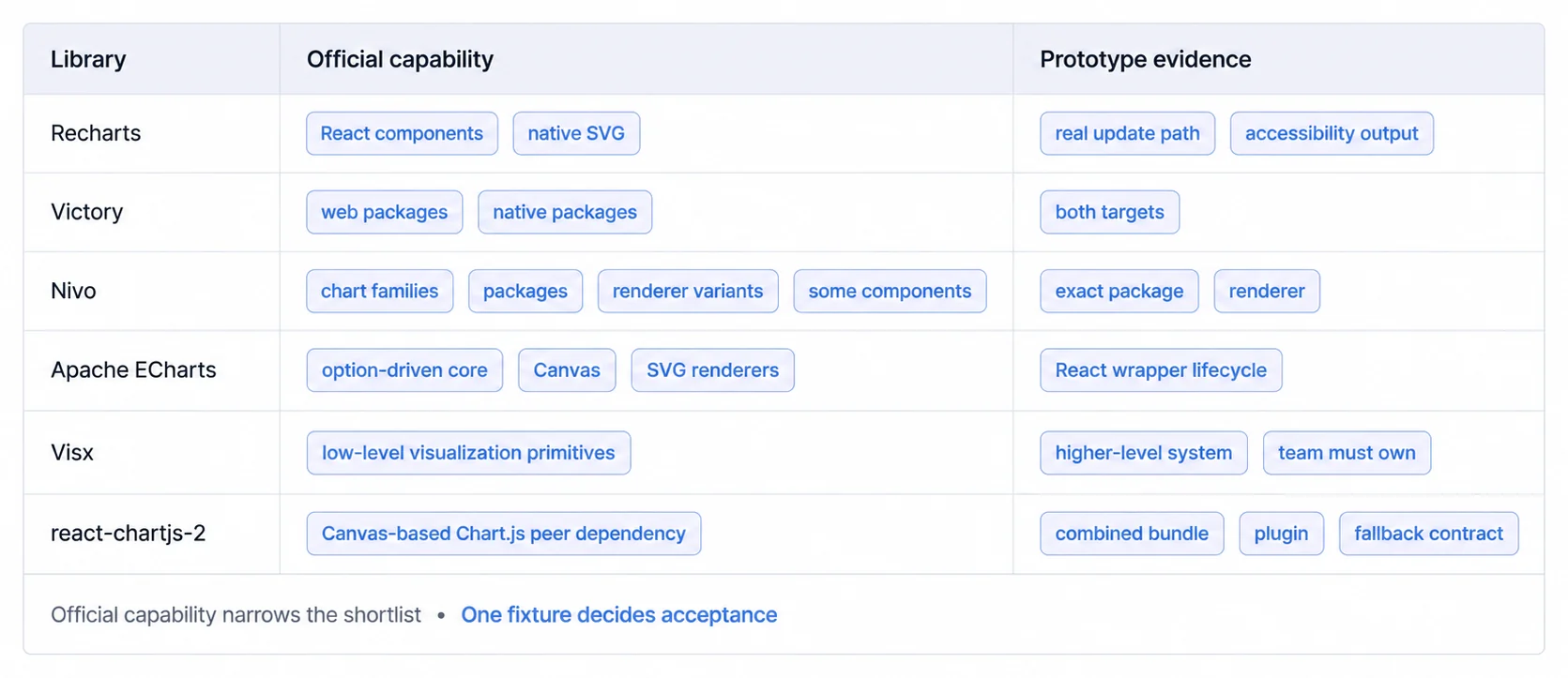
July package traffic narrows the shortlist, but package scope blocks a league table
For one comparable window, we queried the official npm Downloads API for 1–31 July 2026. The result is a package-traffic snapshot, not a count of developers or production applications. Automated installs, CI, caches, mirrors, and dependency graphs can contribute downloads. The package boundaries also differ: react-chartjs-2 is a wrapper, @visx/shape is one primitive module, and @nivo/line is one chart module, while Recharts and ECharts are core packages.
| Observed npm package | Downloads reported for 1–31 July 2026 | Package scope in this comparison |
|---|---|---|
recharts | 223,706,484 | Core React chart library |
echarts | 17,869,308 | Core rendering library used through React wrappers |
react-chartjs-2 | 17,372,214 | React wrapper; Chart.js is a separate dependency |
highcharts | 11,002,415 | Commercial core package |
@visx/shape | 10,385,838 | One primitive in the modular Visx family |
apexcharts | 8,893,000 | Core rendering package used by React wrappers |
@nivo/line | 4,267,330 | One chart package in the modular Nivo family |
victory | 1,812,033 | Web and React Native package |
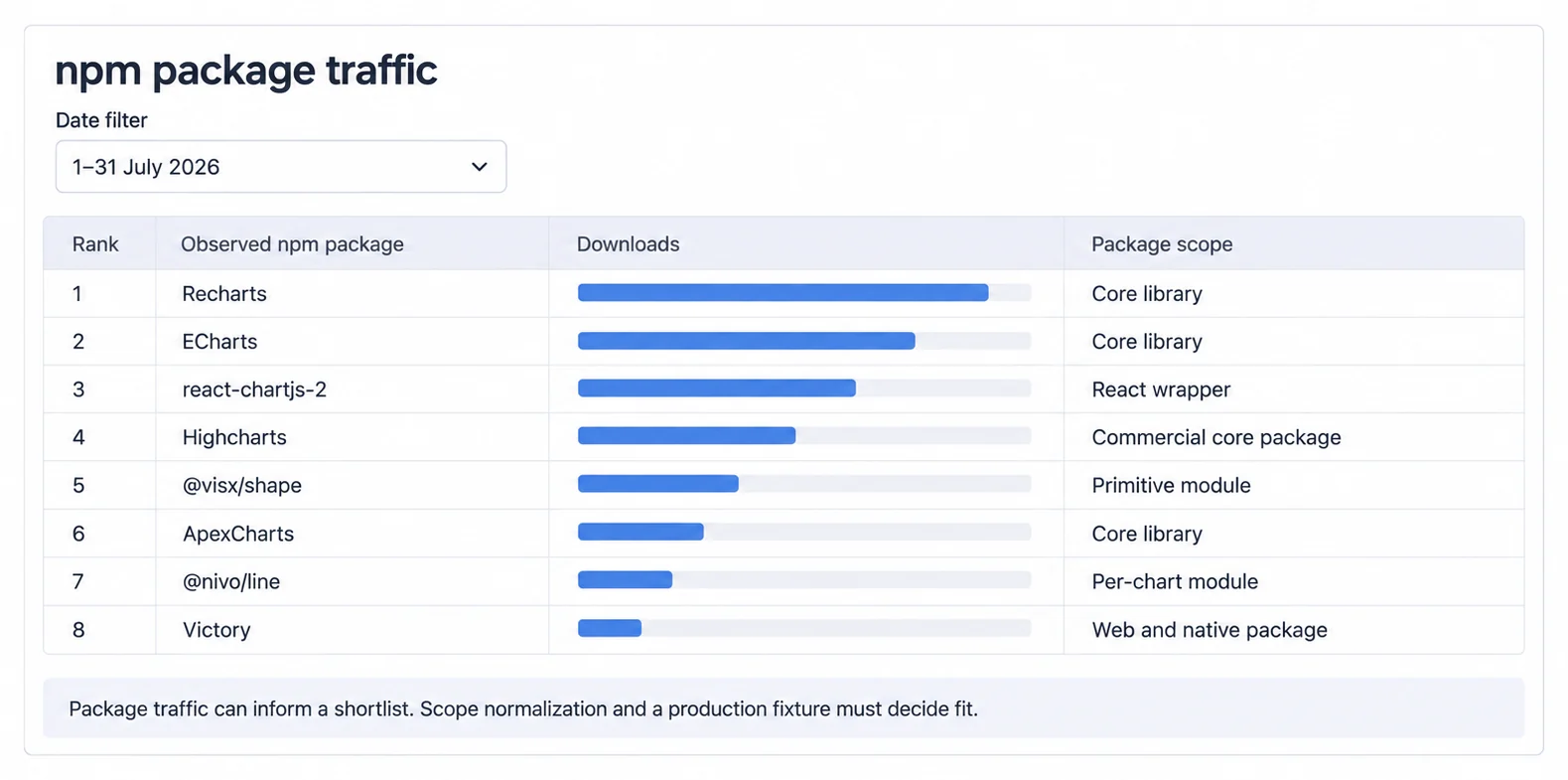
The safe use of this snapshot is risk triage. A team can ask whether a package has enough public traffic to justify deeper maintenance and ecosystem checks. It cannot infer unique adoption, accessibility, runtime performance, or product fit from downloads. Those decisions still require the same production-shaped fixture across the shortlisted libraries.
Package explorers can still help with a reproducible size investigation, but their package-page totals are not the production route. Keep the exact version and import boundary attached when checking Recharts, Victory, ECharts, or react-chartjs-2, then measure the built application. For the wrapper, verify both its repository and the Chart.js peer dependency.
1. Recharts
Documented package contract: React components built with React and D3, rendered as SVG | License: MIT | Primary source: Recharts repository
Recharts exposes chart elements such as axes, tooltips, legends, and series as composable React components. Its repository documents a React-and-D3 implementation with native SVG support. See what is Recharts for a closer look at its API.
Recharts belongs on the shortlist when a team wants:
- A component-oriented API for common business chart families
- SVG elements that can participate in DOM styling and inspection
- A documented responsive container for parent-driven sizing
- A permissive license published with the core repository
Validate these product-specific questions in a fixture:
- Whether its chart families cover the required marks and interactions
- Whether the visible SVG scene meets update and interaction budgets on target devices
- Whether the responsive container behaves correctly in hidden, resized, and narrow layouts
- Whether the generated accessibility tree and fallback route meet the product contract
Shortlist Recharts for business dashboards and customer-facing analytics products, ours included, when that component and SVG contract matches the fixture.
A minimal responsive Recharts line chart looks like this:
import { LineChart, Line, XAxis, YAxis, CartesianGrid, Tooltip, ResponsiveContainer } from 'recharts';

const data = [
  { month: 'Jan', revenue: 4000 },
  { month: 'Feb', revenue: 3000 },
  { month: 'Mar', revenue: 5000 }
];

<ResponsiveContainer width="100%" height={400}>
  <LineChart data={data}>
    <CartesianGrid strokeDasharray="3 3" />
    <XAxis dataKey="month" />
    <YAxis />
    <Tooltip />
    <Line type="monotone" dataKey="revenue" stroke="#8884d8" />
  </LineChart>
</ResponsiveContainer>
2. Victory
Documented package contract: composable React components plus a Victory Native package that shares most code and a nearly identical API | License: MIT | Primary source: Victory repository
Victory publishes web components and a Victory Native package. The maintainers state that the native package shares most of its code with Victory and has a nearly identical API; that is a useful shortlist signal, not proof that every chart behaves identically across platforms.
Victory belongs on the shortlist when the same visualization model must span web and native applications:
- Related APIs for React and React Native
- Built-in animations and transitions
- Composable chart components
- A permissive license published with the repository
Validate the following rather than inferring parity from the API:
- Which chart code, themes, and interaction logic can actually be shared
- Web DOM semantics and native screen-reader behavior
- Bundle and startup impact for each target
- Required chart families, gestures, animation, and export behavior
Shortlist Victory when sharing visualization concepts across React and React Native is a primary requirement, then test both target fixtures.
A basic Victory line chart keeps the same component model on web and mobile:
import { VictoryChart, VictoryLine, VictoryTheme } from 'victory';

<VictoryChart theme={VictoryTheme.material} width={600} height={400}>
  <VictoryLine
    data={[
      { x: 1, y: 2 },
      { x: 2, y: 3 },
      { x: 3, y: 5 }
    ]}
  />
</VictoryChart>
3. Nivo
Documented package contract: chart-specific packages with SVG, HTML, Canvas, and HTTP-rendering options depending on the component | License: MIT | Primary sources: Nivo repository and Nivo FAQ
Nivo packages chart families separately and offers multiple rendering implementations for some components. Its FAQ documents server rendering for SVG or HTML implementations and Canvas alternatives for scenes where DOM-node volume becomes a measured problem.
Nivo belongs on the shortlist when a product needs:
- Specialized chart families in addition to common business charts
- A theme object covering axes, grids, legends, annotations, and chart styling
- Server-rendered SVG or HTML for a supported component
- A Canvas implementation for a supported chart where the measured fixture justifies it
Validate package-level bundle impact, renderer feature parity, accessibility output, and whether the required customization exists in the chosen implementation. A feature shown for an SVG component may not exist in its Canvas counterpart.
Shortlist Nivo for products that need its documented chart families or renderer options, then test the exact package and renderer.
A responsive Nivo line chart starts with a series-oriented data shape:
import { ResponsiveLine } from '@nivo/line';

const data = [{
  id: "revenue",
  data: [
    { x: "Jan", y: 100 },
    { x: "Feb", y: 150 }
  ]
}];

<ResponsiveLine
  data={data}
  margin={{ top: 50, right: 110, bottom: 50, left: 60 }}
  xScale={{ type: 'point' }}
  yScale={{ type: 'linear' }}
  axisBottom={{ tickSize: 5, tickPadding: 5 }}
/>
4. Apache ECharts (for React)
Documented package contract: configuration-driven browser library with Canvas and SVG renderers | License: Apache 2.0 | Primary sources: ECharts repository and renderer guidance
Apache ECharts is not a React component library at its core; React integrations generally wrap its option-driven API and lifecycle. ECharts documents both Canvas and SVG renderers and recommends choosing from the actual scenario rather than treating one renderer as universally faster.
ECharts belongs on the shortlist when the product needs:
- An option-driven API with a broad built-in feature surface
- Both Canvas and SVG rendering
- Data zoom, maps, or other interactions documented by the core project
- Renderer selection as part of a measured workload
Validate the wrapper's maintenance, peer-version compatibility, teardown and resize behavior, event bridging, bundle imports, accessibility alternative, and server-rendering constraints. The core library's license and the wrapper's license are separate checks.
Shortlist ECharts when its feature surface or renderer choice fits the fixture, especially when a React-component API is not a hard requirement.
In React, ECharts is typically configured through a wrapper and an option object:
import ReactECharts from 'echarts-for-react';

const option = {
  xAxis: { type: 'category', data: ['Mon', 'Tue', 'Wed'] },
  yAxis: { type: 'value' },
  series: [{ data: [120, 200, 150], type: 'line' }]
};

<ReactECharts option={option} style={{ height: 400 }} />
5. Visx (Airbnb)
Documented package contract: reusable low-level visualization components split into installable packages | License: MIT | Primary source: Visx repository
Visx combines D3 calculations with React-managed DOM updates and is intentionally low-level and unopinionated. Its repository explicitly positions the packages as building blocks for reusable chart libraries or custom one-off visualizations.
Visx belongs on the shortlist when the visualization must behave like part of a product design system rather than a prebuilt widget:
- Install only the primitive packages the implementation uses
- Own the component API built on top of scales, shapes, groups, and interactions
- Retain direct control over SVG composition and product-specific behavior
That contract intentionally leaves more work with the product team. Measure the code and test surface for axes, legends, tooltips, responsive behavior, animation, accessibility, and interaction rather than comparing only the rendering primitive.
Shortlist Visx for custom branded visualizations and teams that explicitly want to own a higher-level chart system.
A Visx line path exposes the scales and SVG composition directly:
import { Group } from '@visx/group';
import { LinePath } from '@visx/shape';
import { scaleLinear } from '@visx/scale';

const xScale = scaleLinear({ domain: [0, 10], range: [0, 400] });
const yScale = scaleLinear({ domain: [0, 100], range: [400, 0] });

<svg width={500} height={500}>
  <Group top={50} left={50}>
    <LinePath
      data={data}
      x={d => xScale(d.x)}
      y={d => yScale(d.y)}
      stroke="#8884d8"
    />
  </Group>
</svg>
6. react-chartjs-2 (Chart.js Wrapper)
Documented package contract: React components that pass data and options to Chart.js Canvas charts | License: MIT for the wrapper; verify the Chart.js peer dependency separately | Primary sources: react-chartjs-2 docs and Chart.js performance guide
react-chartjs-2 wraps Chart.js and supports typed chart components as well as a generic component. Its documentation requires Chart.js as a peer dependency and documents explicit registration of the controllers, elements, scales, and plugins used by a tree-shaken setup.
react-chartjs-2 belongs on the shortlist when a team wants:
- Chart.js configuration and plugin compatibility inside React
- Canvas rendering for a workload that will be measured in the target fixture
- Explicit registration of the Chart.js modules used by the route
- Access to the underlying chart instance through the wrapper's ref contract
Validate the combined wrapper and peer-dependency bundle, update behavior, plugin compatibility, keyboard path, and fallback content. Chart.js accessibility guidance notes that Canvas content is not exposed as semantic HTML, so accessibility requires deliberate labeling and fallback content.
Shortlist react-chartjs-2 for products already aligned with Chart.js or where its Canvas and plugin contract matches the fixture.
A minimal line chart passes the familiar Chart.js data object through the React wrapper:
import { Line } from 'react-chartjs-2';

const data = {
  labels: ['Jan', 'Feb', 'Mar'],
  datasets: [{
    label: 'Revenue',
    data: [12, 19, 3],
    borderColor: 'rgb(75, 192, 192)'
  }]
};

<Line data={data} />
Choose Your React Chart Library From the Constraint That Binds First
Select based on primary constraint:
If a component-oriented SVG API is the primary constraint, shortlist Recharts.
- Standard business chart families
- A component-oriented React API
- Parent-driven responsive container
If one visualization model must cover web and mobile, shortlist Victory.
- Shared codebase between React and React Native
- Verify accessibility and interaction separately on both targets
If Nivo's specialized chart families or renderer options are required, shortlist Nivo.
- Need specialized visualizations
- Theming across supported components
- Server-rendered SVG or HTML where documented
For dense or frequently updated scenes, include Apache ECharts or react-chartjs-2 in the measured shortlist.
- Real-time monitoring
- Performance critical
- Canvas rendering is a candidate, not a conclusion
If owning a custom chart system matters more than receiving complete charts, shortlist Visx.
- Unique branded visualizations
- Complex interactions
- A team prepared to own the higher-level component and accessibility contract
For embedded analytics products, pair Recharts with an analytics platform rather than expecting a chart library to provide product infrastructure.
- Chart library handles visualization
- Embedded analytics platforms provide infrastructure (multi-tenancy, white-label, dashboard builders)
Performance Depends on Workload and Rendering Backend, Not on the Library Name
Performance depends on the visible workload, rendering backend, library configuration, browser, device, update pattern, interaction model, and whether the result remains visually and accessibly correct. A point count by itself cannot make libraries comparable: one hundred thousand source rows aggregated into a few hundred pixels is a different job from one hundred thousand interactive marks.
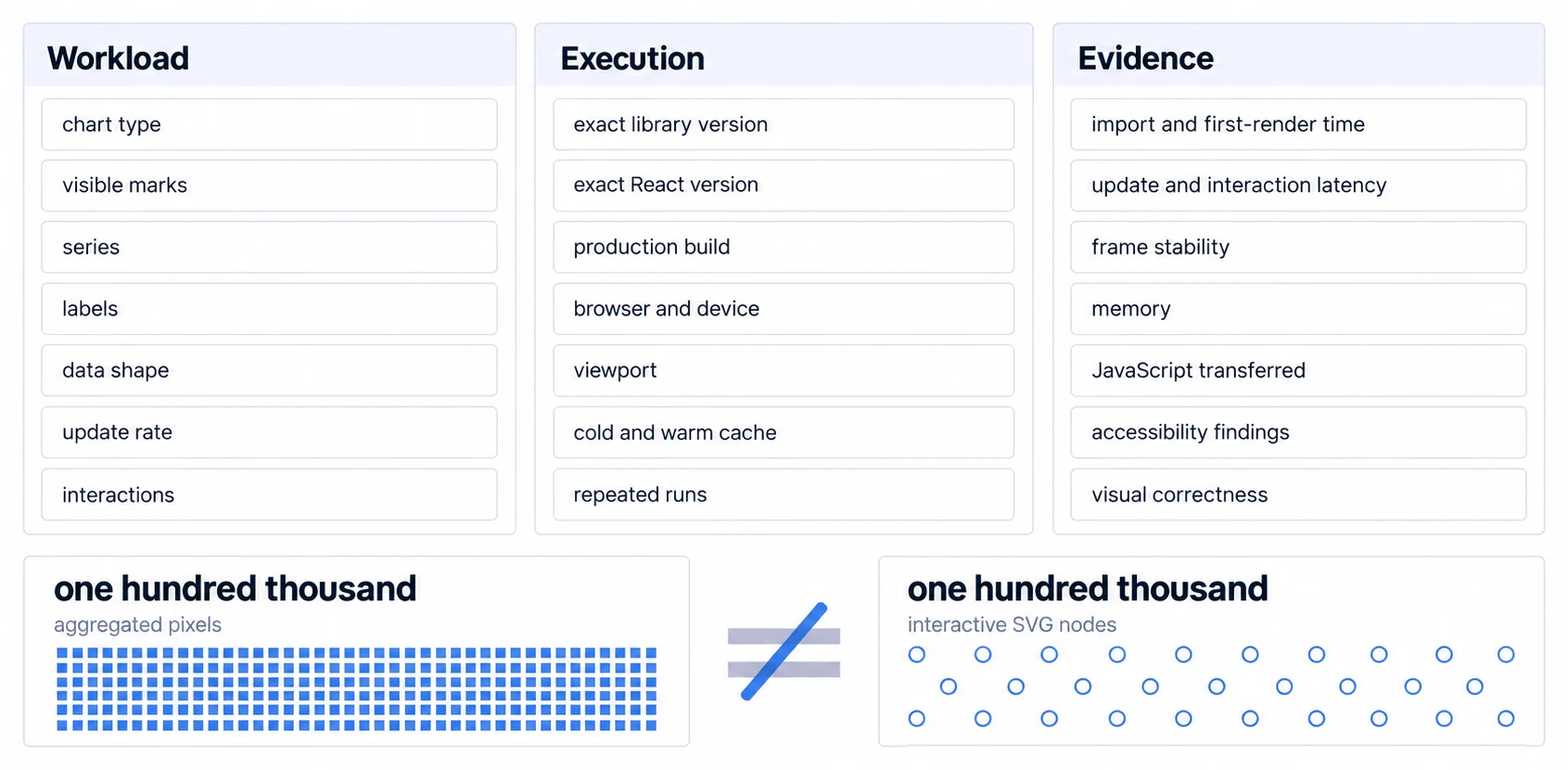
Build one production fixture per representative chart family. Keep data, dimensions, labels, animation, tooltips, decimation, and interaction requirements equivalent. Record exact package and React versions, production build settings, browser and device, viewport, cold and warm cache, and multiple runs rather than one stopwatch result.
Measure separate phases: module transfer and evaluation, first render, data update, resize, hover or keyboard interaction, and teardown. Capture distributions rather than only an average, along with frame stability, peak memory, JavaScript transferred, accessibility findings, and visual correctness. A fast render that drops labels, blocks the main thread during interaction, or exposes no usable screen-reader alternative has not passed the same contract.
Use the result to find the boundary where the candidate stops meeting your acceptance criteria. Aggregation, sampling, progressive rendering, virtualization, Canvas, WebGL, or a different interaction design may move that boundary. The production-shaped fixture, not a universal SVG-versus-Canvas threshold, decides which intervention is necessary.
Best Practices for React Chart Libraries
Code Splitting & Bundle Optimization
Chart-library bundle impact depends on the package version, imported modules, build tool, tree-shaking, locales, renderers, and plugins. Measure the production route rather than copying a package-page total. Strategies include route or component-level dynamic imports, supported modular entry points, and removing unused renderers or features.
Example code splitting:
const LineChart = lazy(() => import('./LineChart'));

<Suspense fallback={<ChartSkeleton />}>
  <LineChart data={data} />
</Suspense>
Analyze bundle impact with webpack-bundle-analyzer identifying largest contributors.
Responsive Design Patterns
Charts must adapt to containers across devices. Use a library responsive wrapper when it satisfies the product contract; for example, Recharts provides <ResponsiveContainer width="100%" height={400}>. Define aspect behavior, label reduction, orientation handling, and dashboard layout explicitly. Test representative physical devices as well as emulators because browser chrome, font loading, scrolling, and touch competition are part of the result.
Data Transformation & Formatting
Chart libraries expect specific data shapes. Transform API responses before passing to charts. Common patterns include arrays of objects ([{x: 1, y: 2}]), grouped series, and pre-calculated aggregations. Place expensive transformations where profiling shows they meet latency, memory, freshness, and ownership requirements; source-row count alone does not choose the execution tier.
Handle missing data explicitly (null values, gaps in time series). Format axes appropriately (dates, currencies, percentages). Use data utilities, date-fns for date formatting, numeral.js for numbers.
Color Schemes & Accessibility
Choose colorblind-friendly palettes, avoid red-green combinations. Maintain WCAG AA contrast ratios (4.5:1 minimum). Provide patterns or labels as color alternatives. Test with Chrome DevTools color blindness simulator. Popular accessible palettes: Viridis, ColorBrewer schemes, IBM Carbon Design System.
Inspect the rendered accessibility tree and interaction path for every required chart. Library defaults can change by component and version, and a title or ARIA attribute alone does not make an interactive chart usable.
Error Handling & Fallbacks
Handle invalid data (null, undefined, NaN) gracefully with validation. Display meaningful empty states with descriptive text and calls-to-action. Handle API failures with retry buttons and timeout scenarios. Wrap charts in Error Boundaries preventing chart failures from crashing applications. Detect large datasets exceeding capabilities, show warnings or auto-aggregate. Proper error handling cuts support tickets, because a chart that explains its own empty state stops a ticket being written.
Always implement Error Boundaries around chart components. A single malformed data point should never crash your entire application. Proper error handling cuts support tickets, because a chart that explains its own empty state stops a ticket being written. We have no published figure for the size of that reduction and will not invent one.
Accessibility (WCAG Compliance)
Ensure keyboard access for required interactions, visible focus, non-color cues, meaningful text alternatives, and a data table or equivalent route when the chart cannot expose its values reliably. Add SVG titles and descriptions where they improve the accessible name, but inspect the actual accessibility tree and screen-reader experience rather than counting attributes. Apply the contrast criterion appropriate to text, graphical objects, and UI components in the rendered design.
Mobile Optimization Strategies
Use containers that react to parent dimensions and define a narrow-screen information hierarchy instead of shrinking every label. Provide target sizes and spacing appropriate to the product's accessibility requirements, touch alternatives for hover behavior, progressive disclosure, and both orientations where supported. Test real devices because font loading, browser chrome, scrolling, and touch competition are part of the chart experience.
Caching & Performance Optimization
React.memo can avoid renders when stable props and comparison cost make that worthwhile. useMemo can reuse expensive pure calculations when its dependency contract is correct. Application caches, dynamic imports, virtualization, debouncing, throttling, aggregation, and workers solve different measured bottlenecks; each also adds invalidation, scheduling, or lifecycle complexity. Profile before and after the intervention with the benchmark contract above.
Treat an optimization as successful only when the production fixture improves its target distribution without breaking freshness, interaction, accessibility, memory, or visual correctness. Record the before and after evidence with the same build and workload.
React Chart Library Integration Directions
Headless UI & Composable Architectures
Low-level and headless approaches separate calculation or state from final rendering. Visx is the documented example in this comparison: it supplies reusable visualization primitives while leaving the product team to assemble a higher-level chart API. The benefit is control; the cost is ownership of more rendering, interaction, accessibility, and testing work.
Server Components & Streaming
React Server Components can own data fetching and pass serializable data into a client chart boundary. Interactive chart code still needs a client runtime, while a static SVG, image, table, or textual summary may be rendered separately. Verify each library's current server-rendering and hydration behavior instead of inferring compatibility from React support alone.
AI-Assisted Data Visualization
Natural-language chart creation, anomaly detection, and narrative summaries sit above the renderer contract. Keep generated specifications constrained to supported chart schemas, validate queries and permissions, and expose the evidence behind summaries. The chart library still renders the approved specification; it does not by itself provide trustworthy model output or data governance. See the AI analytics guide.
Ready to launch customer-facing analytics?
Stop losing customers to competitors with better analytics. Sumboard's customer-facing analytics platform lets you launch self-service dashboards in days, not months.