We've been seeing more development teams evaluate ECharts for their dashboard projects lately. The conversation usually starts with excitement about the chart variety and performance capabilities, then shifts to questions about production deployment and customer-facing use cases.
ECharts (Apache ECharts) is a powerful open-source JavaScript visualization library that handles everything from simple line charts to complex heatmaps and Sankey diagrams. But there's a difference between building impressive demos and shipping production dashboards that your customers will actually use.
ECharts Earns Its Place on Rendering Control, Chart Vocabulary, and Framework Freedom
Teams choose ECharts when they need rendering control, a broad chart vocabulary, and framework flexibility.
Performance with large datasets is where ECharts really shines. The library is optimized for incremental rendering and data streaming, which means it can handle substantial amounts of data without the lag you'd see with other libraries.
Teams building analytics dashboards for cloud monitoring or e-commerce platforms consistently report smooth performance even with complex, data-heavy visualizations.
The chart variety is genuinely impressive. You get 20+ chart types out of the box, from basics like bar and line charts to specialized visualizations like radar charts, treemaps, and parallel coordinates.
More importantly, you can combine and customize these chart types to create exactly what your data needs, not just what the library assumes you want. Among JavaScript charting libraries, ECharts offers one of the most complete type selections available.
Framework compatibility matters when you're integrating into existing applications. ECharts works smoothly with React, Vue, Angular, and Svelte.
Unlike some libraries that force you into a specific framework, ECharts uses a declarative configuration object that adapts to whatever stack you're already using.
The Apache Licence Means No Single Vendor Owns the ECharts Roadmap
Being Apache-licensed means ECharts has an active community constantly improving the library. You're not locked into a proprietary solution or dependent on a single vendor's roadmap. The WAI-ARIA implementation ensures accessibility compliance, and the mobile optimization comes built-in rather than bolted on later.
Production ECharts Dashboards Break on the Wrapper, the Update Cycle, and Mobile
Getting from prototype to production involves solving some specific challenges.
React integration is the most common pattern we see. The basic setup requires installing ECharts and creating a wrapper component that manages the chart lifecycle.
The wrapper question is where teams usually spend their first day, and it is worth checking rather than inheriting an opinion about. Read on 5 August 2026 from the npm registry: echarts-for-react is at 3.0.6, published 21 January 2026, and its peer range accepts echarts 3 through 6, so it is neither abandoned nor pinned to an old core. echarts itself is at 6.1.0, published 19 May 2026.
Teams still write their own wrapper, and the reason is control rather than neglect: a component you own decides when setOption runs, what it merges, and when the instance is disposed, and those three decisions are what the next two paragraphs are about. Check the release date and the peer range yourself before you depend on either answer, because both move.
Real-time data updates need careful handling. ECharts can definitely handle live data, but you need to manage the update cycle properly. Too frequent updates and you'll see performance issues. Too slow and users notice the lag. The key is using the setOption method strategically and implementing proper memoization to prevent unnecessary re-renders.
Mobile responsiveness isn't automatic despite ECharts being "optimized for mobile." You need to explicitly configure responsive behavior, handle touch events differently than mouse events, and test across actual devices. The desktop-first mindset of many JavaScript charting libraries shows up in the default configurations.
ECharts Configures Everything Through Objects, Which Buys Control and Costs a Learning Curve
ECharts uses a declarative configuration object for everything - chart appearance, behavior, interactions, animations. This gives you incredible control but creates a steep learning curve. Unlike React component libraries where you get visual components for axes, legends, and tooltips, ECharts requires you to define everything through JavaScript objects.
One of Those Breaks Is Documented by ECharts Itself, and a Fourth Risk Is Documented Beside It
The section above names the wrapper, the update cycle and mobile as where production ECharts dashboards break. One of those, the wrapper and its mobile face, is described in the library's own handbook. The handbook also documents a separate risk that is not on that list of three and belongs beside it: what a major version can change in a chart you already shipped.
Resize does not happen by itself, and the browser event is not enough. The handbook's page on chart size says you "can listen to resize of the site to catch the event that the browser is resized" and then "use echartsInstance.resize to resize the chart". It also names the case that the browser event misses: when a container's size changes through JavaScript or CSS rather than a window resize, that event does not fire, and the documented answer is ResizeObserver.
Read that twice if you are embedding. A chart inside your own page usually changes size when the window does. A chart inside somebody else's application changes size when a sidebar collapses, a panel is dragged, a tab becomes visible, or a container animates open, and none of those are window resizes. The failure looks like a chart that is the right size on load and the wrong size for the rest of the session.
A major version can change how an existing chart looks without you touching it. The v5 upgrade guide states that "the default theme has been changed", that "the priority of the visuals between [visualMap] and [itemStyle] are reversed since v5", and that "the axis line and axis ticks of the Y axis (value axis) has been hidden by default since v5". Rich text padding was also adjusted to be "more compliant with CSS specifications", reversing the top and bottom behaviour from v4.
None of those are bugs and all of them are visible. In an internal dashboard a changed default is a conversation with the person who owns the board. In a customer-facing one, a chart whose axis lines quietly disappeared after a dependency upgrade is a support ticket that arrives as "your reporting is broken", and the person who files it does not know that a library changed.
The practical version is short. Pin the version rather than tracking a range, hold an upgrade until you have looked at a rendered chart on each chart type you ship, and put a ResizeObserver on the container from the beginning rather than after the first complaint.
Two of the three breaks named above are not covered here. The update cycle and the parts of mobile beyond sizing were not stated in the handbook pages we read, and we are not going to describe behaviour we have not confirmed in the documentation.
ECharts Sits Between Chart.js and D3.js on the Integration Versus Customization Trade
The choice between ECharts and alternatives comes down to your specific requirements.
Compared to D3.js, ECharts is significantly easier to use for standard dashboard visualizations. D3 gives you lower-level control for completely custom visualizations, but that comes with complexity. If you need common chart types with customization, ECharts is faster to implement.
Chart.js offers simpler integration but less flexibility. It's great for straightforward charts with minimal customization needs. ECharts makes more sense when you need advanced features like drill-downs, complex multi-series charts, or specialized visualization types.
Recharts is purpose-built for React and provides actual React components for chart elements. This makes it more "React-native" but potentially limits you if you need to work across multiple frameworks. ECharts' framework-agnostic approach gives you more flexibility but requires more setup work.
The tradeoff is always the same: easier integration versus deeper customization. ECharts sits in the middle - more powerful than simple libraries, more accessible than D3.
An ECharts Contract Ends at the Pixels, and Customer-Facing Analytics Starts After That
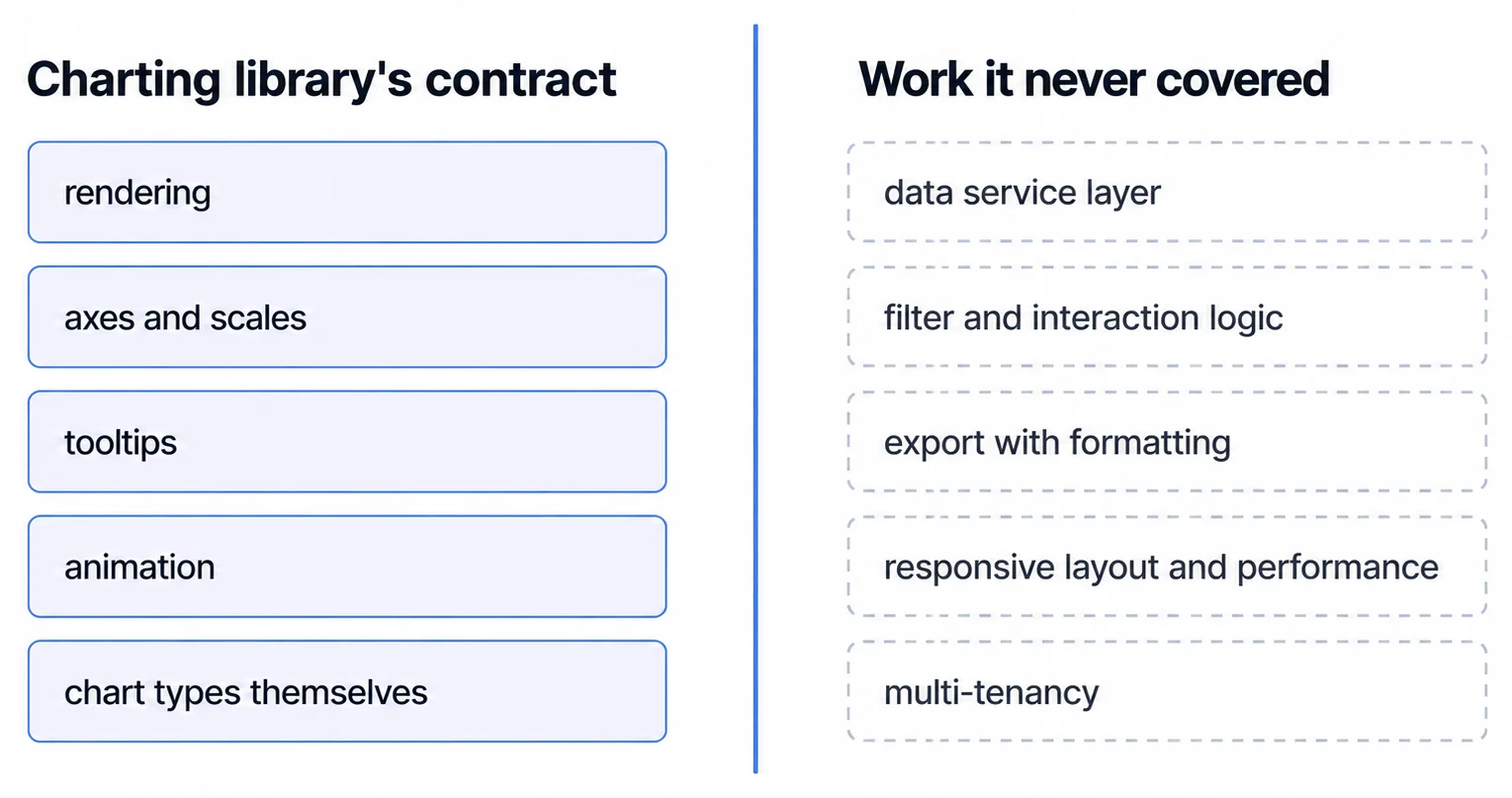
This is where the conversation gets interesting - and where many teams realize they need more than just a charting library.
Building internal dashboards with ECharts is one thing. Shipping a customer-facing analytics product is entirely different. Your customers expect features like drill-downs, exports, filters, and responsive design. They need dashboards that match your product's look and feel, not generic chart visualizations.
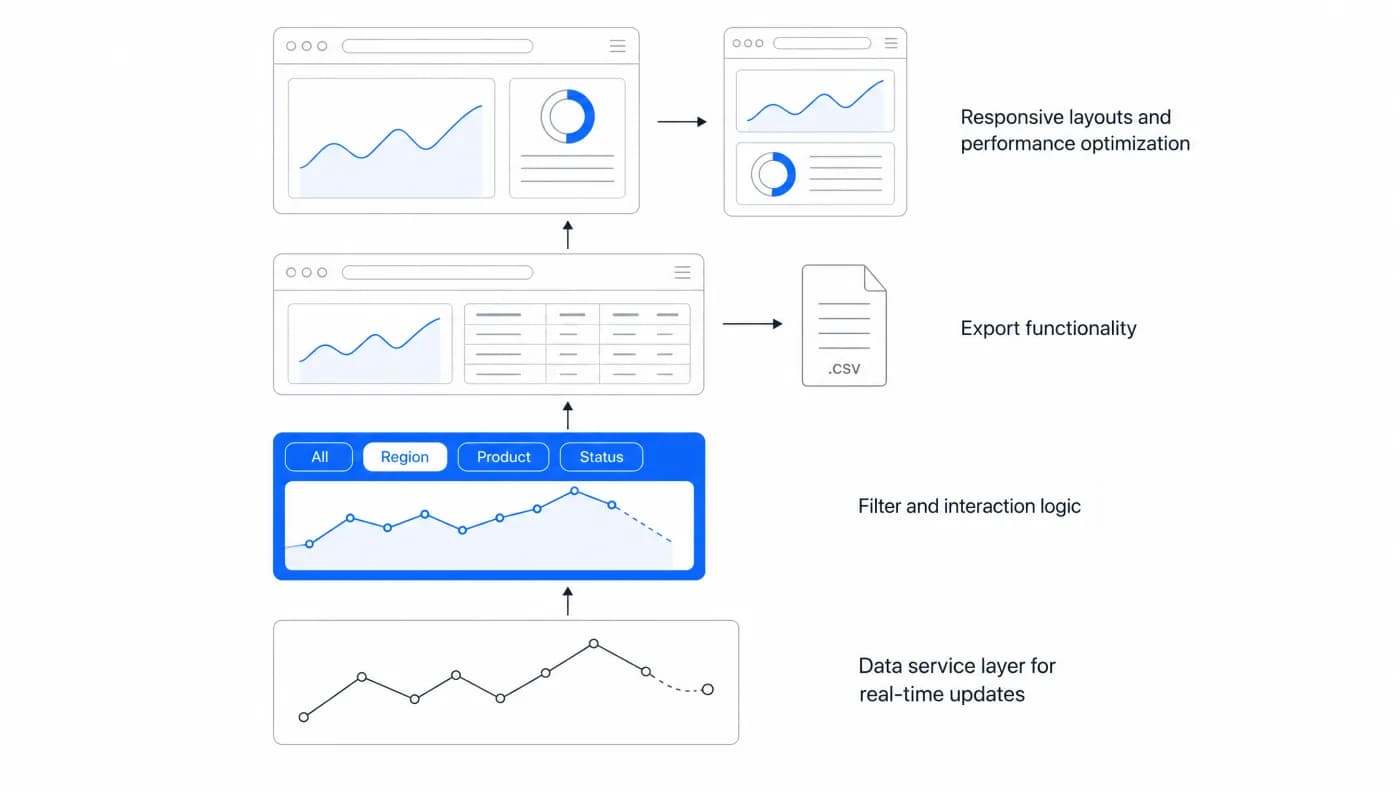
ECharts gives you the visualization components, but you still need to build:
- Data service layer for real-time updates
- Filter and interaction logic
- Export functionality (PDF, Excel, CSV)
- Responsive layouts and performance optimization
- User-specific data isolation (multi-tenancy)
Going From ECharts Charts to Customer Analytics Is Months of Work, Not Weeks
Teams typically underestimate what it takes to go from ECharts charts to production-ready customer analytics. You're looking at months of development time, not weeks. And every new feature or customization request means pulling developers away from your core product.
The real question isn't "Can we build this with ECharts?" but "Should we build this with ECharts?" If analytics IS your product, building custom makes sense. But if you're a SaaS company that needs to ship customer-facing analytics quickly, you're essentially building an entire analytics platform on top of a charting library.
From customer feedback, we're learning that the initial build is just the beginning. The ongoing maintenance, feature requests, and performance optimization become a permanent engineering burden.
A Rendered Chart Is Not a Readable One, and That Gap Is Yours to Close
Rendering performance is the trade this page has been about. Readability is a separate one that arrives with it and does not appear in any benchmark.
A chart painted into a canvas exposes no marks to assistive technology, so whatever a sighted user reads off the shape has to exist somewhere else as well: an accessible name for the chart, a text summary or data table carrying the values, keyboard-reachable interaction where the chart is interactive, and an encoding that survives without colour. Verify what the library offers here against your own requirement rather than assuming it, and budget the remainder as part of the component. Retrofitting focus management and text equivalents into a chart already in production costs more than building them in, and in a customer-facing product it is not optional work.
Embedded Analytics Trades ECharts Customization for Time to Market
There's a different approach that more teams are considering.
Rather than building a full analytics platform on top of ECharts (or any charting library), embedded analytics platforms give you production-ready dashboards out of the box. You get the visualization layer, data services, user interactions, exports, and responsive design without the months of custom development.
The tradeoff shifts from "build everything custom" to "deploy quickly with standard features." You lose some customization flexibility but gain speed-to-market and no infrastructure for you to run.
For most SaaS companies, analytics is a feature customers expect, not your core differentiator. Shipping those dashboards in days rather than months means your engineering team can stay focused on what actually makes your product unique.
Where to go next
- JavaScript charting libraries guide: where each library stops, and what that costs you at the boundary.
- Highcharts vs Chart.js: compare Chart.js and Highcharts by licence scope, rendering model, export, accessibility.
- Charting Libraries articles: every article in this cluster.
Skip the months of custom development
Sumboard gives you production-ready embedded dashboards without building on top of charting libraries.