The adoption gap is large, but the exact counters move. Use the live Recharts npm page and Victory npm page as dated maintenance signals, not as a verdict on API fit.
But popularity doesn't automatically mean "better for your use case." We've helped teams transition from libraries like Recharts and Victory to fully managed embedded analytics. The right choice between these libraries depends on what you're optimizing for.
Each Recharts and Victory Difference Sends Its Bill Somewhere Else
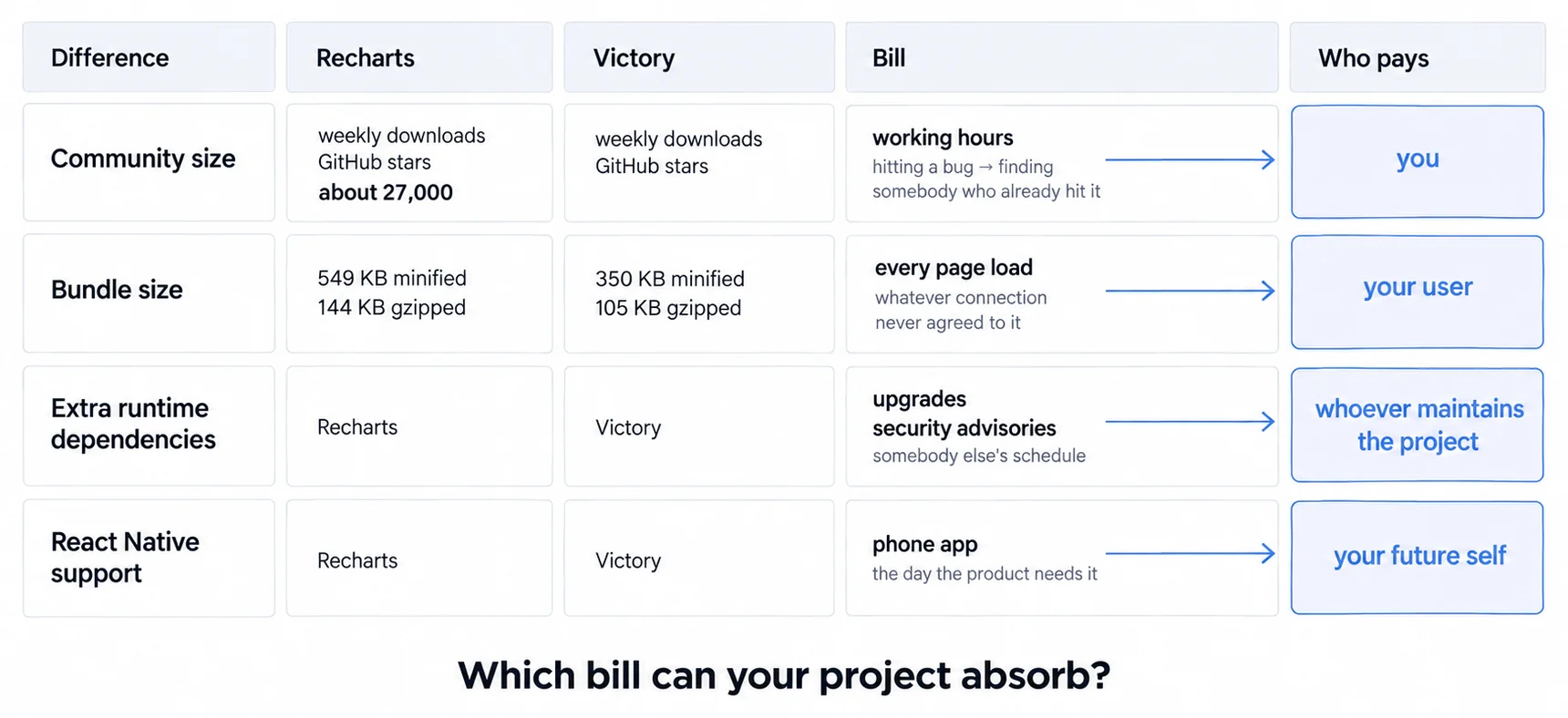
The figures below are usually read as one scoreboard, and that hides the part that decides. Community size costs you working hours during the build. Bundle size costs your users bytes on every page load, and they were never asked. React Native support costs your future self on the day somebody wants a phone app. Which library wins more lines matters less than which of those bills your project can least afford.
Recharts currently has the larger public adoption footprint:
- A substantially higher live weekly-download counter on npm
- About 27,000 GitHub stars on the official repository; verify the live counter at evaluation time
- Heavier on the wire than Victory, at 549 KB minified and 144 KB gzipped against Victory's 350 KB and 105 KB (Bundlephobia, measured 1 August 2026)
- Larger community and more Stack Overflow answers
- Shipping: 3.10.1 published 25 July 2026, and the repository was pushed to on 4 August 2026 (npm registry and GitHub API, read 5 August 2026)
Victory has a smaller public adoption footprint:
- A lower live weekly-download counter on npm
- About 11,000 GitHub stars on the official repository; verify the live counter at evaluation time
- Additional dependencies (Prop Types, Lodash)
- Unique React Native support, but as a SEPARATE package rather than the same one
- Shipping, and this is the asymmetry the download counters hide: the WEB package's last release is 37.3.6 on 14 January 2025, and its repository was last pushed to on 19 December 2025. The native line is a different story and is active:
victory-native41.26.0 shipped 9 June 2026 from the victory-native-xl repository (npm registry and GitHub API, read 5 August 2026)
The download gap isn't just vanity metrics. It impacts the practical realities of using each library: finding solutions to bugs, getting community support, and predicting long-term maintenance.
If you're building customer-facing analytics dashboards, on your own stack or on an embedded analytics product like ours, community size matters more than marketing sites admit. When comparing JavaScript charting libraries, React-specific options like Recharts and Victory offer component-first approaches that integrate naturally with modern React applications.
Recharts Reads Like React While Victory Asks You to Learn Victory
Here's where the libraries diverge fundamentally.
Recharts follows a declarative, component-first approach:
<LineChart data={data}>
 <XAxis dataKey="date" />
 <YAxis />
 <Line type="monotone" dataKey="revenue" stroke="#2563EB" />
 <Tooltip />
</LineChart>
Everything is a React component. You compose charts like you compose any React UI. The API feels natural if you already think in React.
Victory's Composition Trades More Concepts for More Control
<VictoryChart>
 <VictoryLine
 data={data}
 x="date"
 y="revenue"
 style={{
 data: { stroke: "#2563EB" },
 parent: { border: "1px solid #ccc" }
 }}
 />
</VictoryChart>
Victory's approach gives you more control over styling and behavior, but requires understanding Victory's specific patterns and conventions.
The examples expose different component and styling conventions. Time the same implementation task with the engineers who will own it; popularity cannot substitute for that onboarding evidence.
Victory requires learning Victory's way of doing things. That's not bad. It's a trade-off. More control means more concepts to learn.
Our React charting libraries guide provides a wider shortlist. Both libraries cover standard chart types; compare the documentation path and customization needed for your hardest non-standard requirement.
Recharts and Victory Both Hold Typical Load, and Differ Only at the Extremes
Both libraries handle typical dashboard loads well. Performance differences emerge at the extremes.
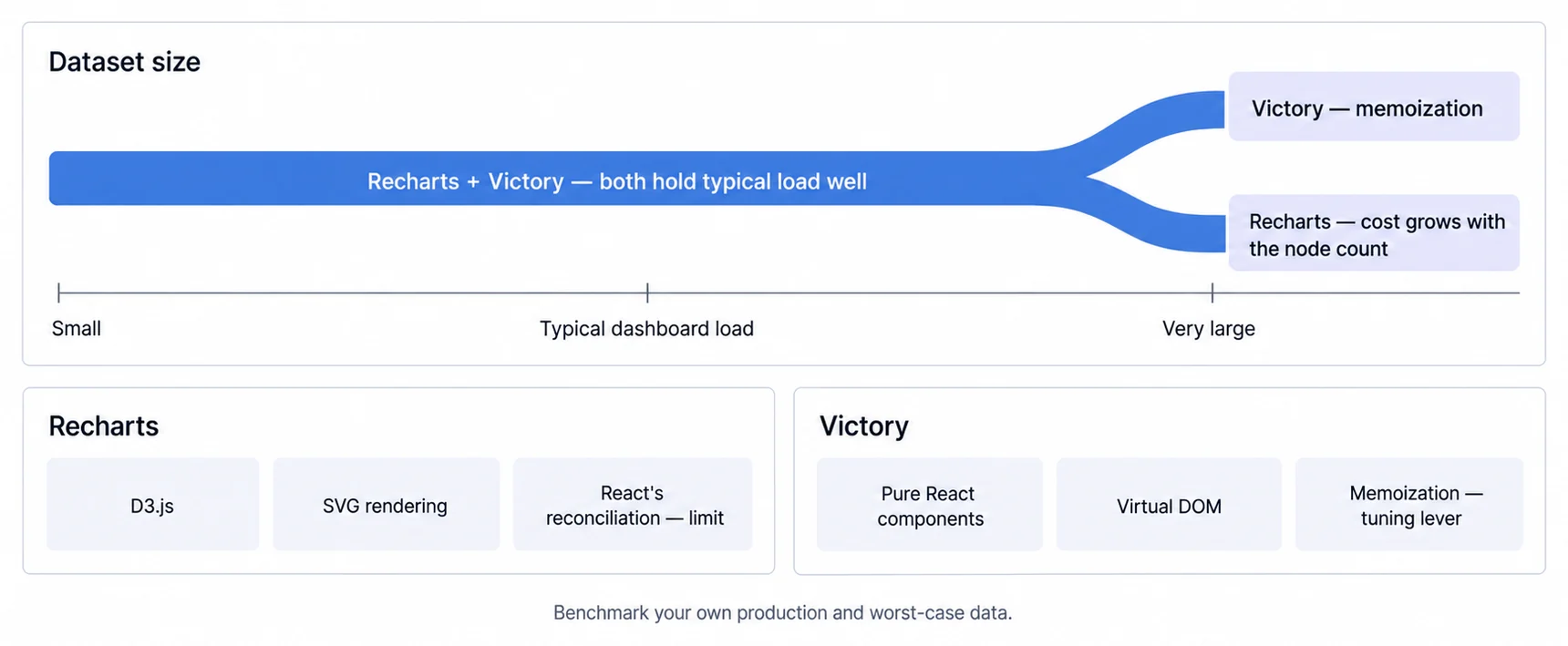
Recharts Renders SVG Through D3, So Cost Grows With the Node Count
- Built on D3.js with SVG rendering
- Handles moderate datasets smoothly, with cost growing as the node count does
- Can slow down with very large datasets due to React's reconciliation
Victory Is Pure React Components, So Memoization Is the Tuning Lever
- Pure React components using React's virtual DOM
- Better control over rendering optimization
- Can be tuned for larger datasets with proper memoization
Aggregation can reduce visual and rendering load, but neither library removes the need to benchmark production and worst-case datasets. Profile the complete dashboard rather than an isolated marketing example.
Recharts Is Web-Only, So React Native Decides the Choice Before the API Does
React Native changes the comparison because the current path is a separate package. The project is named victory-native-xl and that is the repository name, but the thing you install is victory-native: npm i victory-native-xl fails, because no package is published under that name (checked 5 August 2026).
If you are building web and native analytics, compare the web victory API with victory-native directly. Data transformation may be shareable, while components, rendering, animation, accessibility, and testing can differ.
Recharts is web-only. If cross-platform is in your roadmap, this becomes the deciding factor regardless of API preferences.
The trade-off is the abstraction rather than the weight. Victory is the smaller package of the two on Bundlephobia, so what you are paying for cross-platform support is indirection you might not need, not kilobytes.
Victory Is Not the Only React Native Charting Option, So Prototype at Least Two
- For native analytics, prototype
victory-nativeand at least one other maintained native option; Victory is not the only React Native charting choice. - For web dashboards, compare Recharts and Victory on the required chart, accessibility, bundle output, and maintenance surface.
Neither Library Hands You an Accessible Chart by Default
SVG output helps, because the marks exist in the DOM rather than being painted into a bitmap. Existing in the DOM is not the same as being understandable, and neither library ships a description of what a chart shows.
The work is yours in both cases and it is the same work: an accessible name for the chart, a text summary or data table carrying the values, keyboard-reachable points where the chart is interactive, and an encoding that does not rely on colour alone. Budget it as part of the component rather than as a later pass, because retrofitting focus management into a chart someone already shipped is more expensive than building it in. Our notes on visualization accessibility cover what an equivalent actually has to contain.
Server Rendering Is Where a React Charting Choice Usually Surprises a Team
Both are React component libraries, so the chart is rendered by React, so what happens on the server is a question you own rather than one the library answers.
A chart that sizes itself to its container cannot know that width during a server render. First paint therefore either waits for the client or renders at a default and reflows once measured, and the second option is a layout shift a user sees. Decide explicitly whether a given chart belongs in the first paint or is client-only, and test it in the framework you actually ship rather than in a development server where the difference is easy to miss.
Both Repositories Publish a Signal About Themselves, and They Are Not the Same Signal
A charting library goes into a product you will still be shipping in three years, so the repository is part of the evaluation. Both projects publish something worth reading before you choose, and what each one chooses to publish is itself informative.
Victory states a maintenance commitment in words. The repository carries a maintenance-status badge whose text reads: "Active: Formidable is actively working on this project, and we expect to continue to work for the foreseeable future."
That is a sentence a procurement review can quote. It is a statement of intent rather than a guarantee, and it is dated only by the commit that last touched it, so read it at the source rather than trusting this page's copy.
Recharts states a licence and a branch policy. The repository describes the library as a "Redefined chart library built with React and D3", under the MIT License, copyright "2015-2026 Recharts Group". It also carries a note that matters more than it looks: "All development is done on the main branch. The current latest release and storybook documentation reflects what is on the release branch."
That second sentence is the one to act on. It means the code on the default branch and the storybook documentation can be describing different versions of the library.
If a prop behaves differently from the example, check which branch you are reading before concluding the library is wrong. Recharts states the split on its front page, so the check costs you nothing.
Neither of these decides the choice. They tell you what each project has decided to be explicit about, which is a small but real signal when the two libraries are otherwise close on the axes above.
One thing we did not check: neither repository page we read showed a most recent release date or version number, so the freshness question is open here. If maintenance recency is part of your decision, take it from the releases page or the npm registry rather than from this section.
Decide Between Recharts and Victory After Prototyping Your Hardest Requirement
Use this framework after prototyping the hardest charting requirement in both Recharts and Victory:
Recharts belongs on the shortlist when
- You want the fastest path to working charts
- Your team is already comfortable with React
- You're building standard dashboard chart types (line, bar, area, pie)
- Community size and documentation depth matter
- You don't need React Native support
Victory belongs on the web shortlist when
- You need React Native support for mobile apps
- You require fine-grained control over rendering and animations
- Your team values API flexibility over simplicity
- You're building highly interactive, animation-driven visualizations
- You're comfortable with a smaller ecosystem
Recharts currently shows stronger adoption and more recent release activity, while the Victory web package remains usable but was last published earlier according to npm. Confirm the maintenance posture at decision time. Either can support React dashboard components when its tested behavior meets your requirements.
Where to go next
- JavaScript charting libraries guide: where each library stops, and what that costs you at the boundary.
- Chart.js Tutorial: chart.js renders to canvas.
- Charting Libraries articles: every article in this cluster.
Skip the charting library decision entirely
Compare a managed embedded dashboard against the engineering and maintenance scope of owning the charting layer.