Chart.js and Highcharts can both render production charts. The useful comparison is not "free versus paid" or "Canvas versus SVG" in isolation. It is whether the selected library, modules, licence, and retained application work satisfy a specific product contract.
Write down the chart types, data density, update frequency, interactions, keyboard behavior, accessible alternative, exports, responsive states, framework lifecycle, browser support, and operating owner before comparing features.
The Real Cost Question: Beyond the License Fee
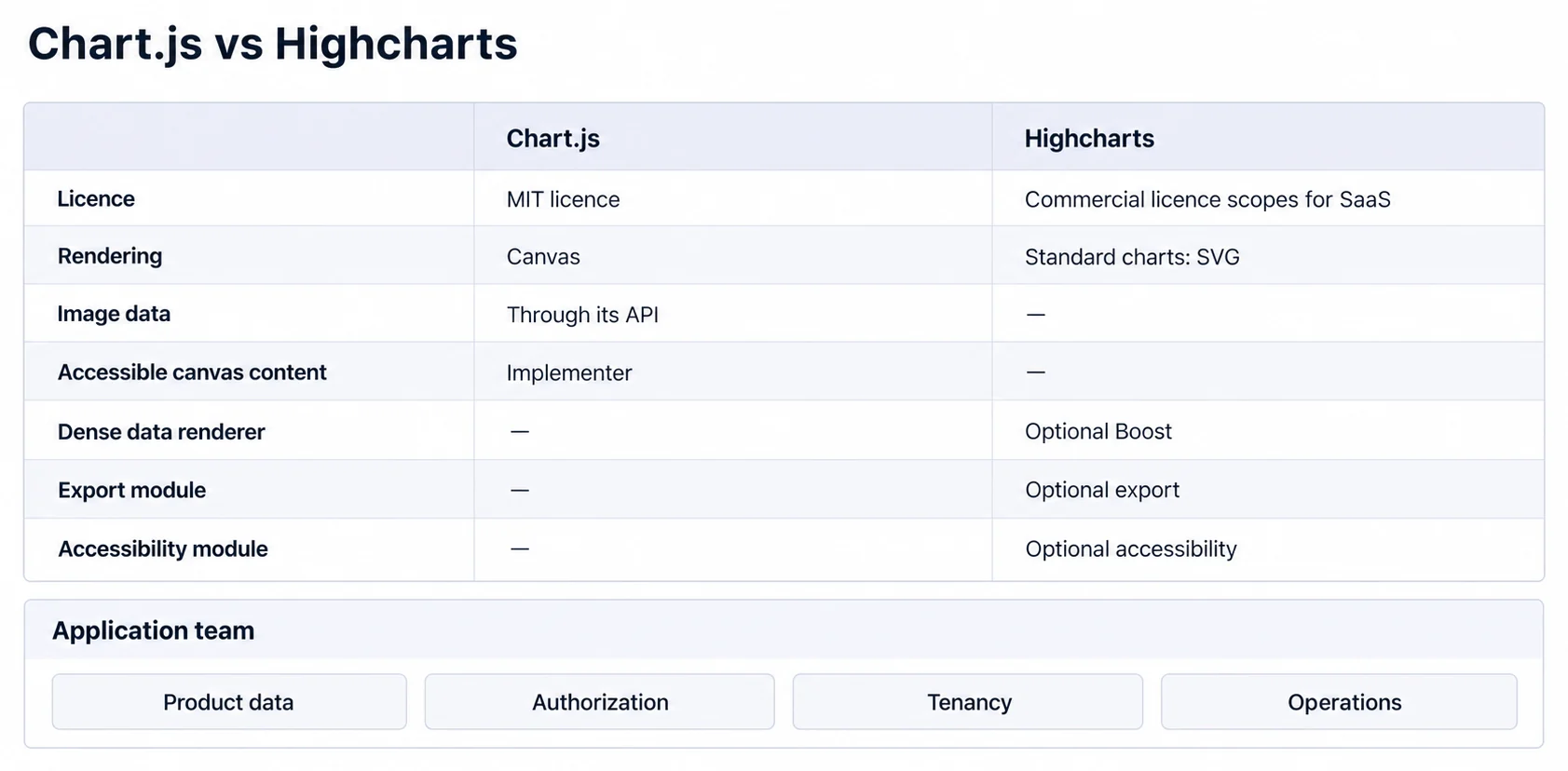
The Chart.js repository publishes an MIT licence. That removes a commercial library fee, not the cost of implementation, accessibility, testing, integration, upgrades, and support.
Highcharts' current licence configurator distinguishes Internal, SaaS, SaaS+, and OEM use, annual and perpetual options, developer seats, applications, and separately configured products. Select the scope from the actual deployment and obtain legal or vendor guidance when distribution or customer-hosted installation is involved.
Model licence, implementation, retained feature work, accessibility testing, bundle and runtime cost, upgrades, support, and exit cost. A paid module creates value only when it covers a verified requirement more effectively than the alternative.
Third-party size estimators such as Bundlephobia are useful snapshots, but they do not represent your production route, modules, tree shaking, framework wrapper, or compression. Compare the generated application chunks and real-user loading behavior.
For JavaScript charting libraries, cost follows the required system rather than the base package alone.
Performance Where It Actually Matters
Chart.js renders charts on Canvas. Highcharts renders standard charts with SVG, while its optional Boost module uses WebGL on a Canvas inside the SVG structure and documents feature trade-offs. These are architectural inputs, not benchmark results.
SVG represents graphical elements in the DOM. Canvas exposes a bitmap drawing surface. Either library can add interaction logic around its renderer, and neither rendering model guarantees acceptable speed or accessibility.
Understanding these rendering approaches helps when choosing the right chart type for your specific use case.
Chart.js publishes performance guidance covering prepared data, parsing, normalization, decimation, animation, tick calculation, and workers. Highcharts Boost changes rendering and disables or simplifies some visual and interaction features. Test both with the same prepared data and required features enabled.
Record initial JavaScript, time to first usable chart, update time, pointer and keyboard latency, resize cost, memory, and long-task behavior on representative devices. A benchmark without the actual chart modules and interactions is weak evidence.
When Each Library Makes Sense
Use a requirement matrix and a vertical-slice prototype:
Prefer a Chart.js prototype when
- You need basic chart types (line, bar, pie) with minimal customization
- The plugin and interaction APIs cover the required experience
- The team can implement and test the accessible canvas name, description, fallback, data alternative, and keyboard path
- The MIT licence and retained ownership fit the product
A Chart.js tutorial shows production setup, updates, cleanup, responsiveness, and accessible canvas content. Estimate the complete vertical slice rather than time to first pixels.
Prefer a Highcharts prototype when
- You need advanced features like data export, drilldown, or complex tooltips
- The optional modules cover required accessibility, export, data, annotation, or dense-series behavior
- The commercial licence scope and support model fit the deployment
- The team can test the configured output with real users and assistive technology
Highcharts' exporting module supports PNG, JPEG, SVG, PDF, printing, and separate data-export capabilities, with version- and format-specific client/server behavior. Chart.js exposes toBase64Image for PNG or JPEG data URLs. Specify the required formats, vector quality, tabular data, privacy boundary, and browser support before scoring export.
When neither rendering library is enough
If you're choosing between Highcharts and Chart.js for embedded analytics, you might be solving the wrong problem. Both libraries still require you to:
- Build the data pipeline
- Handle multi-tenant data isolation
- Implement row-level security
- Create the embedding infrastructure
- Maintain everything as your product grows
For teams needing a bespoke visual encoding, D3.js for custom visualizations offers lower-level primitives while leaving the same surrounding product responsibilities.
An embedded analytics platform may cover more of this stack. Verify its data, tenancy, authorization, chart, interaction, export, accessibility, integration, and operating contract rather than assuming the platform removes every responsibility.
The Developer Experience Reality
Developer experience depends on the required slice and team conventions. For each candidate, build the same framework component with typed input, empty/loading/error states, resize observation, updates, event cleanup, theme changes, tests, and server-rendering boundaries.
For React chart libraries, explicitly decide whether the wrapper or application owns chart creation and destruction, data updates, events, and layout. Count wrapper dependencies and their release cadence in the evaluation.
Highcharts features such as exporting, accessibility, data, annotations, and Boost are optional modules. Its installation guide documents product bundles and module loading. Compare only the modules the prototype actually requires.
Chart.js states that Canvas content is not automatically available to screen readers; its accessibility guidance assigns accessible naming or fallback content to the implementer. Highcharts' Accessibility module adds descriptions, keyboard navigation, and assistive-technology support, but Highcharts also states that final compliance remains the implementer's responsibility. Test both configured results instead of declaring one automatically accessible.
Making the Choice That Actually Works
Do not choose by revenue stage or a generic feature checklist. Score both prototypes on required task completion, accessibility, performance, bundle impact, implementation and upgrade work, support, licence scope, and the product layers left to build.
Choose Chart.js when that evidence supports a Canvas implementation and retained ownership. Choose Highcharts when its licensed products and optional modules cover enough verified requirements to justify the commercial and integration model. Evaluate an embedded platform when the problem extends beyond rendering and its broader contract can be proven.
Where to go next
- JavaScript charting libraries guide: where each library stops, and what that costs you at the boundary.
- Building Dashboards with ECharts: ECharts handles complex visualizations well.
- Charting Libraries articles: every article in this cluster.
Test the complete analytics contract
Compare Sumboard with custom chart libraries across data integration, tenancy, authorization, interactions, exports, accessibility, and operating ownership.