Revenue is where a dashboard can show a precise number and still be wrong for the question. “Revenue” may refer to subscription run rate, invoiced amount, recognized accounting revenue, gross transaction value, collected cash, or a forecast. Those values can legitimately differ because their policies and timing differ.
The first design task is therefore not chart selection. It is deciding which ledger the user is asking about, how the value is defined, and how it reconciles to source records.
Separate Subscription Metrics, Accounting Revenue, and Cash
Monthly recurring revenue (MRR) and annual recurring revenue (ARR) are operational subscription metrics. They are useful only under a documented contract covering active status, trials, discounts, taxes, usage, delinquency, refunds, currency, and normalization. Stripe's current Billing analytics documentation illustrates why the definition matters: its MRR calculation has explicit inclusion rules, configurable treatment for discounts, and a roll-forward across new, expansion, contraction, reactivation, churn, and foreign-exchange movements.
Recognized revenue answers a different question. IFRS 15 ties revenue recognition to customer contracts, performance obligations, transaction price, allocation, and satisfaction of those obligations. The applicable accounting framework and your approved policy, not the dashboard, determine when and how much revenue is recognized.
Cash differs again. A payment can be authorized, captured, settled, refunded, disputed, net of fees, or still in transit. Collection and bank timing do not automatically match either MRR movement or recognized revenue.
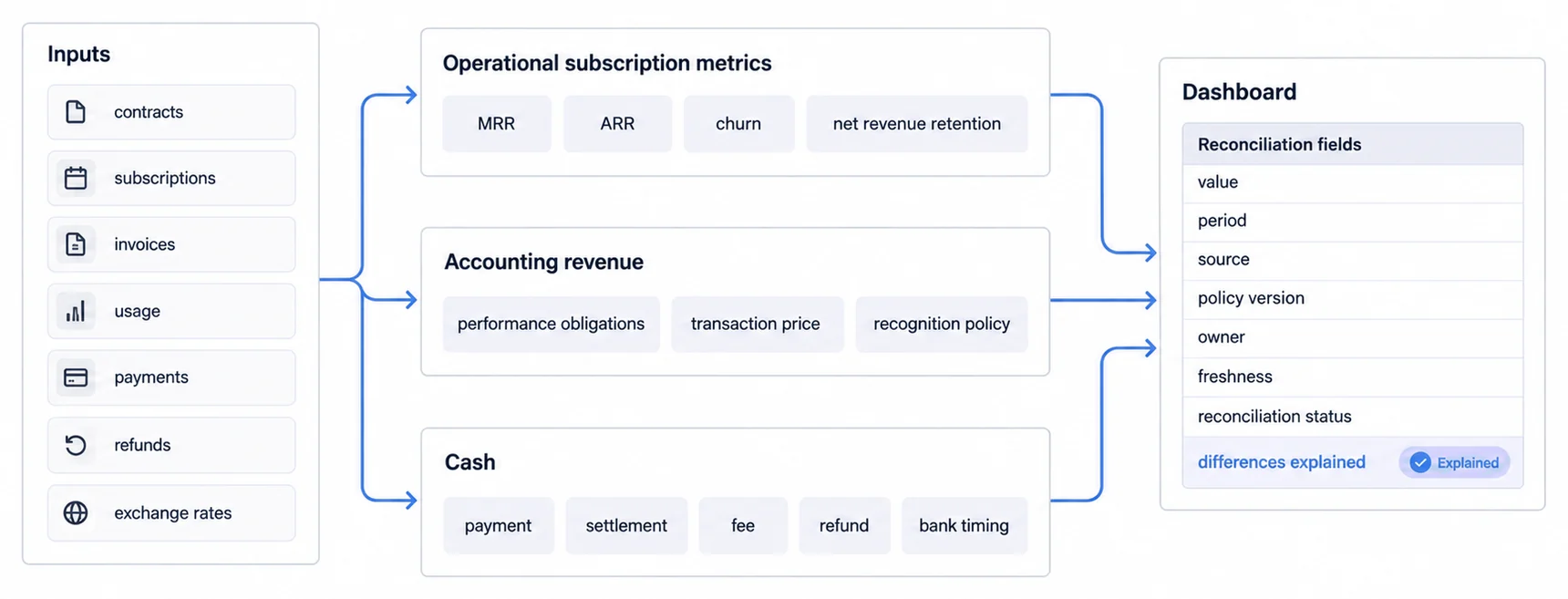
Do not force these branches to match. Explain the bridge. A yearly subscription can increase ARR at contract activation, produce an invoice on another date, settle later, and be recognized over the service period. The dashboard should expose the period, policy, source, freshness, and reconciliation state needed to understand that difference.
Build Metrics as Reconciliation Contracts
A defensible metric specification includes:
- name, purpose, owner, and prohibited interpretations;
- formula, grain, population, exclusions, and movement categories;
- contract, subscription, invoice, payment, refund, usage, and FX sources;
- event time, effective time, accounting period, timezone, and close state;
- currency conversion source and treatment;
- policy or definition version and effective date;
- drill path to supporting records and unresolved exceptions;
- validation, reconciliation, approval, and change history.
MRR, ARR, churn, retention, lifetime value, and acquisition cost are not self-defining. For example, a churn rate changes when the denominator, customer versus revenue basis, observation window, reactivation handling, or cohort changes. LTV changes with margin, churn model, discounting, horizon, and acquisition-cost allocation. A ratio should not be colored red or green until the formula, comparison, risk tolerance, and owner are approved.
Financial KPI tracking can help structure an operating contract, while cash flow visualization covers a separate liquidity decision path.
Choose Metrics From Decisions, Not a Universal Checklist
Different revenue workflows need different evidence:
- Subscription operations: MRR or ARR roll-forward, subscriber movements, upcoming renewals, usage, delinquency, and exceptions.
- Accounting and close: recognized and deferred revenue, journal status, policy version, reconciliation differences, close state, and audit evidence.
- Collections and treasury: invoices due, ageing, payment status, settlement timing, refunds, disputes, fees, and cash scenarios.
- Commercial planning: bookings, pipeline scenarios, renewal exposure, price and volume effects, cohort behavior, and forecast uncertainty.
- Customer reporting: permitted transactions, balances, payouts, fees, refunds, and definitions relevant to that customer's product workflow.
The relevant dashboard type follows the decision cadence. An operational exception view, a controlled close pack, a forecast scenario, and a customer account statement should not be collapsed into one “revenue dashboard” merely because they contain currency values.
Set Freshness From the Source Lifecycle
Real-time is not a universal quality standard. A newly processed payment may be useful for support before settlement. A provisional subscription movement may be useful for operations before accounting review. Recognized revenue may need approved adjustments and a closed period before it is suitable for financial reporting.
Stripe documents a separate revenue recognition workflow with reports, data freshness, auditing, rules, imports, exports, and general-ledger mapping. That separation is a useful reminder: a billing event and an accounting answer can have different availability and control requirements.
For each metric, show:
- the source event time and latest included event;
- the transformation or processing time;
- the applicable period and timezone;
- whether the value is live, provisional, reconciled, adjusted, or closed;
- known lag, missing sources, and unresolved exceptions;
- the owner and expected recovery path.
Trust comes from explainable state and reliable reconciliation, not from displaying a “live” badge or refreshing every few seconds.
Design Drill-Down for Audit and Action
Interactive does not mean that every user receives every dimension. Start with a question and preserve its context through each drill:
- Which movement changed the total?
- Which contracts, subscriptions, invoices, payments, or adjustments support it?
- Which definition and period were applied?
- Is the record permitted for this identity?
- What action can the user safely take, and who owns it?
Filters should make their scope visible. Exports and scheduled reports should retain definitions, period, currency, freshness, and authorization. Empty, stale, partial, unreconciled, and denied states need explicit language; hiding them behind a zero creates a false financial claim.
The related KPI dashboard examples can suggest visual patterns, but the metric contract determines whether a chart is truthful and useful.
Keep Internal and Customer-Facing Boundaries Distinct
An internal financial dashboard may legitimately expose consolidated entities, accounting adjustments, forecasts, and sensitive commercial segments. A customer-facing surface must begin with the product identity and derive a permitted account, organization, role, records, fields, and artifact policy.
For customer-facing revenue analytics, test direct URLs, APIs, caches, filters, drill-downs, exports, scheduled delivery, logs, support tools, and multi-account users. A top-level account filter is not proof that every derived artifact is isolated. Our customer-facing analytics guide covers the wider product boundary.
The same metric name can still require different presentation. Internal users may need reconciliation exceptions and accounting policy detail. Customers may need transaction explanations, payout status, and support actions. Reuse the governed definition where the meaning is truly shared, but do not copy an internal finance dashboard and assume its task or authorization model travels with it.
Release With Evidence
Before release, reconcile representative periods from source events through the dashboard. Cover annual and monthly contracts, mid-period changes, trials, discounts, taxes, usage, credits, refunds, disputes, delinquency, reactivation, cancellation, multiple currencies, late events, and accounting adjustments where they apply.
Record acceptance evidence for definition accuracy, source completeness, authorization denial, accessibility, responsive layout, workload performance, exports, failure states, support, rollback, and ownership. After release, monitor reconciliation differences, stale metrics, failed queries, authorization events, interpretation errors, support cases, and definition changes.
A useful revenue dashboard does not promise that one number is always current, predictive, or actionable. It shows which number the user is looking at, how it was produced, what period and policy apply, what differs from adjacent ledgers, and whether the evidence is strong enough for the intended decision.
Ready to launch customer-facing analytics?
Stop losing customers to competitors with better analytics. Sumboard's customer-facing analytics platform lets you launch self-service dashboards in days, not months.