A Sisense alternative is not proved by a simpler demo or a shorter feature list. It is proved when the candidate reproduces the outcomes you need, preserves the security boundary, survives the production workload, and leaves a cutover you can reverse.
Start with evidence from your own implementation. Sisense documents multiple customer-facing embedding routes, so it is inaccurate to treat the product as either “internal BI only” or one uniform embed. The route, content, custom code, identity model, hosting, edition, and operating history determine what a replacement must carry.
Write the Trigger as an Observable Failure
“Sisense is complex” is not a migration requirement. Record what happened: which user task failed, on which route and version, under what identity and workload, with what business consequence. Separate a product limitation from a configuration defect, a data problem, an unsupported customization, and an ownership gap.
Useful triggers can include a route that cannot support the required host interaction, a dashboard or script that fails an upgrade test, a tenant-denial defect, an accessibility gap, unacceptable tail latency, an operating burden without an owner, or commercial terms that no longer fit the forecast. Preserve logs, screenshots, timings, requests, affected artifacts, support outcomes, and the acceptance threshold.
That evidence keeps an embedded BI versus traditional BI discussion grounded in the boundary you actually operate.
Inventory the Sisense Surface You Must Replace
Sisense's current embedding documentation describes four routes:
- iframe loads a Sisense page with a bounded display contract;
- Embed SDK wraps an iframe and adds events, commands, filters, exports, and state access;
- Sisense.JS renders dashboards, widgets, and filters into host DOM containers;
- Compose SDK provides code-driven queries, filters, charts, and components.
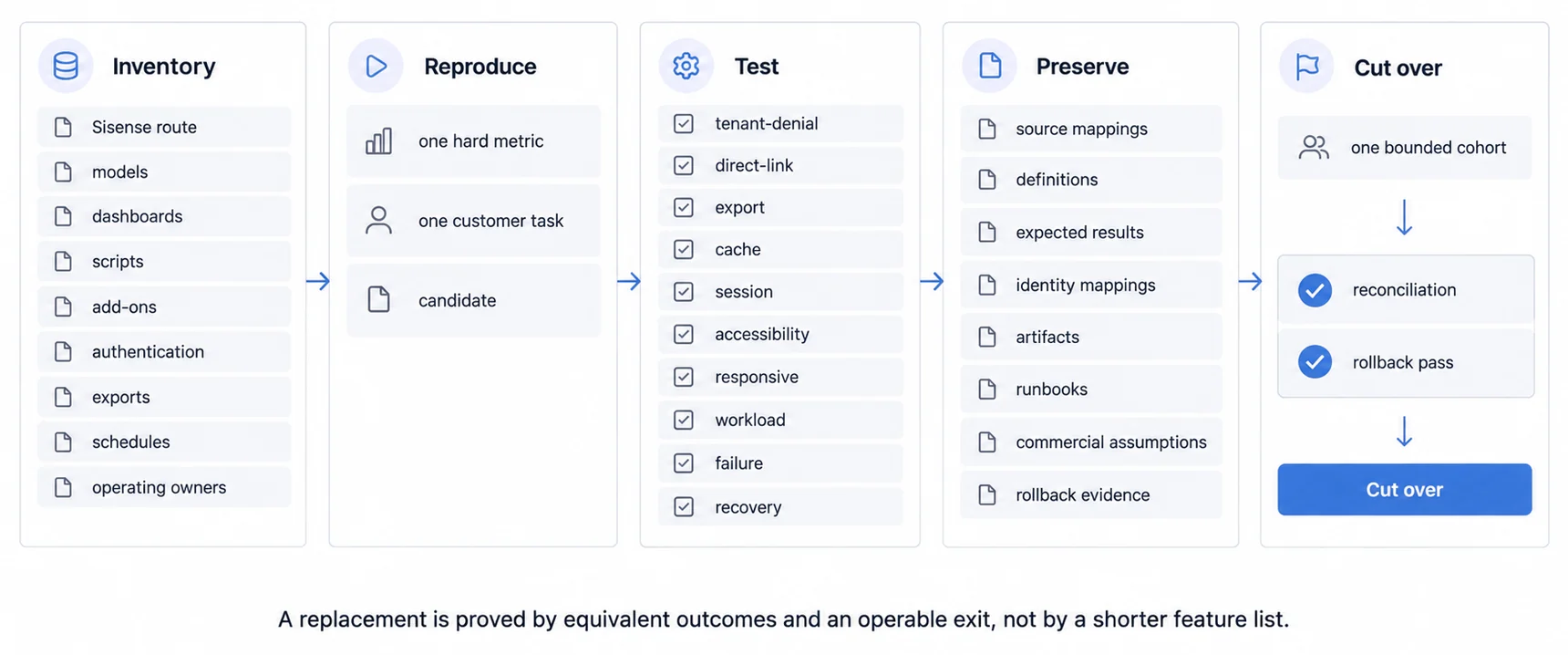
Those are different integration surfaces. Inventory the route for every shipped experience, along with models, dashboards, widgets, filters, scripts, add-ons, themes, authentication, tokens, groups, permissions, exports, schedules, alerts, APIs, domains, cookies, environments, and support ownership.
Do not assume that moving within Sisense or away from it preserves every artifact. Sisense's Compose SDK Mode documentation explicitly identifies compatibility issues such as dashboard and widget scripts, many add-ons, configurations, interactive features, reporting, and exports. A candidate replacement needs the same item-by-item inventory.
Reproduce One Difficult Outcome
Select one governed metric that exercises difficult joins, calculations, filters, time zones, nulls, late data, and authorization-dependent logic. Reproduce it in Sisense and each candidate against the same source snapshot. Compare totals, detail rows, definitions, freshness, and known exceptions, not merely similar-looking charts.
Then select one customer task from entry to action: host sign-in, dashboard load, filter, drill, export or workflow transition, and return. Use the real product shell and required devices. This reveals whether the alternative carries context and interaction or only renders a convincing screenshot.
The embedded analytics implementation guide and alternatives guide can help shape the slice. Keep it narrow enough to finish and difficult enough to expose the binding risk.
Test Identity and Every Exit From the Screen
Sisense documents Web Access Tokens and other authentication paths for embedded experiences. Its WAT documentation also shows that supported actions and permissions can vary by route and token. Translate the current and candidate primitives into the same host-user, tenant, role, model, row, field, and artifact matrix.
Attempt unauthorized access through direct URLs, modified identifiers, APIs, drill paths, cached responses, browser history, exports, schedules, shares, and account switching. Expire and revoke sessions. Verify that error messages, logs, and support tooling do not reveal protected data.
Cookie and domain behavior belongs in the test. Sisense documents allowed domains, cross-site cookie settings, and route-dependent CHIPS compatibility. Test the browsers and top-level domains you support instead of assuming every route has the same session behavior.
Compare Product Experience and Workload
Run loading, empty, stale, partial, denied, expired, error, and recovery states in the host product. Check typography, theme, navigation, focus order, keyboard operation, screen-reader equivalence, zoom, reflow, touch, localization, exports, and print. A more composable SDK can increase host control while also increasing the rendering and upgrade surface your team owns.
Measure initial load plus filters, drills, tabs, exports, refreshes, and account changes at representative data volume, concurrency, device, network, region, and cache state. Capture distributions, queries, payloads, resource use, failures, and recovery. Do not transfer an anonymous benchmark or one warm demo run into your forecast.
Our BI tools comparison hub provides a broader shortlist, while what Sisense offers supplies product context. Neither substitutes for this production-shaped test.
Build the Ownership and Commercial Ledger
For the current route and every candidate, name who owns semantic definitions, data pipelines, dashboards, tokens, permissions, domains, upgrades, regression tests, capacity, incidents, backups, recovery, accessibility, customer support, and migration. A managed service can transfer some infrastructure work; it does not remove product and data ownership.
Obtain current written commercial terms after the route is fixed. Run the same base, growth, and peak workloads through platform, user, usage, capacity, environment, add-on, support, services, renewal, and overage rules. Add internal implementation, data preparation, security review, operation, and exit work using your own rates.
Use the build-versus-buy framework and embedded analytics pricing models to keep scope and workload consistent. Quote-based and published pricing both require a modeled contract; neither format proves fit by itself.
Preserve a Migration and Rollback Packet
Before cutover, preserve source mappings, semantic definitions, dashboard and widget inventory, scripts and add-ons, identity and permission mappings, test fixtures, expected results, exports, schedules, operational runbooks, support history, current commercial assumptions, and the evidence needed to reproduce the hard metric.
Map every current artifact to migrate, rebuild, replace, retire, or retain temporarily. Decide how identifiers, links, bookmarks, emails, APIs, audit history, and customer documentation change. Rehearse rollback with the same identity and data snapshot used for acceptance.
Cut over one bounded cohort. Reconcile results, observe errors, latency, support demand, and downstream actions, then either roll back or expand deliberately. Parallel operation has a cost, but it can provide the evidence that a one-way migration cannot.
The Migration Window Is a Commercial Question Before It Is a Technical One
The evaluation above produces a decision. When to execute it is a separate question, and getting it wrong costs more than most of the technical work.
Two dates govern it: the incumbent renewal and the point at which the replacement can carry real traffic. If the second lands after the first, you either renew for a full term you intend to abandon or run a gap you have not planned for. If it lands well before, you are paying for two platforms while dashboards are rebuilt one at a time, which is the normal case and worth budgeting rather than discovering.
Work backwards from the renewal date at the start of the evaluation, not at the end. Ask what notice period the contract requires, whether a shorter bridging term is available, and what the incumbent's export and data-retrieval terms actually permit, because the answer to the last one occasionally changes the plan entirely.
Choose From Evidence, Including the Option to Stay
The result can reasonably be staying on Sisense, changing the Sisense embedding route, replacing only one surface, moving to another platform, or building a host-owned layer. Choose the smallest boundary change that resolves the documented trigger and passes the complete acceptance contract.
Evaluate Sumboard as one candidate, either its customer-facing analytics product or its embedded analytics platform. It should reproduce the same difficult metric, tenant-denial matrix, product states, workload, ownership ledger, commercial forecast, and rollback packet before it earns the decision. The embedded analytics evaluation guide can help define that evidence without presuming a winner.
Where to go next
- BI tools comparison guide: which platforms survive being embedded, judged on the embedding rather than the connector list.
- Evaluating a Looker Alternative: a Looker replacement decision should inventory semantics, access, embedding, artifacts.
- BI Tools & Comparisons articles: every article in this cluster.
Ready to launch customer-facing analytics?
Stop losing customers to competitors with better analytics. Sumboard's customer-facing analytics platform lets you launch self-service dashboards in days, not months.