A live dashboard, whether built in house or embedded from an embedded analytics product like ours, is useful when its freshness changes a decision before the next update arrives. Refreshing faster than the source data, the decision cycle, or the user's ability to respond adds system work and visual motion without improving the outcome.
A Live Dashboard Earns Its Refresh Rate From a Deadline, Not From the Data Rate
Not every dashboard needs to be live. Define the decision and its deadline first.
Live Updates Are Justified When Someone Must Respond Within Minutes
- Users need to respond within minutes (server health, production lines, live customer support queues)
- The source changes within the decision window and the pipeline can deliver that freshness reliably
- There's a clear action tied to specific thresholds (alert when queue >50, not just "monitoring")
Over-Refreshing Shows Up When the Data Moves Faster Than Anyone Can Act
- The data changes too fast for humans to process (sub-second updates nobody can act on)
- Updates happen outside business hours with no one watching
- The refresh creates visual distraction without new information
If a customer-success queue changes slowly and the response process takes several minutes, a ten-second poll may only cause repeated redraws. Test a longer interval and compare acknowledgement time, missed threshold events, user attention, and query load before adopting it.
The key question: What decision changes based on this update? If the answer is "nothing until tomorrow's meeting," you don't need real-time analytics.
For complete guidance on architecting these systems, our real-time dashboard guide covers the technical implementation patterns.
Three Performance Traps a Live Dashboard Hits That a Static One Never Does
Live data introduces performance challenges that static dashboards don't face. Here's what breaks and how to fix it.
Trap 1: The Database Hammering Problem
Fifty clients polling every ten seconds initiate 300 refresh requests per minute. That does not have to mean 300 database queries, but it will if every request bypasses shared caching and recomputes the result.
The fix: Implement query result caching at the API layer. A short cache window collapses repeated requests for the same result while keeping the display current enough for the decision it supports.
Trap 2: The Browser Memory Leak
Dashboards that append samples indefinitely create unbounded client memory and rendering work. The symptom may be a gradual increase in interaction and render time rather than an immediate failure.
The fix: Use a bounded window. Choose the sample count or time range from the visual resolution and investigation need, discard or aggregate older client-side points, and load historical detail on demand. Measure heap size and long-task duration during a soak test.
Which aggregate matters as much as whether you aggregate. A mean over interval data deletes the highest interval, and in energy billing that interval is the number the customer pays on.
Trap 3: The Network Waterfall
Twelve charts making separate requests increase connection, authorization, serialization, coordination, and server-query overhead. Browsers can run requests concurrently, so the failure is not necessarily a serial waterfall; it is uncontrolled fan-out and duplicated work.
The fix: Batch data that shares an authorization and refresh lifecycle, and cache expensive shared results. Keep independently refreshed or permissioned data separate. Our visualization performance and streaming data architecture guides cover the trade-off between polling, grouped requests, and higher-frequency delivery.
Operations and Executives Need Different Live Dashboards, Not Different Refresh Settings
Operations teams and executives need completely different approaches to live data. Understanding these different dashboard types is critical for effective implementation.
The Operational View Refreshes Inside the Response Deadline
- Granular metrics refreshed within the operational response deadline
- Drill-down capabilities to investigate issues
- Alert thresholds they control themselves
- Historical comparison (today vs yesterday at same time)
The Executive View Aggregates to the Decision Cadence, Not the Data Rate
- High-level trends aggregated to the executive decision cadence
- Clear visual indicators of status (red/yellow/green, not raw numbers)
- Comparison to goals and benchmarks
- Context for why numbers changed
In a manufacturing scenario, a floor manager may need current output and stoppage detail while a plant director reviews the same governed metrics aggregated against a shift or target. The exact intervals come from the response process and reporting cadence, not the titles.
If you're building for both audiences, create separate views. Trying to serve both with one dashboard creates cluttered designs that satisfy neither group. Check our operational dashboards breakdown for specific implementation patterns, or explore how manufacturing dashboards handle real-time production data effectively.
Alert Volume Becomes a Reliability Problem When a Rule Fires Without an Owner
Alert volume becomes a reliability problem when rules fire without an owner or action and users learn that acknowledgement changes nothing.
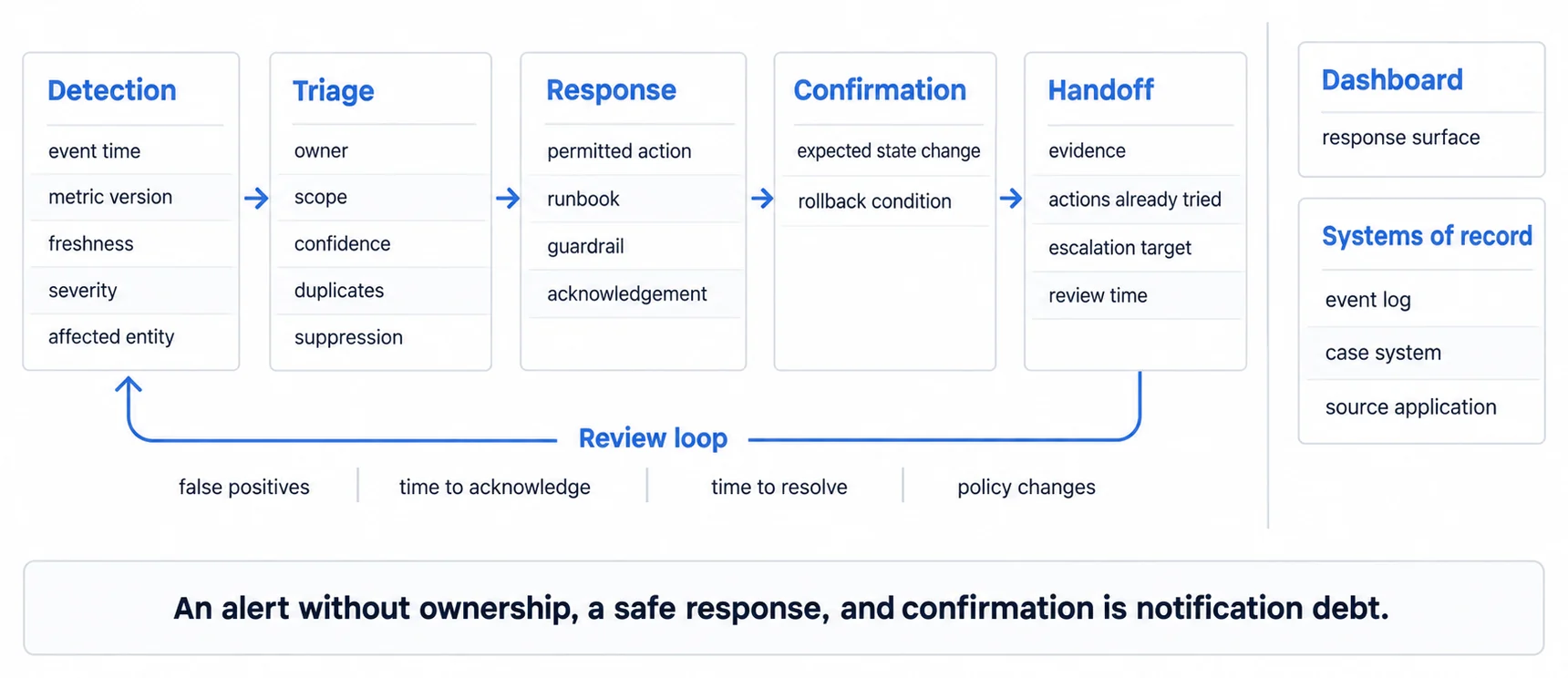
How alert fatigue becomes visible
- Rules fire repeatedly without corresponding incidents or actions.
- Acknowledgement time rises and alerts are closed without investigation.
- Users mute channels, create broad suppressions, or depend on manual tagging.
- Critical events compete with routine notifications in the same path.
Start with the smallest critical set, run it long enough to observe normal and incident conditions, and review false positives and missed events with the owners. Add another rule only when its action and routing are defined.
An Alert Has to Be Actionable, Not an FYI
- Directly actionable (not just "FYI")
- Expected frequency is documented and reviewed against observed false positives
- Clear ownership (specific person/team responsible)
- Defined resolution path (everyone knows what to do)
Thresholds such as a support queue depth or server response time are only useful after the team defines the measurement window, severity, owner, suppression behavior, and runbook. Copying another team's numeric threshold would hide those decisions.
For each alert, document: threshold value, expected frequency, responsible team, and standard resolution. If you can't fill out all four, the alert probably creates noise rather than action.
A Live Dashboard Left Open by Two Hundred Customers Is a Load Decision, Not a Setting
Refresh rate reads like a user preference and behaves like an architecture choice. In an internal tool the difference is invisible, because the number of open tabs is roughly the number of people in the room. In a customer-facing product it is multiplied by a population you do not control.
Work the arithmetic before choosing a default rather than after. A ten-second refresh across two hundred simultaneously open dashboards is a sustained query rate, every one of those queries is tenant-scoped and therefore rarely served from a shared cache, and the peak arrives when the most customers are working, which is also when everything else is busiest.
The mitigations are ordinary once the question is framed as load: refresh on visibility rather than on a timer, so hidden tabs stop asking; push changes instead of polling for them where the transport allows; and let the value's own rate of change set the default rather than the fastest number the interface can display.
Live Data Becomes Actionable When Every State Names Who Responds
The dashboards that actually drive decisions share these characteristics.
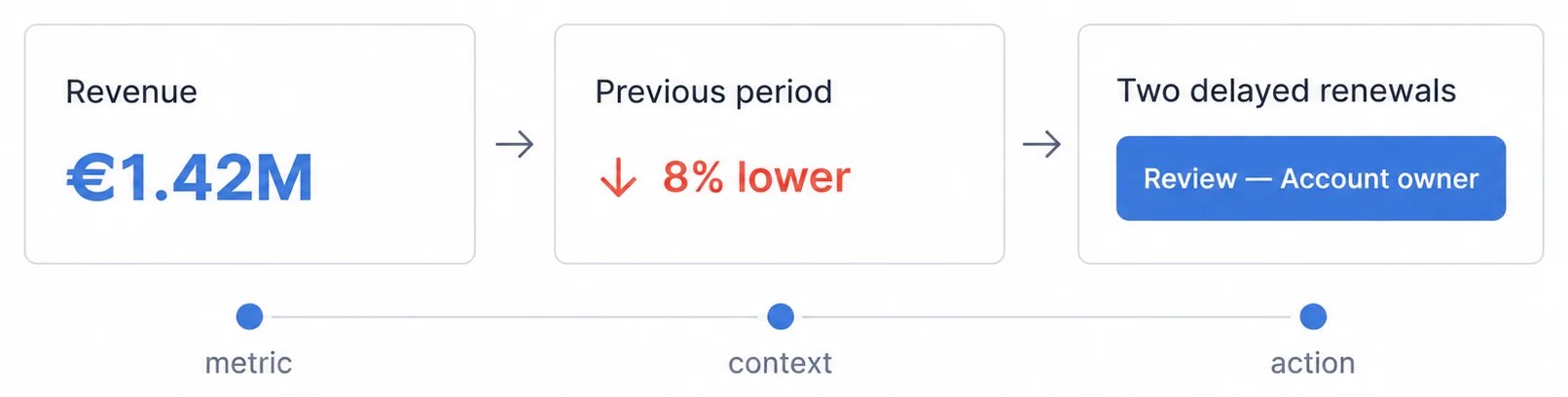
They show change, not just current state. A number going from 47 to 52 matters. Showing "52" without context doesn't drive action. Good live dashboards highlight:
- Percentage change from previous period
- Trend direction indicators (↑ ↓ →)
- Text or shape indicators for threshold crossings, with color as a redundant cue
- Time-based comparison (vs same time yesterday)
They reduce cognitive load. When data updates inside the reader's decision window, users shouldn't have to calculate what changed. The dashboard should:
- Highlight what's different since last refresh
- Dim unchanged values
- Surface the small set of metrics tied to the current decision
- Hide secondary details until needed
They enable quick response. Live dashboards without a path to action create more work. Useful patterns include:
- One-click drill-downs to root cause
- Direct links to resolution tools (support tickets, server logs, inventory system)
- Quick filters to isolate specific segments
- Export options for offline analysis
For any embedded platform, verify frequent-update behavior with a soak test on representative devices. Track memory, long tasks, transferred bytes, query volume, and visual stability alongside trend indicators and threshold states. Use the Page Visibility API to detect hidden tabs and avoid polling or rendering work that the user cannot see; define the resume and stale-state behavior explicitly rather than assuming the browser will reconcile it for you.
Where to go next
- Headless BI guide: the metrics layer underneath all of this, and what each exposure route leaves you owning.
- API-First Analytics: traditional BI tools force you to build through their UI. API-first analytics flips this.
- Architecture articles: every article in this cluster.
Ready to implement live dashboards that users actually act on?
Plan refresh, caching, and alerting around the decision your users need to make, then validate the result on representative data and devices.