Cross-filtering is the smallest feature on the list. A customer clicks a bar, the other charts follow, and it rarely gets a design document.
That is accurate right up until the dashboard is inside somebody else's product. Then the same feature stops being an interaction and becomes three decisions that are made somewhere other than the interface.
Search for it and the first page confirms how small it looks. Metabase's glossary defines it in one sentence, three of the ten results are vendor community threads, and four embedded analytics pages rank without mentioning the term.
The Word Filter Suggests the Query Gets Smaller. Two-Way Filtering Does the Opposite
The word filter suggests the scope gets smaller. Microsoft describes its own tabular models doing the opposite: "Internally, two-way filtering expands filter context to query a superset of your data." A superset is a statement about logical scope, not a measurement of what an engine reads.
Microsoft attaches a cost caution to the security side of the same setting, warning that enabling bi-directional security filtering "can negatively impact query performance, especially in models with many relationships or large datasets."
Neither sentence tells you what your own workload will do, and that is the point worth carrying. A dashboard two analysts open at lunchtime, and the same dashboard behind forty thousand of your customers' users, put very different weight behind whatever that expansion costs, so it is a number to measure on your data rather than to assume from a vendor's caution.
The Direction Setting Has a Modelling Use, and Clicks Are Not Part of It
Microsoft names a use for two-way filters that has no interface in it at all. They "can be an easy fix to the many-to-many query design problem that has challenged tabular and Power Pivot developers in the past," and the same page warns against reading the fix as the thing it resembles: "bi-directional cross-filtering is not a many-to-many construct."
How often teams reach for it that way is not something these documents measure, and we did not measure it either. The narrower thing they do establish is still useful: the setting has a purpose unrelated to interaction.
That is enough to make one question worth asking on your own model. When the direction on a relationship last changed, was the interaction surface part of the decision, or a side effect of it?
The two ends are far apart in an embedded product. A modelling change sits in your backlog and its effect sits in somebody else's product, under their logo.
The Security Filter Is a Separate Switch and Its Default Is Off
Microsoft documents this part in plain words, and it is the part that changes the decision.
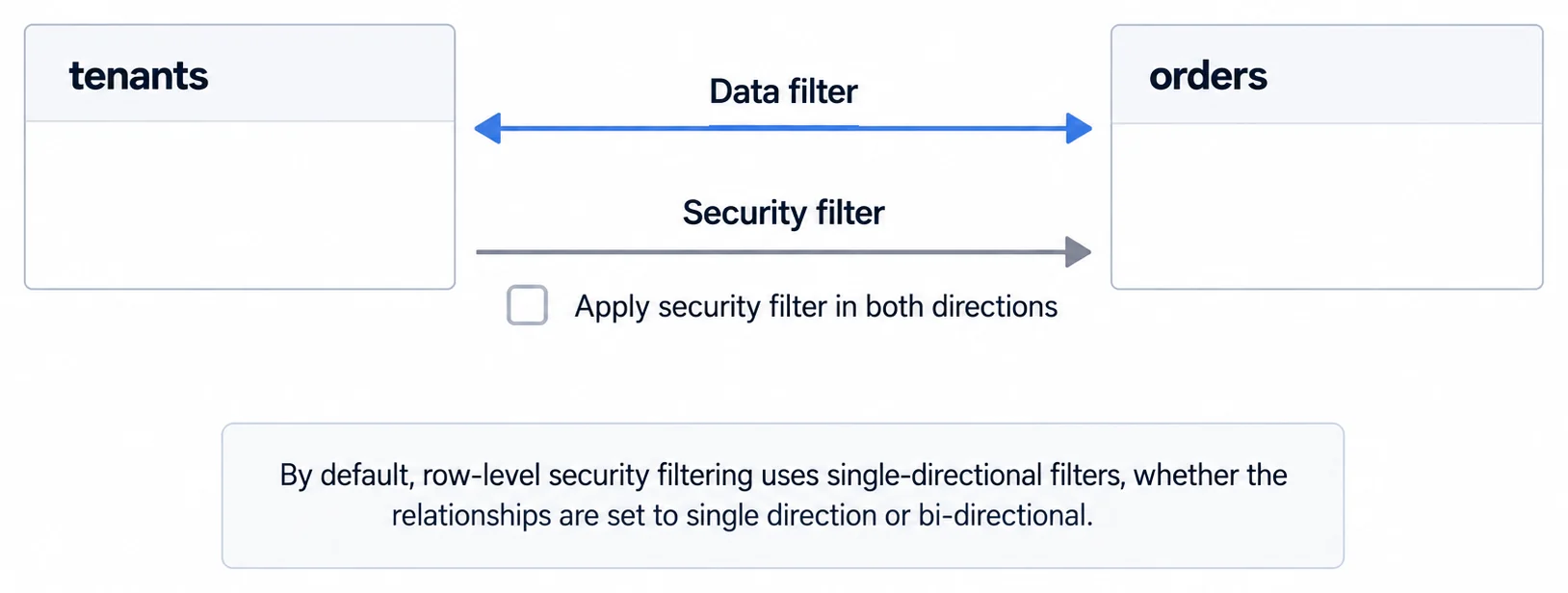
"By default, row-level security filtering uses single-directional filters, whether the relationships are set to single direction or bi-directional." Setting a relationship to filter both ways moves the data filter. The security filter stays where it was.
Moving it is a second, deliberate action: "You can manually enable bi-directional cross-filtering with row-level security by selecting the relationship and checking the Apply security filter in both directions checkbox."
Two constraints come attached. Microsoft limits the scope: "If a table takes part in multiple bi-directional relationships, you can only select this option for one of those relationships." And it attaches a caution about cost, noting that enabling bi-directional security filtering "can negatively impact query performance, especially in models with many relationships or large datasets." The scope limit is conditional: it applies when a table takes part in more than one bi-directional relationship.
Read those together and the shape of the decision changes. You are not switching a feature on. You are choosing, per relationship, whether a viewer's permissions travel the same path their selections do.
The general case, and the paths that get missed when no one has enumerated them, is covered in row-level security rather than repeated here.
Embedded, a Blocked Row Does Not Look Like a Permission. It Looks Like a Bug
The failure mode is the reason this matters more inside someone else's application than inside your own.
Microsoft records what a viewer is shown in one specific case: where a report "references a row with RLS configured," the same message displays "as for a deleted or non-existing field," and "to these users, it looks like the report is broken."
That is the whole of the documented part, and cross-filtering does not appear in it. We are putting the two together because a selection is one of the ordinary ways a report comes to reference a row the viewer is not entitled to, and we have not verified that path in a running tenant.
The rest of this paragraph is our reasoning rather than Microsoft's. Put that screen inside a customer's product and the person looking at it does not know your name, so the report they file is a bug report to their vendor. Whether it then reaches you quickly is a question about your support chain, and it is worth answering before the interaction ships.
Microsoft documents a second trap for the same context. In a report reached through an application that authenticates with a service principal, USERPRINCIPALNAME() and USERNAME() return "the service principal's application ID or an empty string, not an end user's identity."
Microsoft draws the consequence itself rather than leaving it to the reader: those two functions "can't be used for per-user filtering in service principal embedding scenarios," and "dynamic RLS filters based on these functions won't filter data per user in embedded scenarios." The documented remedy is the effective identity feature of the Power BI REST API.
Filters Go In Through the SDK. We Read Two Vendors on Whether Anything Comes Back Out
The third decision is about state, and the inbound direction is the better documented one in both SDKs we read.
We read two embedding documents on 2 September 2026 and found the same asymmetry in both. Passing filters in is covered thoroughly. Getting the resulting state back out is covered thinly, or skipped.
Metabase's embedded chart documentation lists several inbound routes: initialSqlParameters for values at load, sqlParameters for the current set, hiddenParameters, and a signed JWT payload that locks parameters for a guest embed. Going the other way it names one callback for parameter values, onSqlParametersChange, described as a way of "holding the values in your app and get a callback whenever they change," alongside an onSave for a saved question. It does not document a callback for filter changes, drills or selections, and its mapQuestionClickActions plugin adjusts what the click menu offers rather than reporting the click to the host.
Our own documentation sits further along the same axis. It covers passing filters in at initialisation, through sumboard.init({ token, filters, dashboardId }), and changing them afterwards with a changeFilters method, and it documents no event travelling the other way.
Those are statements about two documents rather than about two products. An undocumented capability and an absent one look identical from outside, and only one of them is the vendor's fault.
The pair does establish where to aim the question. The outbound direction is the thinnest part of both SDKs, and cross-filtering is the interaction that generates outbound state.
The direction matters for a reason that is ours rather than the vendors'. Three ordinary features are built in the host application: a deep link that reopens a filtered view, a browser back button that steps back through selections, and a saved view someone wants to send to a colleague.
A host-side implementation of any of those needs the current selection available on the host side. Absent that, the work is not harder, it is somewhere else, and the question is worth settling before the interaction ships rather than after.
What to Settle Before You Turn It On
Four questions, in the order that makes each one answerable.
- Which relationships need to filter both ways? Microsoft's guidance is to resist the blanket answer, warning that enabling two-way filters everywhere can over-filter data "in ways that you might not expect" and can "inadvertently introduce ambiguity by creating more than one potential query path."
- On those relationships, does the security filter travel too? A separate checkbox with a separate default, and where a table sits in more than one bi-directional relationship, the option is available on only one of them.
- What does a viewer see when a selection reaches rows they cannot? If the answer is an empty state that reads as a malfunction, that is a product decision to make now rather than a support incident to receive later.
- Does filter state leave the embed? Ask for the outbound event by name, not for the feature by name.
The first three are data model questions and the fourth is an integration question. None of the four is answered by which chart type carries the interaction, which is a separate decision and a real one.
What This Page Does Not Cover
The primary sources here are five documents read on 2 September 2026: two Microsoft documentation pages, Metabase's cross-filtering glossary entry and its embedded chart documentation, and our own embedding documentation. Microsoft's tabular model page does not mention row-level security, which is why the security behaviour is cited from the row-level security page instead.
We did not test these behaviours in a running Power BI tenant, and we did not survey how other embedded analytics vendors handle the security direction. This establishes what those five documents say, not what the category does.
One source we wanted was closed to us. The Power BI community thread on using multiple cross-filter interactions in Power BI Embedded ranks second for this query and returned a 403 to our reader, so none of the above reflects its contents.
A team evaluating an embedded analytics platform should put question two to the vendor directly, because a product that has one switch instead of two has made the decision for you either way.
Where to Go Next
- Row-level security: the definition and the paths that get missed.
- Embedded analytics security: each route to the data, not just the dashboard.
- Architecture articles: every article in this cluster.
Ready to launch customer-facing analytics?
Stop losing customers to competitors with better analytics. Sumboard's customer-facing analytics platform lets you launch self-service dashboards in days, not months.