An alert has to fire when nobody is looking at the chart. A typical embedding integration assumes the opposite: a short-lived token, an authenticated session, a component rendering inside your application. That is a claim about how embedding is usually built, and it is ours rather than any vendor's.
Take the viewer away and no scheduler remains to run the query, and no identity remains to decide whose threshold was crossed. The four vendor pages below were not asked to confirm that reading and do not. They establish something narrower and more checkable: where each product puts an alert, whose account holds it, and the fact that three of the four never mention embedding at all.
An Alert Outlives the Session That Rendered the Chart
A common embedding integration is built around a single request. Your application authenticates the user, mints a signed token that scopes the data, and hands it to the analytics layer, which renders. Row-level security applies inside that request.
None of the vendor pages read for this article describe this pattern, so treat it as the shape we see in practice rather than as a documented standard.
An alert has no request to attach itself to. Something must run the query on a schedule, compare the result against a stored threshold, and reach a person who is not currently holding a token.
Those are three separate capabilities, and a request-scoped integration supplies none of them on its own.
This is why alerting shows up in evaluations as a gap rather than as a bug. The product is not broken. The feature belongs to a part of it you did not embed.
Microsoft Draws the Line at a Dashboard Tile, and Never Mentions Embedding
Power BI's documentation on data alerts is the clearest statement of the boundary available from any vendor, and it makes that statement without discussing embedding at all.
The page is scoped "Applies to: ✅ Power BI service" and says: "Alerts can only be set on tiles pinned from report visuals, and only on gauges, KPIs, and cards." A dashboard tile in the Power BI service is a specific artefact with a specific home. It is not the report you rendered inside your own product, and a note on the same page sends report-level alerting to a different product, Fabric Activator.
The ownership sentence carries as much weight as the scope one: "Only you can see the alerts you set, even if you share your dashboard." An alert in Power BI is personal property attached to a Power BI account. The page does not address whether your embedded reader holds one, and neither will we.
Then the trigger, stated plainly: "Alerts only work on refreshed data. When data refreshes, Power BI looks to see whether an alert is set for that data." The refresh fires the alert, and nobody has to be looking. Note the scope of the page while reading it: the Power BI service throughout, with no mention of embedding in either direction. (Microsoft Learn, Set data alerts in the Power BI service, read 20 August 2026.)
Metabase States the Problem in One Sentence About Links
Metabase documents alerts as sending the results of a question to people by email or Slack, or to a webhook. Then it addresses embedding directly.
"Since people viewing embedded questions likely don't have direct access to your Metabase, Metabase omits links to Metabase items in alerts sent from embedded questions." (Metabase documentation, Alerts, read 20 August 2026.)
Read the qualifier: likely. Metabase is not asserting that embedded viewers have no access, it is designing for the case where they probably do not. Delivery still works, because Metabase hands the message to email, Slack or a webhook rather than to a session.
It is worth noting how rare this sentence is. Of the four pages read for this article, it is the only one that mentions embedding at all, and it mentions it to describe something that gets removed.
Three of the Four Documentation Pages Never Mention Embedding
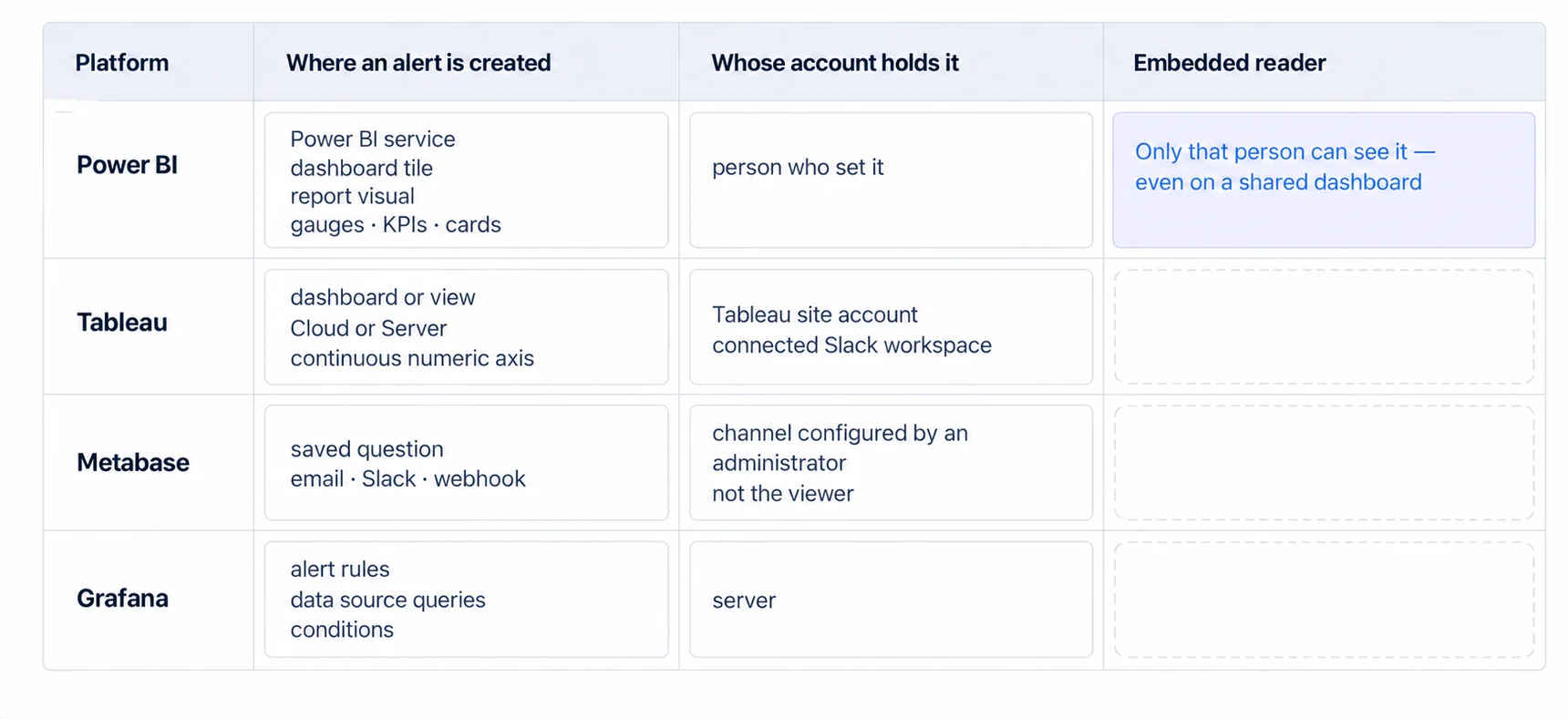
Tableau places alerts on dashboards and views hosted on Tableau Cloud or Tableau Server, on "a continuous numeric axis of any chart other than a Gantt chart or map", and not on story points. Delivery goes to email, to a notification in the Tableau site, or to a connected Slack workspace. (Tableau Help, Data-Driven Alerts, read 20 August 2026.)
Grafana takes the opposite architectural route and says so in one line: "Grafana Alerting periodically evaluates alert rules by executing their data source queries and checking their conditions." The evaluation belongs to the server, not to a dashboard being open. (Grafana documentation, Alerting fundamentals, read 20 August 2026.)
Neither of those pages mentions embedded views, in either direction, and neither does Microsoft's. Silence is not permission and it is not prohibition. Three vendors describe where alerting lives without addressing the case you are asking about, and that pattern is itself the finding, and it is the reason this question keeps reaching community forums.
Three Places the Trigger Can Live, and They Fail Differently
In the analytics platform. Shortest path, and the one a vendor demo shows you. The alert inherits platform identity and platform delivery, so the question you have to ask the vendor directly is the one their page did not answer: what an embedded reader receives, and under which account.
In the data layer. A scheduled query or a database trigger evaluates the threshold where the numbers live, so a single definition serves your API and your batch jobs as well as the chart. The cost is that the data layer has no view of what a person is looking at, so the alert cannot be phrased in terms of the chart that prompted it.
In your own application. You keep your identity model, your notification preferences and your unsubscribe handling, and your alert can link to your own product rather than to somebody else's. You also write the scheduler, the threshold store, the deduplication and the escalation. That is a real amount of work, and it is the only route where the alert can carry your product's language.
The choice is usually presented as technical. It is closer to a question about ownership, which is the next section.
The Threshold Belongs to Someone, and Multi-Tenancy Makes You Say Who
A threshold is a row somewhere, and who owns that row decides the data model before it decides the feature.
If the threshold belongs to the tenant, there is one row per customer account, edited by whoever administers it, and your evaluation work scales with your customer count. If it belongs to the individual user, there is one row per person, your evaluation work scales with total users, and two colleagues can disagree about what counts as a problem.
If it belongs to you, the vendor, it applies everywhere and cannot be switched off by the customer it irritates. That last one is the shape most often shipped by accident, because a hardcoded threshold looks like a sensible default until the first customer asks to change it.
Most arguments about alerting features turn out to be arguments about this row. Settle it before you pick where the trigger runs, because a per-user threshold and a platform-owned trigger are a poor fit.
An Alert Is a Claim on Attention, and Not Every Number Earns One
One failure mode survives all three architectures: the alert nobody reads.
A threshold on a metric that moves constantly produces noise on a schedule. Put one on a metric that moves rarely and you get silence, which is fine, right up until somebody decides the alert is broken and switches it off. Both cost more than the feature returns.
The useful test before building anything is whether a person would change what they do that day. If the honest answer is that they would look at it later anyway, a scheduled report is the cheaper instrument and it does not need any of the machinery above.
Alerting is where a request-scoped integration runs out of room, at least as we see it built, and the four documentation pages above do not settle the question for you. Three of them do not discuss it, and the fourth documents a link being removed. Decide who owns the threshold, then choose where the trigger runs, then evaluate any embedded analytics product against those two answers rather than against a feature list.
Where to go next
- Embedded analytics security: the paths to the data, including the ones a scheduled job opens when no session is present.
- Real-time dashboard practices: what live data changes about refresh, and where a threshold belongs when the numbers never settle.
- Embedded analytics guide: the three routes to shipping it, and what each one leaves you owning.
- Embedded Analytics articles: every article in this cluster.
Ready to launch customer-facing analytics?
Stop losing customers to competitors with better analytics. Sumboard's customer-facing analytics platform lets you launch self-service dashboards in days, not months.