

Self-Service BI Definition and User Autonomy
Self-service business intelligence (BI) is an approach to data analytics that enables non-technical users (product managers, business analysts, executives) to access, analyze, and visualize data independently without relying on IT teams or data specialists. For B2B SaaS companies, self-service BI extends beyond internal analytics to empower END CUSTOMERS with data exploration capabilities within embedded dashboards.
What Self-Service BI Means Beyond Report Requests
Traditional BI creates bottlenecks: business users submit requests to IT, wait in queue, answer clarifying questions, and receive reports that may be outdated by the time they are delivered. Self-service BI eliminates this friction through intuitive interfaces, drag-and-drop builders, and pre-built templates that enable users to generate their own insights in real-time.
For B2B SaaS platforms using embedded analytics, self-service BI serves dual purposes. Internally, product teams can analyze user behavior and platform metrics without engineering support. Externally, customers get interactive dashboards where they can filter data, create custom views, and export reports, all without contacting support or requesting custom analytics.
Modern self-service analytics platforms balance user freedom with governance: users gain autonomy to explore data while IT maintains security controls, data quality standards, and compliance frameworks. This democratization of data accelerates decision-making at every organizational level. For a deeper look at what this means in practice, see what self-service analytics is and self-service analytics best practices.
Self-Service BI Characteristics That Balance Freedom and Governance
What defines self-service BI:
- No-Code Interface: Drag-and-drop builders and visual query tools eliminate technical barriers, enabling non-technical users to create complex analyses without SQL or coding knowledge.
- Direct Data Access: Users connect to data sources independently, bypassing IT request queues while operating within governance guardrails that ensure security and compliance.
- Real-Time Insights: On-demand analytics eliminate report delays, enabling faster decisions and reducing the time from question to answer from days to minutes.
- User Empowerment: Business users become self-sufficient, freeing IT teams to focus on infrastructure, data governance, and strategic initiatives rather than fulfilling ad-hoc report requests.
- Embedded Capabilities: For SaaS products, self-service features extend to customers through white-label dashboards, enabling end-users to explore their own data without vendor support.
Self-Service Means Bounded Actions, Not Unlimited Building
"Self-service" covers at least five different permissions, and treating them as one is where deployments go wrong. Filtering a governed dashboard, drilling into detail, saving a personal view, asking a question in natural language, and authoring a new analysis are separate capabilities with separate risks.
Name which personas hold which. A customer filtering their own governed dashboard needs no governance conversation. The same customer authoring a metric raises the question of whose definition wins when their number disagrees with yours, and that question is much cheaper to answer before the feature ships than after a support ticket asks it.
The Bottleneck Usually Moves Rather Than Disappearing
The stated benefit is that IT stops fulfilling report requests. The observed outcome is often that two or three capable users absorb them instead, informally and without a queue anyone can see.
That is measurable: look at who authors the content that actually gets viewed rather than at how many accounts exist. If a handful of names appear on most used dashboards, the work was redistributed, not removed. The usual fix is fewer things to build, meaning certified starting points that cover the common questions, so the next request is a variation rather than a new build. Our self-service BI implementation notes cover the rollout side of that.
In an Embedded Product, Self-Service Runs Inside a Tenant Boundary
Internal self-service risks a wrong number. Customer-facing self-service risks a wrong number belonging to someone else, which is a different category of problem.
Everything a user can reach through exploration has to stay inside the scope their identity grants: the fields offered in a filter, the values that appear in an autocomplete, the rows a drill path reaches, the results of a saved view when the underlying permissions change, and anything exported or scheduled from it. The interface is not the boundary; the query and data layer are. A dropdown that lists a segment the viewer cannot open has already disclosed something.
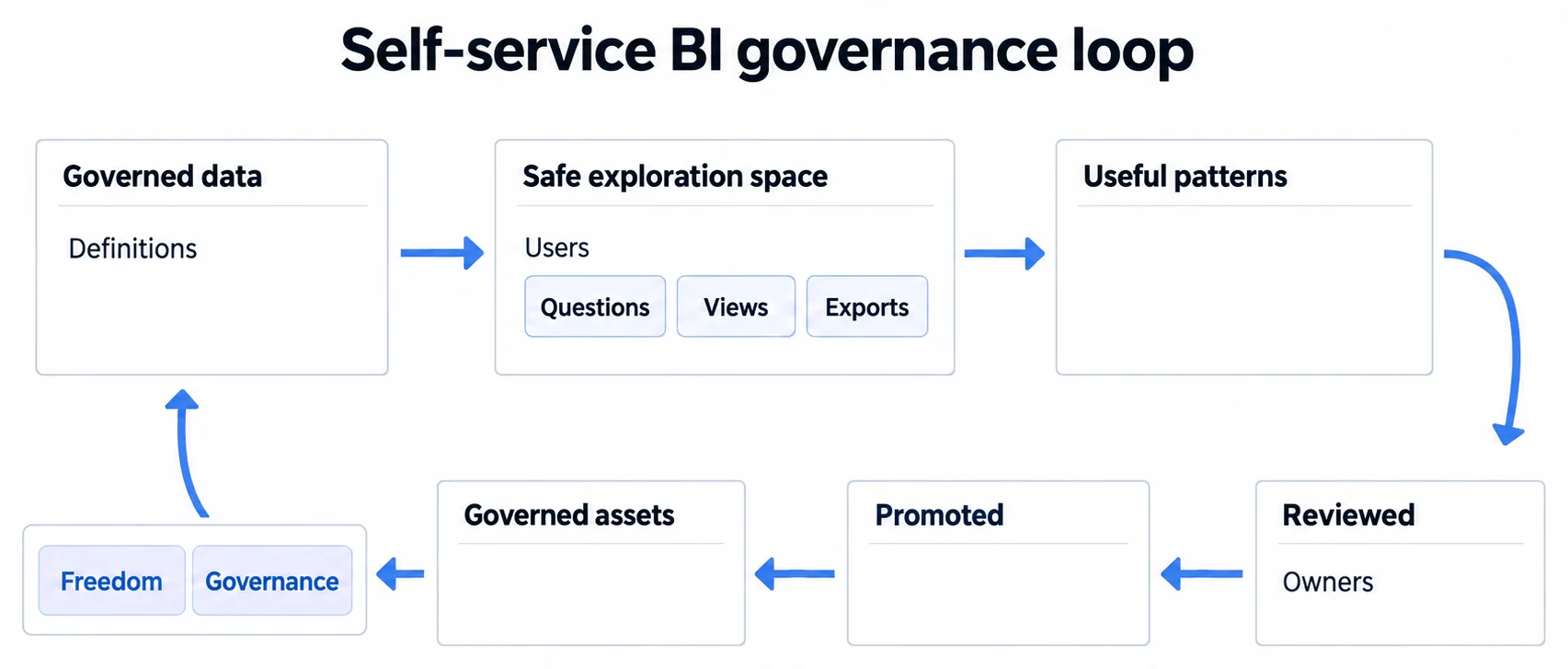
The Loop Only Closes if a Useful Ad-Hoc View Can Become a Governed One
Self-service produces two kinds of content and confusing them is what erodes trust. Certified content carries an owner, a reviewed definition, and an expectation that it is correct. Personal content is someone exploring, and it should be visibly personal.
What makes the arrangement work over time is a path between them. When a personal view turns out to answer a question several people have, there needs to be a defined way for it to be reviewed, given an owner, and promoted into certified content. Without that path, the good views stay personal and get copied instead, which is how an organisation ends up with nine similar dashboards and no agreement about which one is right.
Promotion also has to run in reverse. A certified asset nobody opens for a quarter should lose its certification rather than sit there implying it is maintained.
Related Self-Service BI Concepts and Analytics Guides
- Self-service analytics guide: the two jobs hiding behind one name, and where self-service stops paying for itself.
- Choosing the tools is the smaller half of the job, and what the larger half turns out to be
- From a question to a governed answer, where free exploration meets a definition it must respect
- The complete guide to building analytics reports, including what changes when your customers author them
- AI Analytics Guide, how AI capabilities are extending self-service to non-technical users
Enable Self-Service Analytics for Your Customers
White-label embedded dashboards with bounded self-service, so customers explore their own data inside the scope their identity grants.